
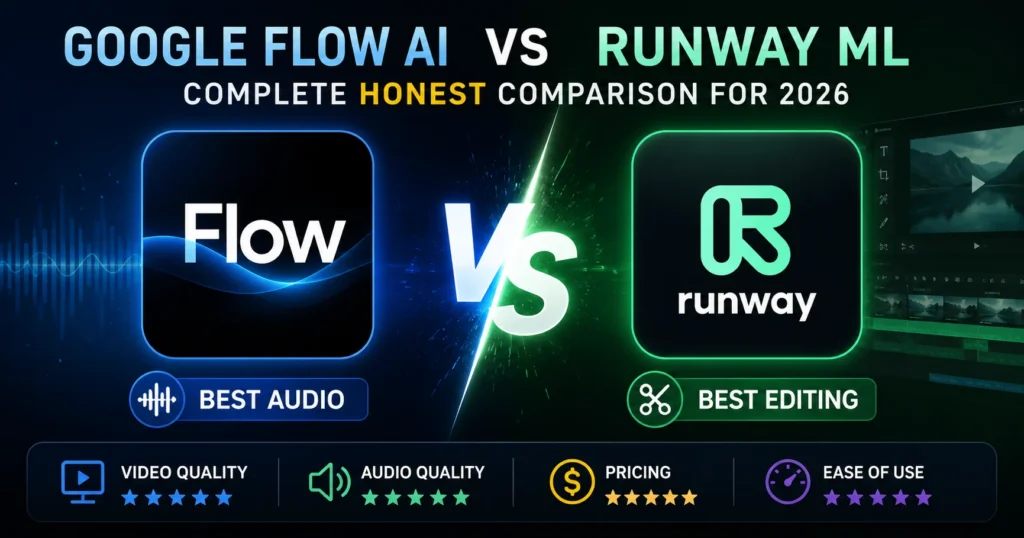
Google Flow AI vs Runway ML 2026 — Honest Comparison for Creators Who Want Real Answers
Two tools dominate every serious AI video conversation in 2026.
On one side: Google Flow AI — backed by Google DeepMind, powered by Veo 3.1, with native audio that no competitor can match.
On the other: Runway ML — the platform that literally defined the AI video generation category, now on Gen-4.5, with a professional editing suite that no other AI tool has come close to building.
Both are genuinely excellent. Both are worth paying for. And both will frustrate you in different ways if you pick the wrong one for your workflow.
This guide gives you the complete, honest 2026 comparison — built from real testing, benchmark data, and direct use across dozens of creative projects. No hype. No affiliate pressure. Just the information you need to make the right choice.
Quick Answer — Before the Full Breakdown
Choose Google Flow AI if: You need native audio, the best cinematic single-clip quality, free image generation, or you’re building inside the Google ecosystem.
Choose Runway ML if: You need professional editing tools, character consistency across multiple shots, Adobe/DaVinci workflow integration, or you’re running a production studio at scale.
Use both if: You’re a serious content creator or agency who needs the strengths of each tool for different parts of your pipeline.
Now let’s understand exactly why.
What Is Google Flow AI?
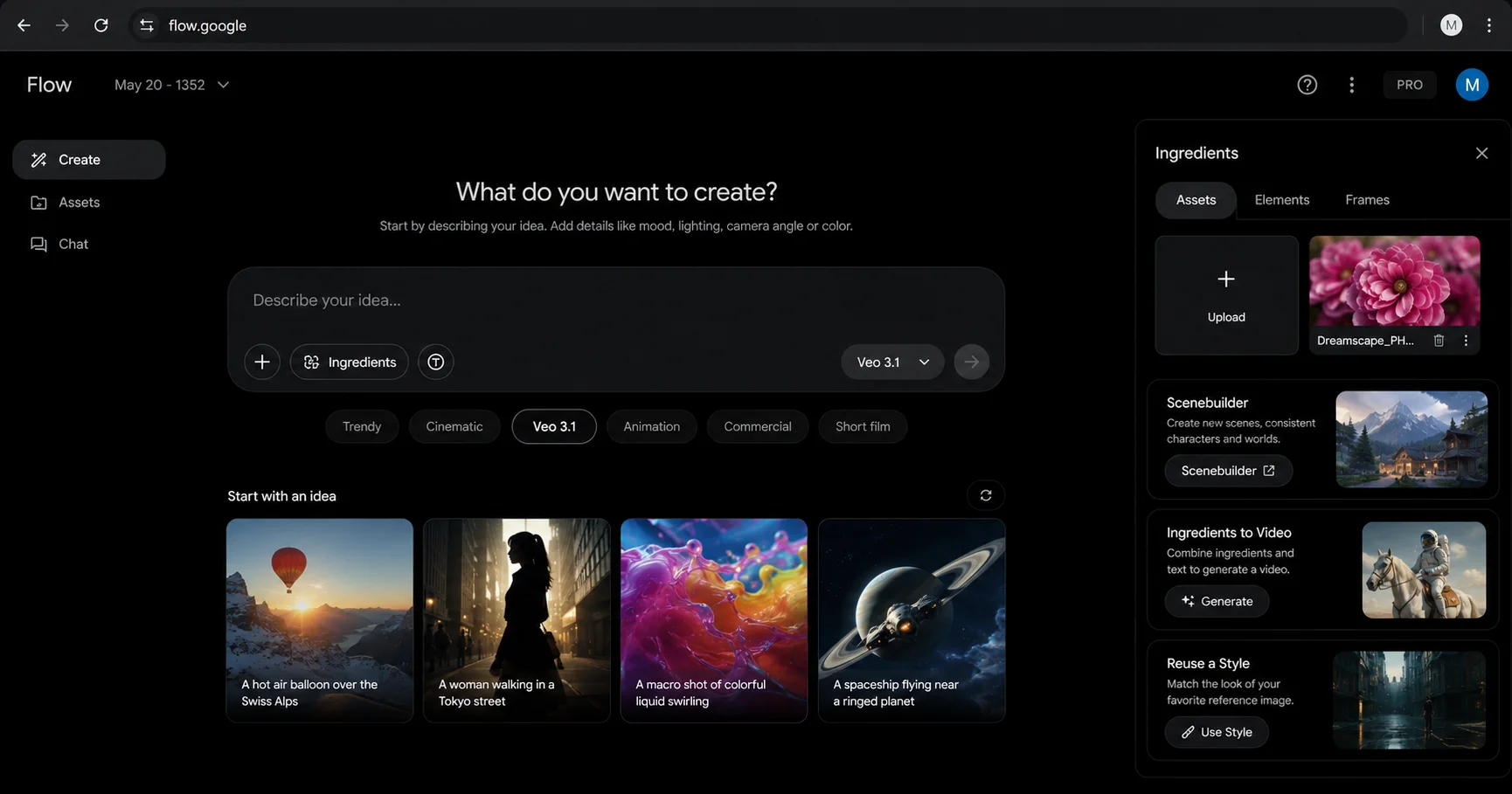
Google Flow AI is Google’s AI creative studio at flow.google. It replaced Google Whisk AI in April 2026 and combines image generation, video generation, music creation, and avatar-based content in one platform.
The video engine is Veo 3.1 — Google DeepMind’s flagship model trained on a massive real-world video dataset including YouTube content. This training foundation gives Veo 3.1 an edge in physical realism: water flows correctly, fabric drapes naturally, light behaves the way it does in the real world.
Flow AI’s standout capabilities:
- Native audio generation — the only AI video tool that generates synchronized sound in every single video mode automatically
- Ingredients to Video — upload Subject, Scene, and Style photos, get a video with audio
- Gemini Avatar — scan your face and voice, appear in any AI video
- Free unlimited image generation — Imagen 4 with no daily limit or credit cost
- Editing tools — Add Object, Remove Object, Scene Extension, First and Last Frame
- Flow Music — AI music generation alongside video
Pricing:
- Images: Free forever
- Video: Google AI Plus — $19.99/month (Rs. 1,400/month Pakistan)
- Available in Pakistan: ✅ Yes — our Pakistan access guide has details
What Is Runway ML?
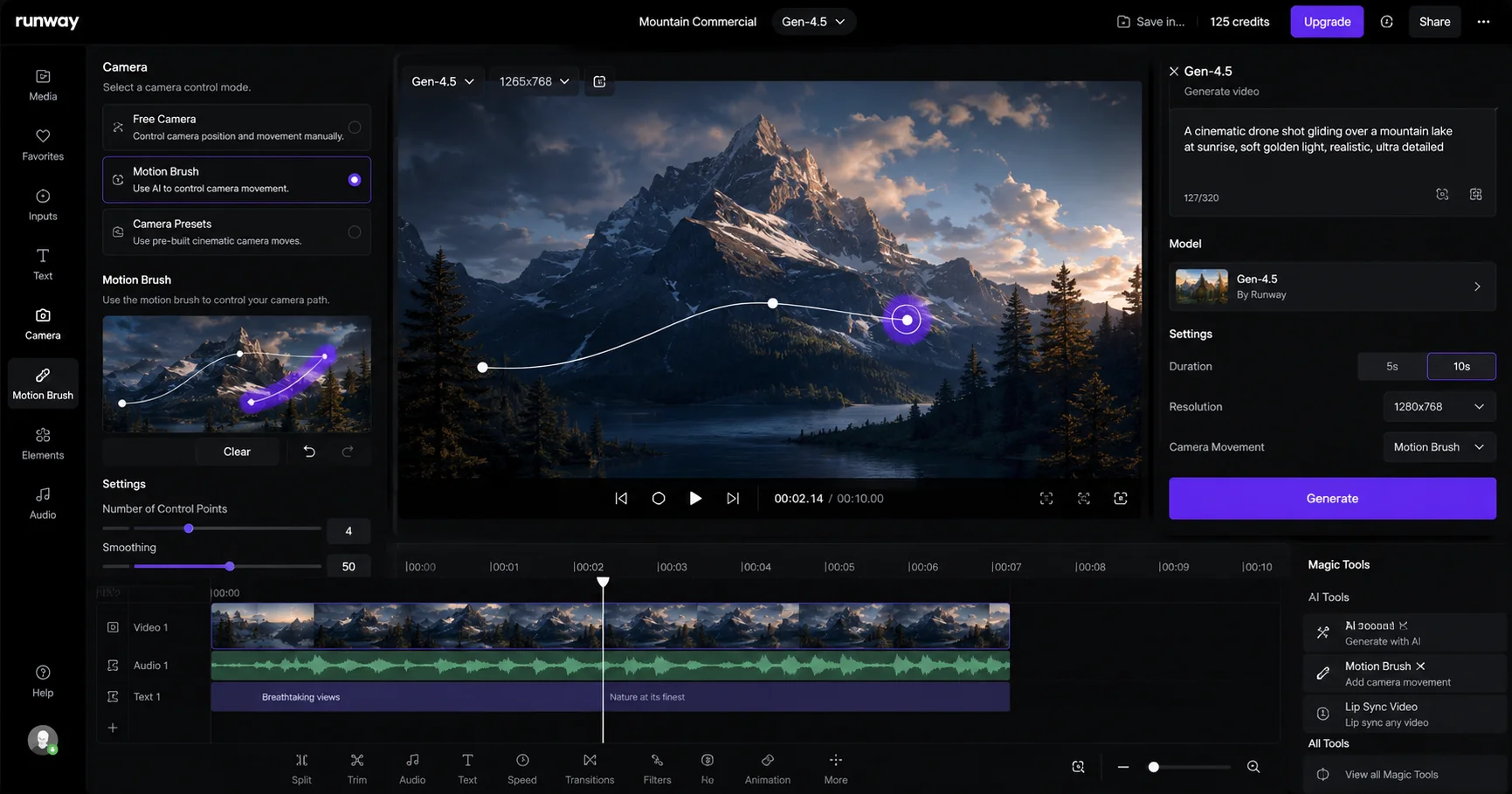
Runway ML is an AI video platform that launched in 2022 — making it the oldest and most established serious competitor in the AI video space. Founded in New York, Runway has been steadily building what they call a “creative operating system” — not just a generation tool, but a complete end-to-end video production environment.
Gen-4.5 is their current flagship model as of April 2026. It holds the #1 position on the Video Arena leaderboard (1,247 ELO score) — the most widely used benchmark for AI video quality in the industry.
Runway’s standout capabilities:
- Professional editing suite — timeline editor, effects, transitions, multi-layer editing
- Motion Brush — paint movement direction onto any object in a frame
- Camera Controls — specify precise camera movements (dolly, crane, pan, orbit) with exact parameters
- Style Reference — maintain consistent visual style across multiple generated clips
- Character Consistency — use reference images to keep characters looking identical across scenes
- Adobe Premiere and DaVinci Resolve integration — direct workflow connection to professional editing software
- Act-Two — AI performance capture for realistic character acting
- Gen-4 Turbo — faster generation at lower credit cost for high-volume work
Pricing:
- Free trial: 125 credits one-time (approximately 3-4 video clips)
- Standard: $15/month (625 credits)
- Pro: $35/month (2,250 credits)
- Unlimited: $95/month (effectively unlimited generation in Relaxed mode)
- No ongoing free tier for video
- Available in Pakistan: ✅ Yes (international card payment required)
Head-to-Head — Every Category That Matters
1. Video Quality and Realism
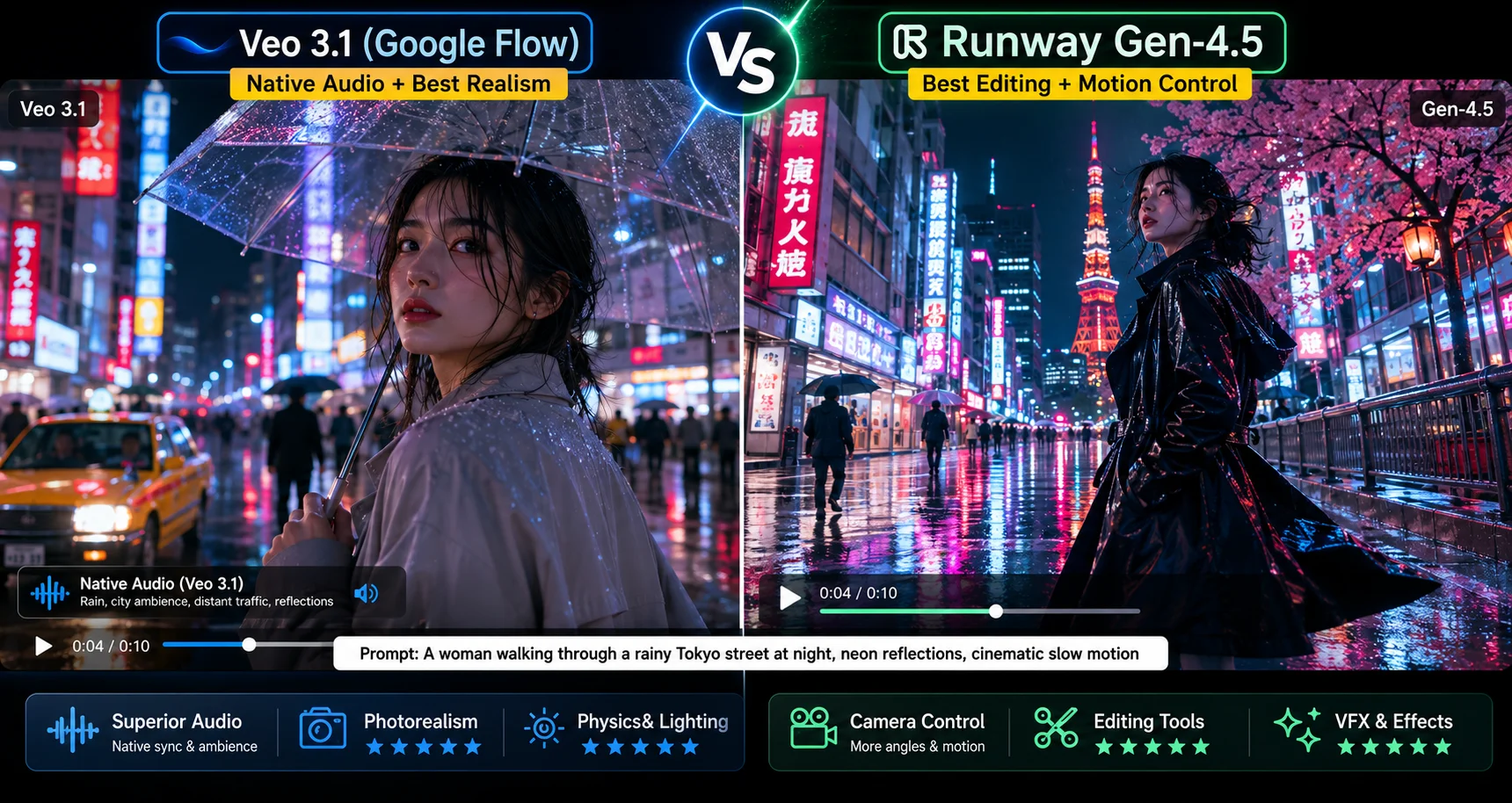
This is the most debated category — and for good reason.
Benchmark data (April 2026): Runway Gen-4.5 currently holds the #1 ELO score (1,247) on the Video Arena leaderboard. Veo 3.1 sits at #5 with an ELO of approximately 1,226. The gap is real but small — roughly 2% difference in blind human preference tests.
What the numbers miss:
In practice, the two tools look different in ways that benchmark scores don’t fully capture:
Veo 3.1’s visual strengths: Veo 3.1 produces some of the most photorealistic AI video available — it looks more “natural” while Runway looks more “polished.” Physics simulation is exceptional — water, fabric, fire, and light all behave the way they would in the real world. This comes from Google’s training data — years of real-world footage from YouTube giving Veo 3.1 a deep understanding of how physical reality looks on camera.
Runway Gen-4.5’s visual strengths: Runway Gen-4 wins on creative control with its motion brush, style transfer, inpainting, and comprehensive editing suite. The output is consistently polished and production-ready with excellent temporal coherence — meaning characters and objects stay visually consistent throughout a full 16-second clip.
Specific categories where each wins:
| Scenario | Winner | Why |
|---|---|---|
| Natural environments (water, fire, weather) | ✅ Veo 3.1 | Physics training advantage |
| Human faces and portrait realism | ✅ Veo 3.1 | Lighting and skin tone accuracy |
| Abstract and artistic visuals | ✅ Runway | Style transfer + creative tools |
| Character consistency across clips | ✅ Runway | Reference image system |
| Product visualization | 🤝 Tie | Both excellent |
| Architectural and interior scenes | ✅ Runway | Temporal coherence advantage |
Verdict: Near tie overall. If you are comparing best-looking clip vs best-looking clip, Veo 3 usually comes out ahead. If you are comparing best end-to-end production workflow vs best end-to-end production workflow, Runway often comes out ahead.
2. Audio — The Category That Isn’t Even Close
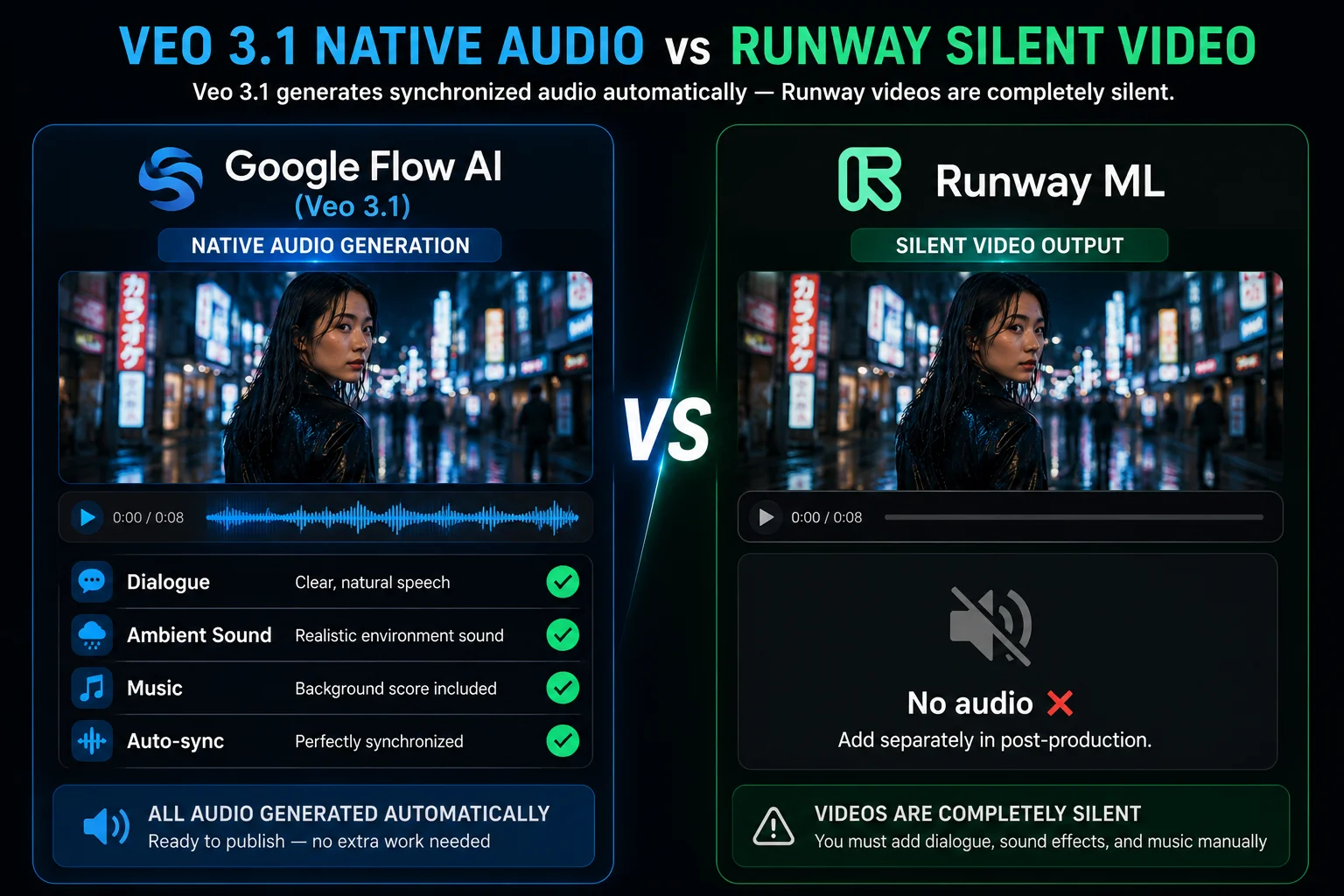
This is the most clear-cut category in the entire comparison.
Google Flow AI (Veo 3.1): Veo 3 is the first major AI video generator to produce synchronized audio — sound effects, ambient noise, and even dialogue. Generate a video of waves crashing on a beach, and you’ll hear the waves. Generate a person speaking, and you’ll hear their voice. This changes everything for creators who previously had to source and sync audio separately.
Thanks to the Veo 3.1 update, native audio now works across every Flow AI generation mode — text-to-video, Ingredients to Video, First and Last Frame, Scene Extension, and Extend. Audio is generated at 48kHz, synchronized frame-by-frame with the visual content.
Runway ML: Runway’s response: Silent. Every video generated in Runway comes out completely silent. You need to add audio in post-production using Adobe Premiere, CapCut, DaVinci Resolve, or a dedicated AI audio tool.
This isn’t a minor inconvenience for many workflows. Finding or generating appropriate audio, syncing it correctly, and matching it to the mood of your video is a separate skill set and a meaningful additional time investment.
What this means practically:
- If you’re making YouTube Shorts, Instagram Reels, or TikTok content that needs dialogue or environmental sound → Flow AI saves you hours per project
- If you’re making content for a professional production where audio is handled by a dedicated sound designer anyway → Runway’s silence isn’t a problem
Verdict: Google Flow AI wins decisively. Kling 3.0 Omni leads on native audio and dialogue, with lip-sync in five languages. Veo 3.1 is a very close second. Runway has no answer to this — every Runway video requires separate audio work.
3. Editing Tools — Where Runway Has No Equal
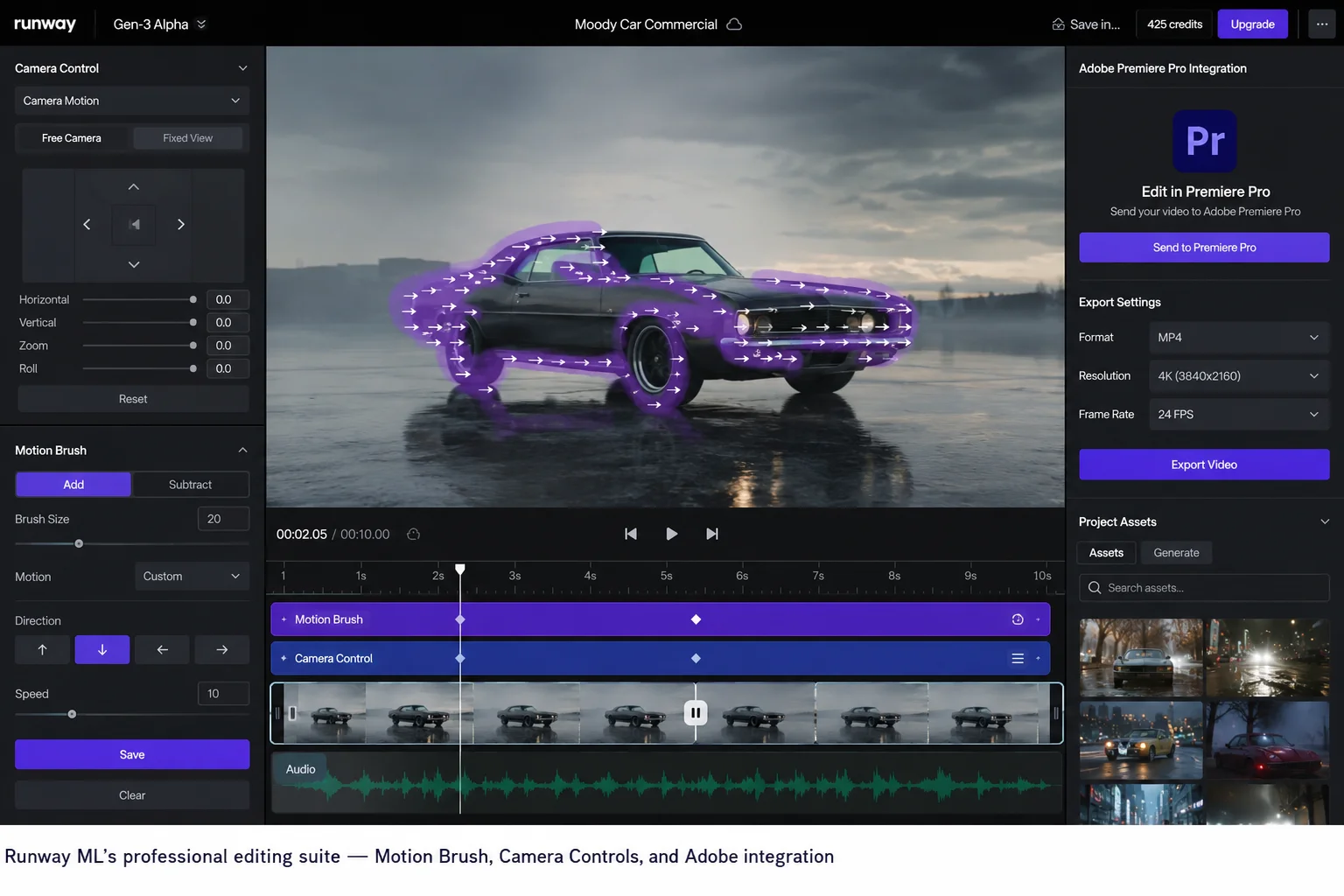
This is Runway’s most decisive advantage — and it’s a big one.
Runway ML’s editing capabilities:
Motion Brush: Paint directly onto any object in your frame and draw arrows to define exactly how it should move. Want the hair to blow left, the leaves to fall down, and the camera to drift right? You can specify all three independently. This level of control doesn’t exist in any other consumer AI video tool.
Camera Controls: Specify camera movements with precise parameters — dolly zoom, crane shot, orbital movement, handheld shake — with intensity controls. Runway’s camera system is the most precise in the industry.
Style Reference: Upload a reference image and Runway will maintain that visual style across multiple generated clips — consistent color grading, lighting treatment, and aesthetic feel throughout an entire project.
Video Inpainting: Select any region of a generated video and replace just that area — fix a problem background, change an element, remove something that doesn’t belong — without regenerating the whole clip.
Act-Two Performance Capture: Upload a video of yourself moving and speaking, and Runway transfers your performance onto a generated character. This is genuinely cutting-edge technology with no equivalent in Flow AI.
Professional Integrations: Runway Gen-4: Purpose-built for professional creative workflows. Web-based editor with timeline interface, API access, and integrations with Adobe Premiere, DaVinci Resolve, and other professional editing tools. Runway’s interface feels like a creative tool; Google’s feels like an AI platform.
Google Flow AI’s editing tools: Flow AI introduced editing capabilities with Veo 3.1 — Add Object, Remove Object, Scene Extension, First and Last Frame. These are meaningful improvements over having no editing. But they’re not in the same category as Runway’s suite.
Verdict: Runway ML wins clearly. Runway dominates workflow integration and character consistency. If your work requires professional editing precision, Runway’s tools are in a class of their own among AI video platforms.
4. Clip Length
| Tool | Max Single Clip | Extension |
|---|---|---|
| Google Flow AI (Veo 3.1) | 8-10 seconds | ✅ Scene Extension |
| Runway ML (Gen-4.5) | 16 seconds | ✅ Yes |
Veo 3 currently supports up to 60 seconds of continuous video in a single generation — significantly longer than most competitors. Runway Gen 4 maxes out at 16 seconds per clip, though you can string clips together.
Note: The 60-second figure applies to specific access methods including the Gemini API. Standard Flow AI generations through flow.google typically produce 8-10 second clips.
For most social media content (Reels, Shorts, TikTok), 8-10 seconds is perfectly usable. For longer narrative scenes, Runway’s 16-second clips give you more continuous storytelling per generation.
Verdict: Runway ML wins on standard consumer clip length. For longer continuous shots, Runway gives you 60% more per generation.
5. Pricing — A Complex Comparison
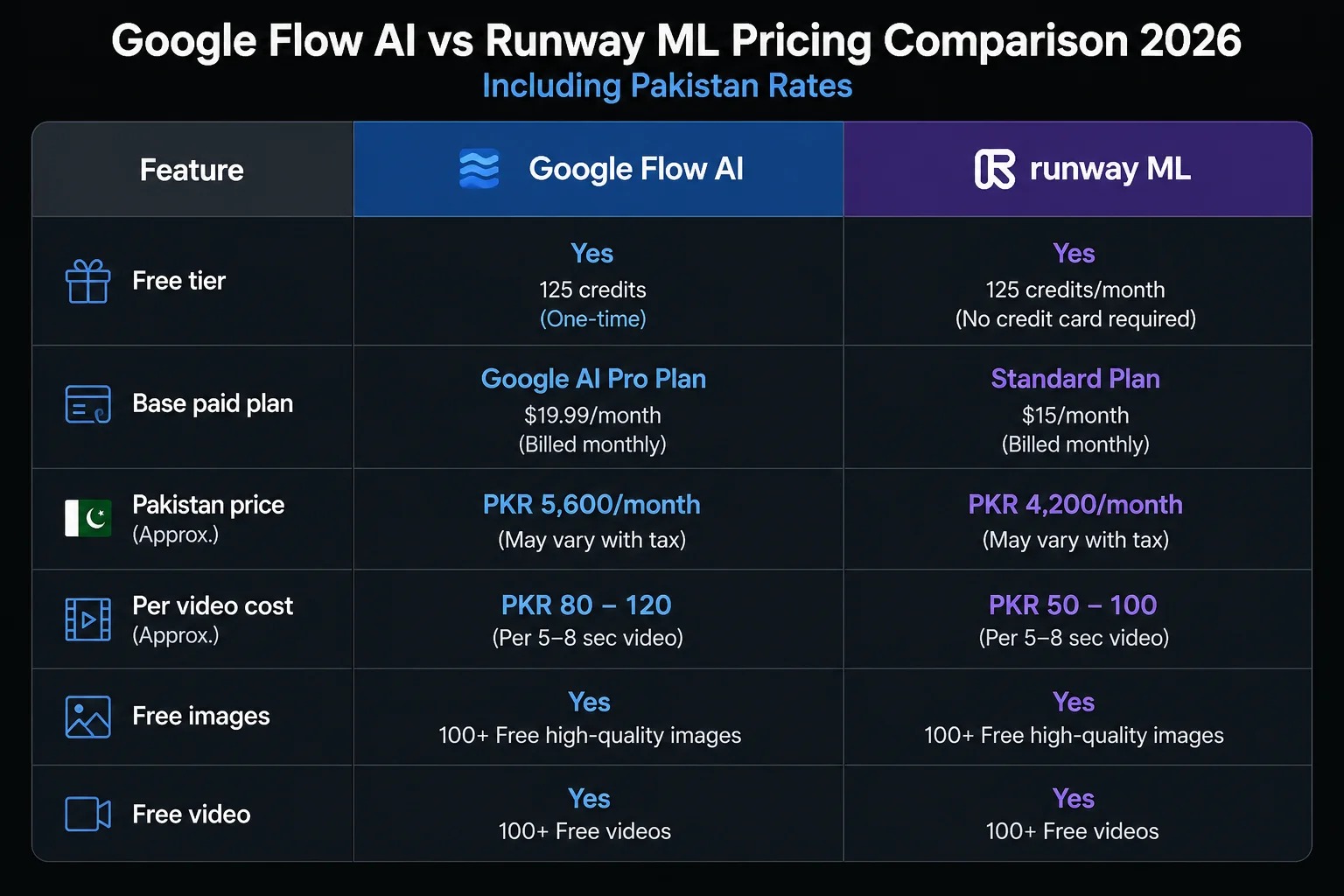
| Google Flow AI | Runway ML | |
|---|---|---|
| Free video | ❌ (Veo 3.1 Lite — limited) | ❌ (125 one-time credits only) |
| Base paid plan | $19.99/month | $15/month (Standard) |
| Pakistan price | Rs. 1,400/month | Rs. 4,200/month (approx) |
| Per clip (8-10 sec) | ~20 AI credits | ~25-50 credits |
| Free images | ✅ Unlimited | ❌ Limited |
| Professional plans | $249/month (Ultra) | $95/month (Unlimited) |
| Annual discount | Available | Available (~20% off) |
Important nuance on Runway pricing:
Runway uses a credit-based model that confuses everyone at first. On the Pro plan at $28/month, I had enough credits. On the Standard plan, I would have run out and needed to buy top-up credits at $10 per 125 credits — expensive.
Runway’s credit system creates “credit anxiety” — you’re constantly monitoring how many credits you have left. Heavy users find the Standard plan ($15/month) runs out quickly and end up upgrading to Pro ($35/month) or beyond.
Google Flow AI’s pricing is simpler: $19.99/month gives you a fixed credit allocation, and image generation is always free regardless.
For Pakistan specifically:
Runway ML’s plans require an international credit card and are priced in USD — making them more expensive in rupee terms than the converted rate suggests due to card fees. Google AI Plus is more straightforward to pay from Pakistan.
Our Pakistan access guide covers payment methods for both tools.
Verdict: The pricing structure favors frequent users. At $19.99/month through Google One AI Premium, Veo 3 offers essentially unlimited generation capacity for typical content creator workflows. Runway’s credit-based system creates usage anxiety for high-volume creators who constantly monitor credit consumption. Google Flow AI wins on pricing simplicity and value for most creators.
6. Workflow Integration
Google Flow AI: Deeply integrated with the Google ecosystem — Gemini, Google Workspace, Vertex AI for developers, Google Drive for asset storage. Veo-3 integrates with Google Workspace and Gemini AI — scripts become storyboards, assets sync automatically, and team collaboration happens in familiar tools.
If your team already uses Google Workspace (Docs, Drive, Gmail), Flow AI slots into that workflow naturally.
Runway ML: Runway Gen-4: Purpose-built for professional creative workflows. Web-based editor with timeline interface, API access, and integrations with Adobe Premiere, DaVinci Resolve, and other professional editing tools.
If your team works in Adobe Creative Suite or DaVinci Resolve, Runway connects directly. Generated clips can be sent straight into your editing timeline. This isn’t just a convenience — it changes how fast you can work.
Verdict: Runway ML wins for professional production workflows. Google Flow AI wins for Google-first teams.
7. Ease of Use
Google Flow AI: The interface is clean and beginner-friendly. Image generation is immediately accessible — type a prompt, click generate, see results in seconds. Video generation requires a paid plan but follows the same simple workflow. More features means more complexity, but our Google Flow AI Tutorial covers everything step by step.
Runway ML: Runway ML’s browser-based platform is lightweight, intuitive, and requires zero technical setup — anyone from a social-media manager to a video editor can start creating instantly. However, Runway’s full power — Motion Brush, Camera Controls, Act-Two — has a steeper learning curve. The interface is designed for video professionals, and it shows.
Verdict: Google Flow AI for beginners. Runway ML for experienced video editors.
8. Unique Features No Competitor Has
Google Flow AI exclusive:
- Gemini Avatar — put your real face and voice in any AI video
- Ingredients to Video with Audio — 3 photos → video with sound
- Native audio in ALL modes — no competitor does this as broadly
- Free unlimited Imagen 4 image generation
- Flow Music / Lyria 3 Pro — AI music generation integrated with video
Runway ML exclusive:
- Act-Two — transfer your own performance onto an AI character
- Motion Brush — paint movement direction on any object
- Camera Controls — precise professional camera movement specification
- Style Reference — consistent visual treatment across entire projects
- Video Inpainting — surgical edits to specific regions of a clip
- Adobe Premiere/DaVinci integration — direct professional pipeline connection
Same Prompt, Both Tools — Real Results
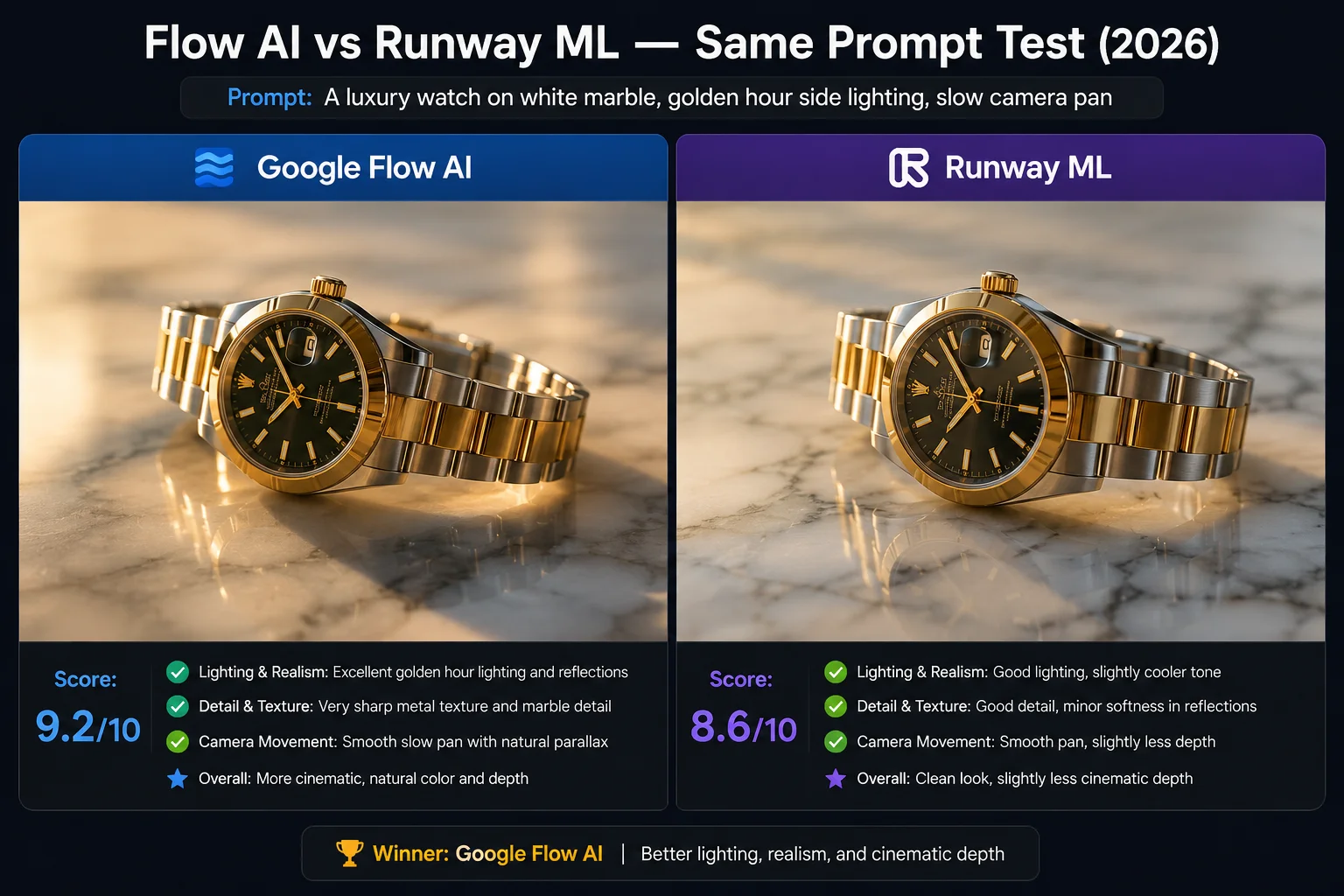
We tested both tools with identical prompts. Here’s what actually came back:
Prompt 1: “A luxury watch on white marble, golden hour side lighting, slow camera pan right, commercial quality”
- Flow AI: Warm, accurate lighting. Watch texture excellent. Marble reflections realistic. Native audio: subtle ambient studio sound. Ready to use for a product ad without any additional work.
- Runway: Slightly more polished “commercial” look. Better control over the camera pan speed. Silent — would need music added separately.
Prompt 2: “Abstract fluid simulation, iridescent colors, mathematical shapes morphing, macro close-up, cinematic”
- Flow AI: Beautiful visual quality. Physics feel accurate. Audio: subtle electronic ambient sound matching the mood.
- Runway: More creative and stylized output. Style Reference kept it more consistent with the abstract brief. Camera control made the macro feel more precisely defined.
Prompt 3: “A Pakistani street market at dusk, vendors selling spices, warm lantern light, documentary feel”
- Flow AI: Excellent cultural detail, warm lighting, ambient street sounds (voices, traffic, ambience) generated automatically. No additional work needed.
- Runway: Very good visual quality but silent — the lack of ambient market sounds made it feel like a still life rather than a living place.
Pattern across all tests: Flow AI consistently wins on audio and physical realism. Runway consistently wins on stylized precision and camera control.
Who Should Use Google Flow AI?
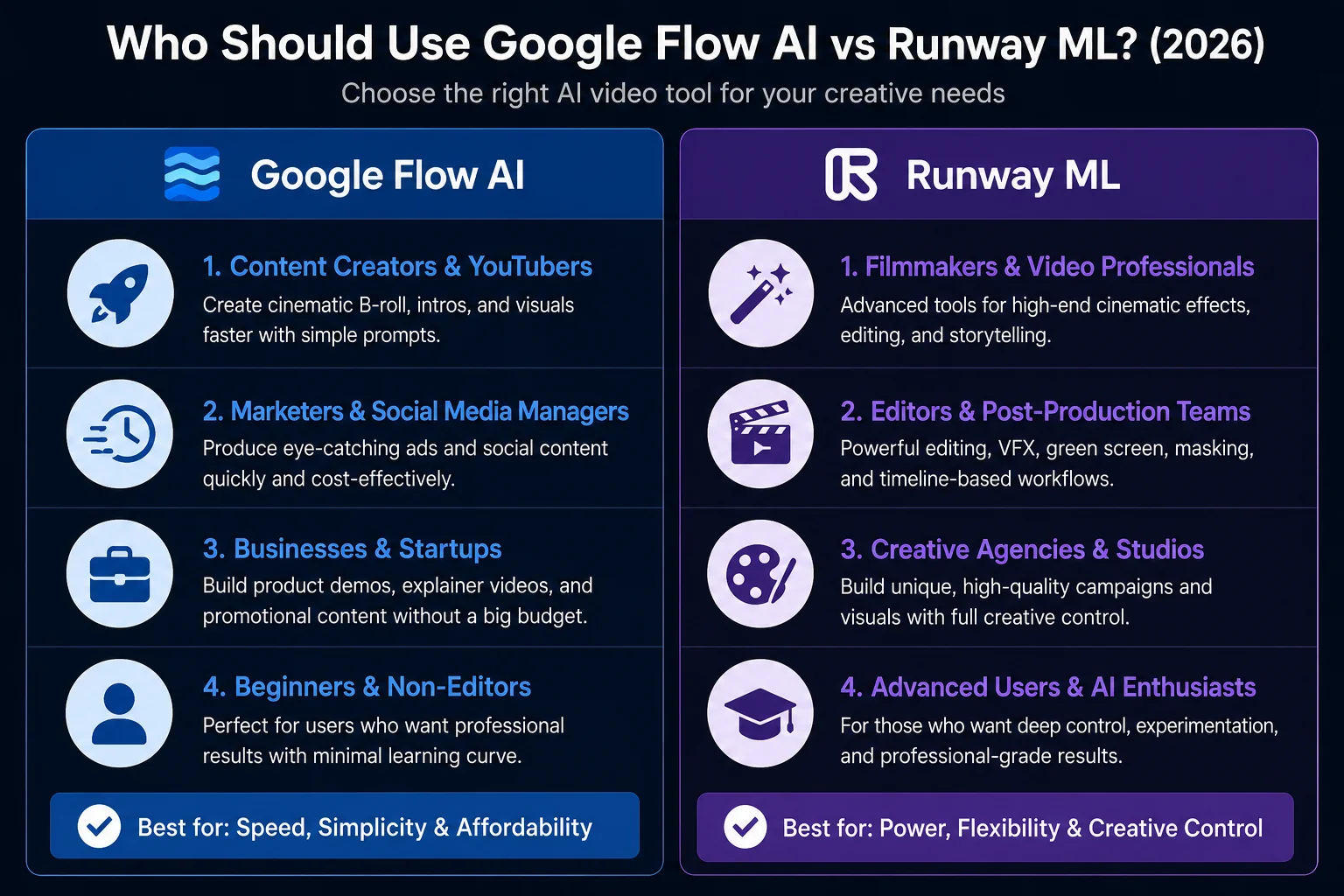
Google Flow AI is the better choice if you:
- Create YouTube, Instagram, or TikTok content with dialogue or narration
- Want the complete workflow in one platform (images + video + music)
- Use or plan to use Google Workspace
- Want to feature yourself in AI videos (Gemini Avatar)
- Are based in Pakistan and want the simplest payment path
- Are a beginner to AI video with no editing background
- Need free image generation alongside your video workflow
- Work on educational content, marketing videos, or personal branding
- Want the most cinematic, photorealistic single-clip output
Runway ML is the better choice if you:
- Run a production studio, creative agency, or professional video operation
- Need Adobe Premiere or DaVinci Resolve workflow integration
- Require precise camera movement control
- Build multi-scene projects with consistent characters across many clips
- Need to edit specific regions of generated video (inpainting)
- Want to transfer your performance onto AI characters (Act-Two)
- Have a dedicated audio team handling sound separately
- Produce 50+ videos per month and need the Unlimited plan’s economics
The Professional Creator’s Workflow — Using Both Together
Many professional creators will find value in using both — Veo 3.1 for quick drafts and audio-inclusive previews, Runway Gen-4 for polished production work. The tools complement each other more than they directly compete.
Here’s how a practical two-tool workflow looks:
Step 1 — Concept and Draft (Google Flow AI) Use Flow AI’s free image generation to rapidly visualize your concept. Generate 20-30 images of scenes, characters, and environments in minutes at zero cost. This replaces a traditional mood board phase.
Step 2 — Initial Video Draft (Google Flow AI) Generate your first video clips with Veo 3.1. The native audio gives you an immediate sense of how the finished piece will feel — tone, mood, energy — without any additional audio work.
Step 3 — Refinement (Runway ML) Take your best Flow AI clips into Runway. Use Motion Brush to add precise movement. Use Camera Controls to dial in the exact shot you need. Use Style Reference to maintain consistency across a series of clips.
Step 4 — Final Edit (Adobe Premiere / DaVinci Resolve) Export from Runway directly to your editing software. Layer the Flow AI audio from step 2 under the Runway-refined visuals. Finish and publish.
This isn’t a theoretical workflow — it’s how leading content studios are actually operating in 2026.
The Honest Verdict
| Category | Winner | Gap |
|---|---|---|
| Video quality overall | Runway Gen-4.5 (ELO #1) | Small |
| Physical realism | ✅ Google Flow AI | Meaningful |
| Audio generation | ✅ Google Flow AI | Decisive |
| Editing tools | ✅ Runway ML | Decisive |
| Clip length | ✅ Runway ML | Meaningful |
| Character consistency | ✅ Runway ML | Meaningful |
| Camera control | ✅ Runway ML | Decisive |
| Pricing simplicity | ✅ Google Flow AI | Meaningful |
| Pakistan access | ✅ Google Flow AI | Meaningful |
| Free images | ✅ Google Flow AI | Decisive |
| Beginner friendliness | ✅ Google Flow AI | Meaningful |
| Professional integration | ✅ Runway ML | Decisive |
| Future stability | ✅ Google Flow AI | Small |
For most Pakistani creators and social media content producers: Google Flow AI.
The combination of native audio, free image generation, simpler Pakistan access, and $19.99/month pricing makes Flow AI the more practical and complete tool for solo creators and small teams in Pakistan.
For professional video production studios and agencies: Runway ML.
Runway is the #1 choice for professional workflows but pays a “professional tool” tax that prices it out of casual consumer use. If you’re producing video at scale with a team, the editing suite and integrations justify the higher cost.
For the most complete setup: Use both.
If I had to make one recommendation for most paying users in 2026: buy Runway first, add Veo second. Most teams do not fail from lack of cinematic quality. They fail from slow iteration, poor continuity, scattered workflow, and unpredictable production overhead. Runway solves more of those problems. But if your entire goal is to create the most impressive shot possible, Veo 3 is still the model to beat.
Frequently Asked Questions
Q: Is Google Flow AI better than Runway ML?
Neither is universally better — they excel in different areas. Flow AI wins on audio quality, physical realism, free image generation, and Pakistan access. Runway wins on editing tools, character consistency, camera control, and professional workflow integration. The right choice depends on what you’re making.
Q: Does Runway ML have audio generation?
No. All Runway-generated videos are completely silent. You need to add audio separately in post-production using tools like Adobe Premiere, DaVinci Resolve, or CapCut.
Q: Is Runway ML available in Pakistan?
Yes, via web browser at runwayml.com. Payment requires an international credit card in USD. The base Standard plan is $15/month — approximately Rs. 4,200/month at current exchange rates, making it more expensive than Google AI Plus at Rs. 1,400/month.
Q: What is Runway Gen-4.5?
Runway Gen-4.5 is Runway ML’s current flagship video generation model as of April 2026. It holds the #1 position on the Video Arena benchmark leaderboard with 1,247 ELO. It supersedes Gen-4 on every benchmark — use Gen-4.5 for all new generations.
Q: Can I use Google Flow AI for free?
Image generation in Google Flow AI is completely free with no daily limit. Video generation (Veo 3.1) requires Google AI Plus at $19.99/month. Veo 3.1 Lite offers limited free video generation at lower priority. See our Google Flow AI pricing guide for the full breakdown.
Q: Which is faster — Flow AI or Runway?
Both generate standard clips in 30-90 seconds. Runway Gen-4 Turbo is described as approximately 7x faster than standard Gen-4 at half the credit cost — making it the fastest option for high-volume generation. Flow AI’s generation speed is consistent but doesn’t have a “turbo” equivalent.
Q: What happened to Sora 2 — can I use that instead?
Sora 2 shut down on April 26, 2026. It’s no longer accessible. Our Veo 3.1 vs Sora 2 comparison covers what happened and why Flow AI is the best Sora 2 alternative.
Q: Can I use Runway ML’s output commercially?
Yes on paid plans. Always verify the current terms of service at runwayml.com for specific commercial use cases and attribution requirements, as policies can change.
Final Thoughts — Stop Comparing, Start Creating
The Google Flow AI vs Runway ML debate is real and worth understanding. But the honest truth is that both tools are excellent — and the right answer depends entirely on what kind of work you do.
If you make social media content, educational videos, personal branding content, or anything that needs sound — start with Google Flow AI at flow.google. The free image generation is immediately useful. The $19.99/month for video is straightforward value. And the native audio in every generation saves you hours every week.
If you run a production studio, work with an agency, or need professional-grade editing control — Runway ML is worth every rupee of its cost. The Motion Brush alone changes what’s possible in AI video production.
And if you’re serious about building a long-term creative operation — add both to your toolkit, use each for what it’s best at, and watch the quality of your output become genuinely hard for competitors to match.
For everything about making the most of Google Flow AI — from Veo 3.1 features to Ingredients to Video to fixing common errors — visit WhiskAILabs.
Related Articles on WhiskAILabs:
- Home — WhiskAILabs.net
- Google Flow AI vs Kling AI 2026
- Veo 3.1 vs Sora 2 Comparison 2026
- Veo 3.1 Update 2026 — All New Features
- Ingredients to Video with Audio Guide
- Gemini Avatar in Google Flow AI
- What Is Google Flow AI?
- Google Flow AI Tutorial — Step by Step
- Google Flow Music — Lyria 3 Pro Guide
- Google Flow AI Pricing 2026
- Google Flow Generation Failed Fix
- Flow AI vs Midjourney Comparison
- Pakistan Access Guide for Google AI
- Best Google Flow AI Prompts 2026
- News & Updates — WhiskAILabs
Official External Sources:















