
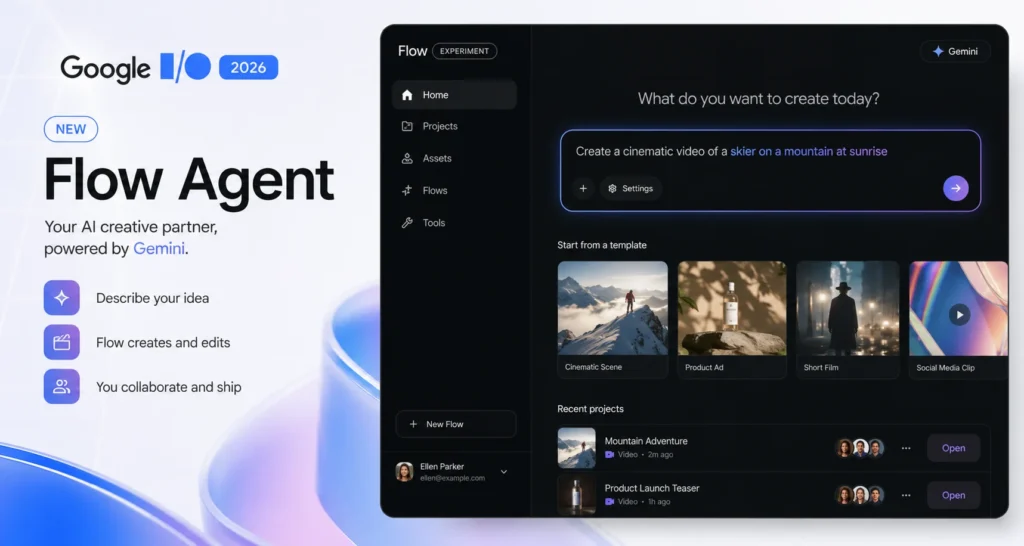
Google Flow AI Agent Launch — What Is Flow Agent and What Do Free Users Actually Get? (June 2026)
Google announced something at I/O 2026 that quietly changes everything about how Google Flow AI Agent works — and most people who use the tool regularly have not fully realized what it means yet.
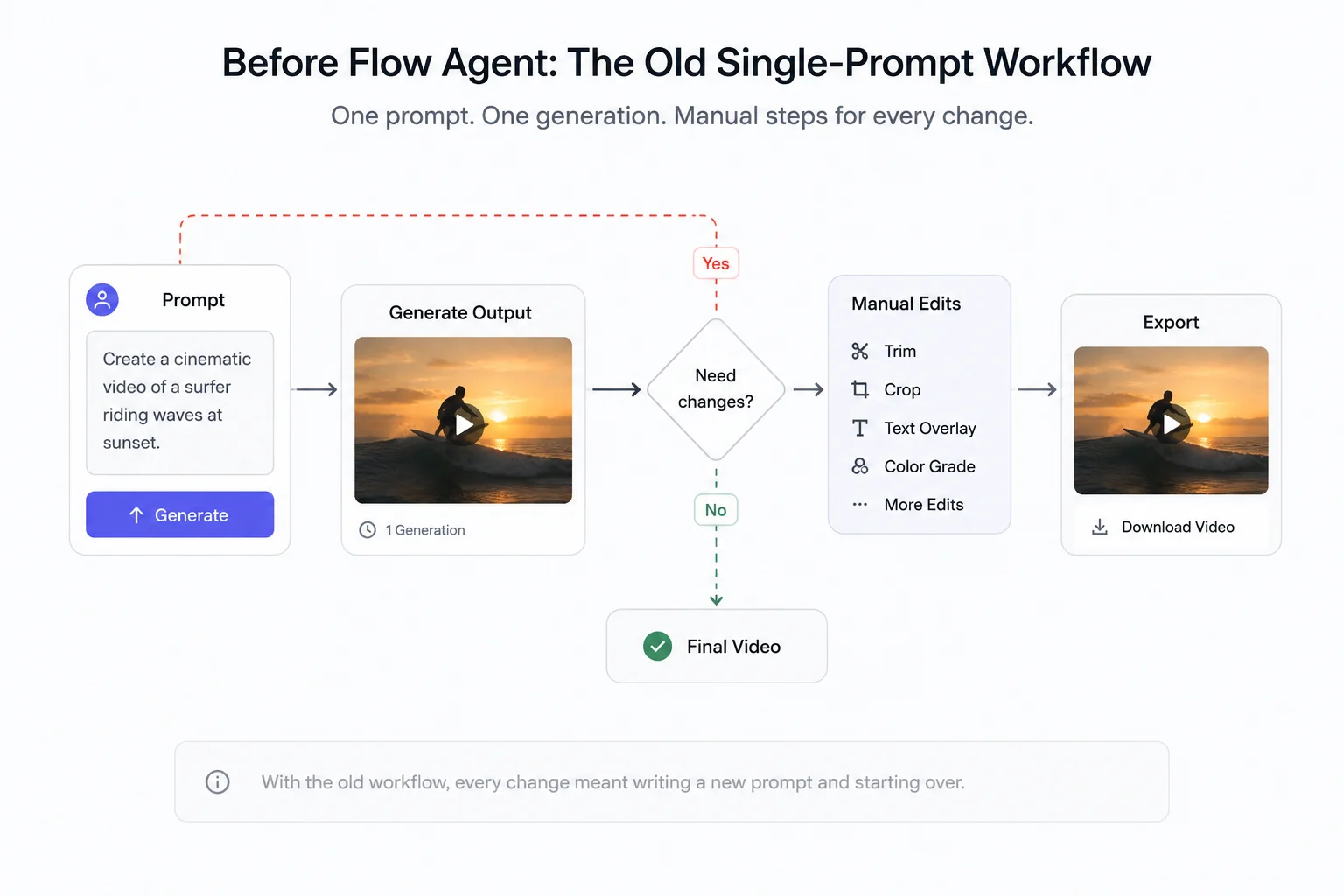
Before May 19, 2026, Google Flow AI could only execute one prompt at a time. You typed, it generated, you reviewed, you typed again. Every single step was on you. The tool had no memory of what you were building, no understanding of where you wanted to go, and no ability to act on its own.
That changed with the launch of Google Flow AI Agent.
Flow Agent is not a button. It is not a filter or a preset. It is a Gemini-powered AI assistant that lives inside your Flow workspace, remembers your entire project, reasons through what needs to happen next, and takes action — brainstorming with you, editing multiple assets at once, organizing your files, and helping you make decisions — all while you remain in full control of every creative choice.
And the part that matters most for the majority of Flow users: it is available to everyone, including free accounts.
This guide covers everything — what Flow Agent actually does, how it technically works, what free users get versus what paid subscribers get, honest feedback from early users, how Flow Tools and Gemini Omni Flash fit in, and exactly how to start using it today.
The Short Version: Flow Agent is live for all Flow users globally — free included. Gemini Omni Flash is for paid subscribers only. Flow Tools (using existing ones) is free; creating your own tools requires a paid plan.
The Problem Google Was Solving — Why Flow Needed an Agent
To understand why Flow Agent matters, you need to understand the frustration that existed before it.
Every AI creative tool up until now has worked the same basic way: you describe what you want, the tool generates it, you look at the result, you describe what you want changed, it generates again. One prompt, one output, repeat.
This works fine for simple tasks. But the moment your project gets complex — multiple scenes, recurring characters, a consistent visual style, dozens of generated assets — the single-prompt model breaks down completely.
Imagine you are building a short film with five scenes. You have generated 40 clips across those scenes. You decide the overall color tone needs to be warmer. In the old Flow, you would need to go to each clip individually, describe the change, regenerate, review, and move on. Forty clips means forty separate sessions of doing exactly the same thing.
Or imagine you are halfway through generating scene three when you realize the character’s outfit should be different. In the old Flow, you cannot tell the tool “remember that change and apply it going forward.” Each new generation starts from scratch.
Google’s VP of Product for Google Labs, Elias Roman, put the problem plainly at I/O 2026: creators were navigating “an expensive, disjointed ecosystem of single-purpose tools.” The creative process was constantly being interrupted by the mechanical work of managing the tool itself.
Flow Agent is Google’s answer to that problem.
What Is Google Flow AI Agent — The Complete Explanation
According to Google’s official announcement at I/O 2026, Flow Agent is described as:
“Your creative partner that can plan and reason through complex tasks with your inputs, under your control. Built with Gemini models, it brings expertise and a deep understanding of your project to help with early brainstorming, creating and editing.”
The critical phrase in that description is “a deep understanding of your project.”
Unlike the old single-prompt model where each request started fresh, Flow Agent maintains a full memory of your project across the entire session. It knows what you have already generated. It knows what characters exist in your scenes. It knows what visual style you have been building toward. It knows which assets belong to which parts of your project.
This memory is what makes everything else possible. The agent is not just responding to individual requests — it is reasoning about your project as a whole and using that understanding to take meaningful action.
The agent is built on Google’s Gemini models, the same AI that powers Gemini Pro and Gemini Ultra across Google’s other products. This gives Flow Agent both the creative reasoning ability to understand narrative and character questions, and the technical capability to execute complex multi-step tasks across your workspace.
Every Confirmed Capability of Google Flow AI Agent
Here is everything Flow Agent can do as of the June 2026 rollout, based on Google’s official announcements and documented capabilities:
1. Multi-Step Task Execution
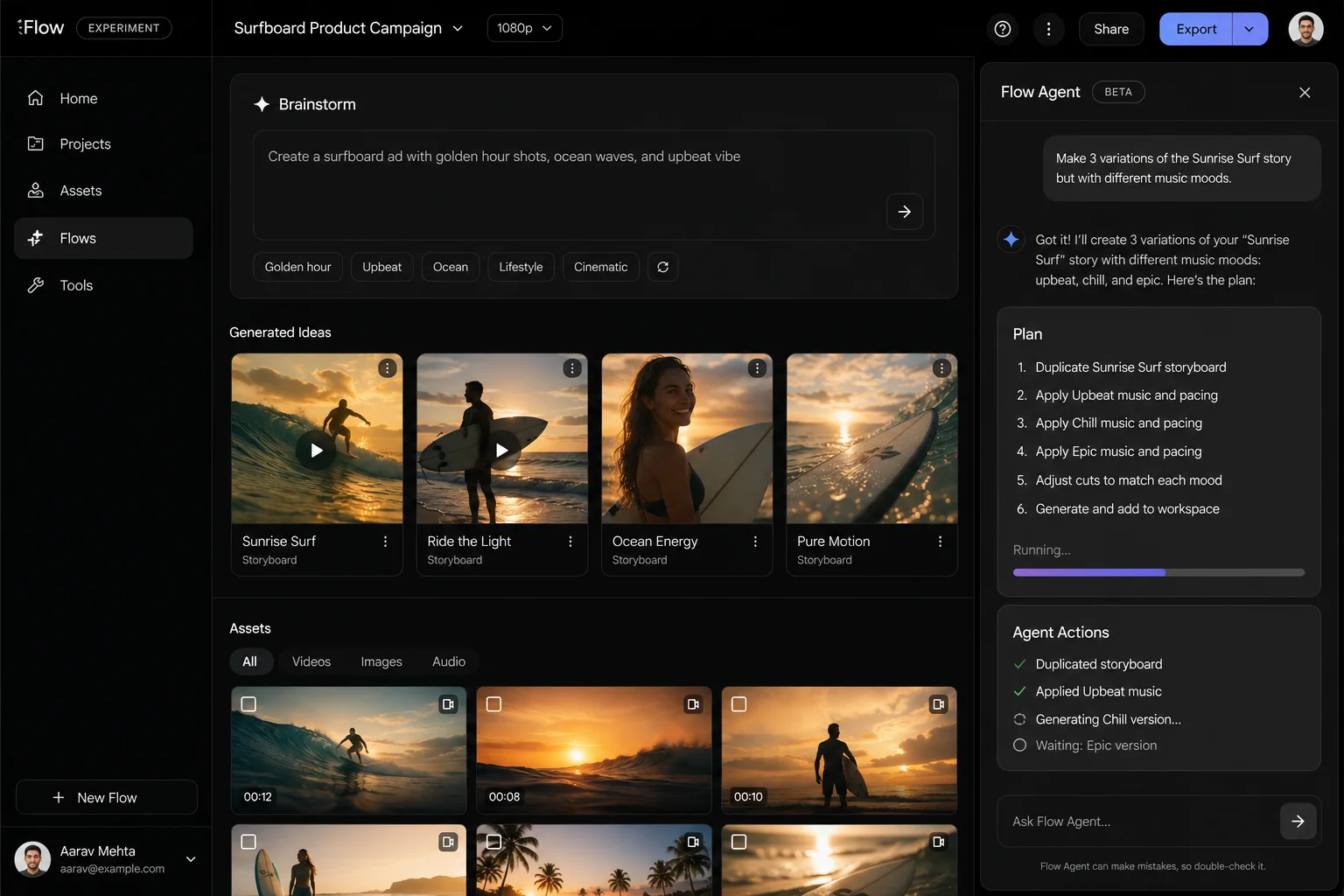
This is the fundamental shift. Before Flow Agent, every task required a separate prompt. Now the agent can handle a chain of connected tasks in a single session.
You could ask: “Create three different versions of this opening scene — one dramatic, one light-hearted, one cinematic — and organize them into a collection called Opening Variations.”
The agent understands that as one connected request, executes each part, and completes the organizational step without you needing to issue three separate instructions.
2. Brainstorming and Dialogue Development
Flow Agent can act as a genuine creative sounding board. If you are writing dialogue for characters in a scene, you can describe who the characters are, what the situation is, and what you are trying to communicate — and the agent will suggest dialogue options, push back on what is not working, and iterate with you in conversation.
This is not a template-filling exercise. The agent understands narrative context and can engage with the creative logic of what you are building.
3. Plot and Story Recommendations
Beyond dialogue, Flow Agent can suggest where your story should go next. If you describe the scenes you have already built and where you are stuck, the agent can propose plot developments, scene transitions, and narrative directions that fit the tone and direction of your existing work.
4. Generating Multiple Scene Variations Simultaneously
Instead of generating one option, reviewing it, and iterating — you can ask Flow Agent to generate multiple creative variations at once. Google demonstrated this with a creator asking for 16 variations of a product shot with different angles, lighting, and compositions — all generated in parallel.
This saves a significant amount of time during the early iteration phase when you are trying to find the right direction before committing to a specific approach.
5. Batch Editing Across an Entire Project
This is the capability that will make the biggest practical difference for anyone managing large projects.
Flow Agent can apply changes across multiple assets simultaneously with a single instruction. Examples from Google’s documentation:
- “Apply a warm color grade to all clips tagged DAYTIME”
- “Trim the first two seconds from every clip in Scene 3”
- “Change the background to overcast in all exterior shots”
One instruction. Dozens of clips updated. The repetitive work of manually touching every asset disappears.
6. Automatic Asset Organization
As your project grows and your generated assets pile up, Flow Agent can organize everything into logical collections based on what it understands about your project. It groups clips by scene, character, location, or theme — without you manually sorting through hundreds of files.
7. Intelligent Asset Renaming
Instead of generated files named “output_0047.mp4” or “generation_image_003.png,” Flow Agent renames your assets based on context. A clip of a sunset scene in Act 2 gets a name that actually tells you what it is. This sounds minor until you are managing a project with 200 generated assets and trying to find the right one quickly.
8. Project Planning and Workflow Coordination
For larger projects, Flow Agent can help break down the work into phases, suggest what needs to be created in what order, and track progress across multiple scenes and asset types. It becomes less of a generation tool and more of a production coordinator.
Gemini Omni Flash — The New AI Brain Powering Flow
Running alongside Flow Agent, Google introduced Gemini Omni Flash — a new multimodal AI model that now powers Google Flow for paid subscribers. Understanding what it is helps explain why some things work better now than they did before.
Google describes Gemini Omni Flash as “Nano Banana, but for video.” That comparison is intentional. When Nano Banana Pro launched as the upgraded image model in Google Flow, it significantly improved image quality and prompt understanding. Gemini Omni Flash does the same thing for video — it is the AI engine that makes video generation smarter, more responsive to complex prompts, and more consistent across multiple scenes.
What Gemini Omni Flash Specifically Improves:
World Understanding Omni Flash has a much deeper understanding of how the real world looks and works — lighting, physics, spatial relationships, how objects interact. This translates to video generations that look more physically plausible and less like obvious AI output.
Multimodal Input Omni Flash can take any combination of text, image, and video as input simultaneously. You can feed it a real photograph, a reference video clip, and written instructions at the same time and it understands all three together. This makes the “blend real-world inspiration with generated content” use case significantly more practical.
Conversational Creation With Omni Flash, you can refine your video project through natural conversation rather than discrete prompts. “Make the character’s jacket darker.” “The scene feels too rushed, slow it down slightly.” “The lighting in this shot does not match the previous one, fix it.” Each instruction builds on the last with full context of what came before.
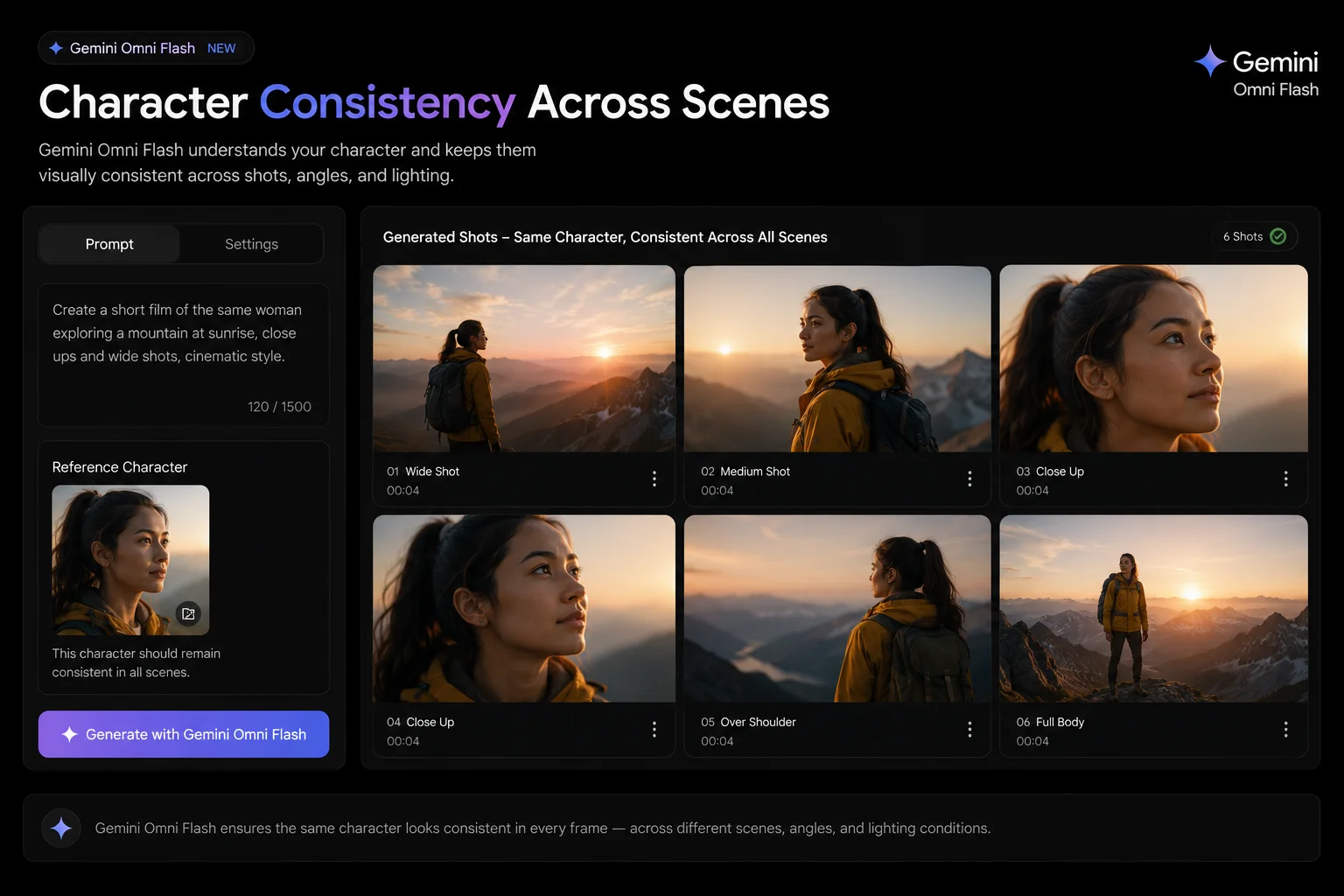
Character and Voice Consistency This was one of the most persistent complaints about AI video generation — characters looked noticeably different from scene to scene. Same name, different face, different voice. Gemini Omni Flash specifically addresses this by maintaining character identity and voice consistency across every scene in a project. If your lead character has a specific look and voice in Scene 1, that same look and voice carries through Scene 7.
Precise Video Editing Omni Flash enables more surgical edits to generated video — changing specific elements within a clip without regenerating the entire thing, adjusting timing, and modifying individual elements while the rest of the frame stays consistent.
Availability: Gemini Omni Flash is available now for all Google AI Plus, Pro, and Ultra subscribers globally. Free users do not get Omni Flash — they continue on the standard generation model.
Flow Tools — Build Your Own Creative Tools Without Code
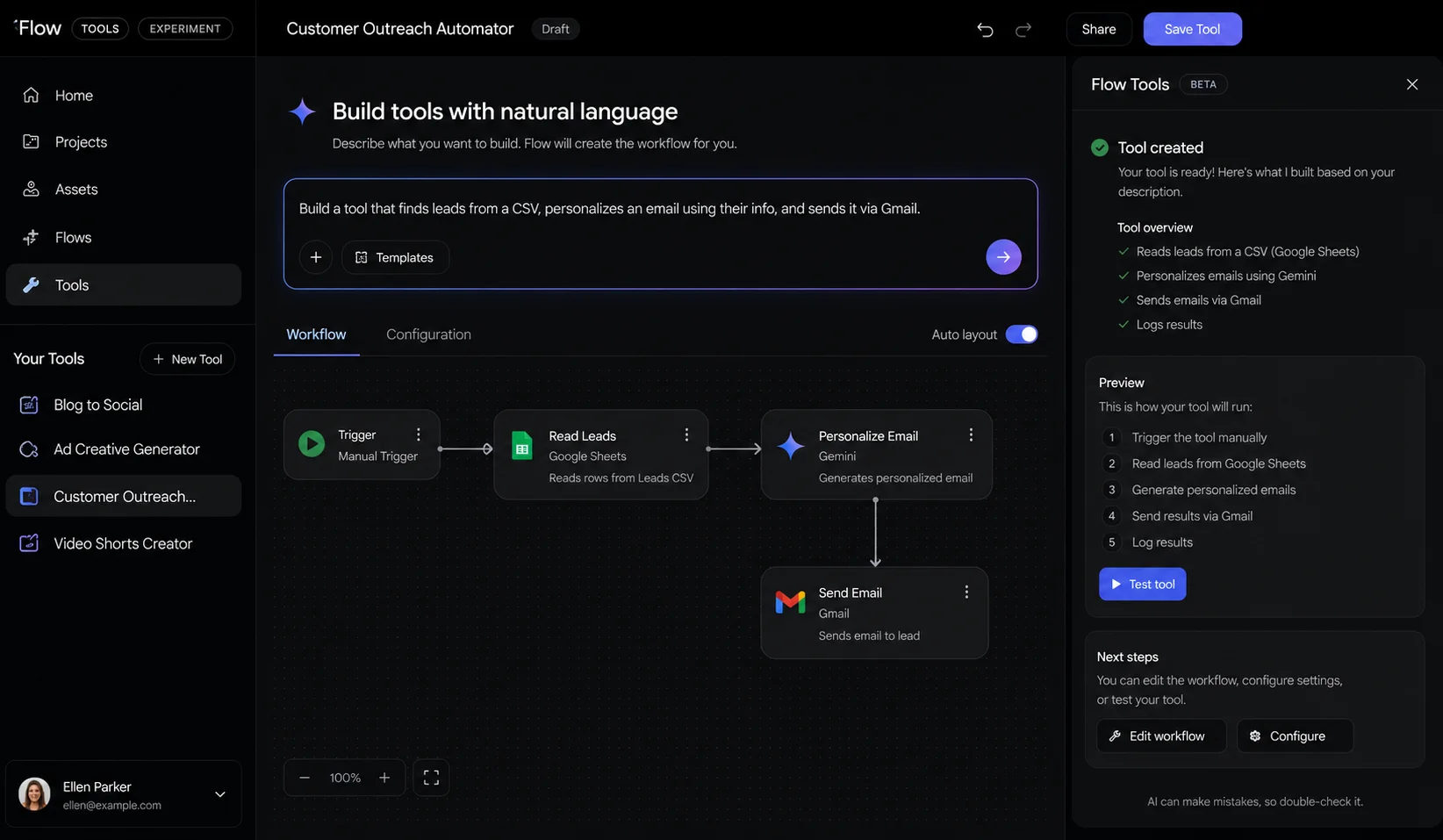
The third major announcement from I/O 2026 was Google Flow Tools — a system that lets creators build custom creative tools and workflows using plain language, with no coding knowledge required.
Google calls this “vibe coding” for creative tools — the same concept that has taken off in software development, applied to creative production workflows.
How Flow Tools Works
You describe what you want a tool to do in natural language. Flow’s AI builds the actual code and functionality behind it. You get a working tool that does exactly what you described, built specifically for your creative process.
Examples of tools creators have built or can build:
- A video resizer that automatically adjusts generated clips to the exact dimensions needed for different platforms (16:9 for YouTube, 9:16 for Instagram Reels, 1:1 for feed posts)
- A custom image editing tool that applies a specific color grading style consistently across all generations
- Visual effects and post-processing filters for a particular aesthetic
- Custom shaders for animation-style or illustrated looks
- A batch tool that applies a watermark, crops to size, and exports in the right format — all at once
The Community Sharing Aspect
Tools you build can be shared with other Flow users. Tools that others have built can be remixed into new versions tailored to your needs.
Google highlighted several early-access community tools at I/O 2026:
pixelBento by László Gaal — applies lo-fi and glitch-style post-processing effects that give generated video a distinctive lo-fi aesthetic.
Tools from Kat Zhang and metapuppet — Google did not detail these fully but highlighted them as examples of the creative range the community is already building.
This sharing ecosystem means that even if you never build a tool yourself, the community’s tools will continuously expand what is available to use in your projects.
Who Can Access Flow Tools
- Use existing community tools: All Flow users globally, including free accounts
- Build new custom tools from scratch: Google AI Plus, Pro, or Ultra subscribers only
- Remix and modify existing tools: Google AI subscribers only
Free users have access to a growing library of community-built tools — they just cannot add to it or customize what exists.
The Honest Assessment — What Early Users Are Actually Saying
Here is something most coverage of Google I/O announcements skips: the gap between what was demonstrated and what early users are experiencing in practice.
After the launch, real users started posting their honest feedback:
One creator noted: “9/10 prompts fail on Flow, I can’t make anything work.”
Another observed: “It reflects 85% of what you want and you spend most of your time correcting it. It doesn’t work well with creators at all.”
A third made a sharp point about the batch variation feature: “Generating 16 scene variations doesn’t save the work, just relocates it. The bottleneck in creative was never producing options — it was deciding which one ships.”
These are real frustrations that deserve honest acknowledgment. Flow Agent, like every AI tool at launch, is not a finished product. It is a significant step forward from where Flow was before, but it is not a professional video editing replacement and it does not eliminate creative decision-making — it shifts where that work happens.
What this means practically for new users:
Flow Agent is most useful when you are in the early and middle stages of a project — brainstorming, generating variations, exploring directions, managing assets. It is less useful when you need surgical, precise control over a final polished output.
Think of it like having a very capable but occasionally overeager assistant. It can take a huge amount of work off your plate. It will sometimes get things wrong in ways you need to correct. The more specific and clear your instructions, the better the results.
The content moderation issues some users have reported are a real factor — Google Flow applies strict content policies, and some creative directions hit limits that are not always obvious before you try them. This is not specific to Flow Agent; it applies to all Google Flow generations.
Despite these limitations, the core capabilities — particularly batch editing and asset organization — represent genuine time savings for anyone managing complex projects.
Free vs Paid — The Complete Breakdown
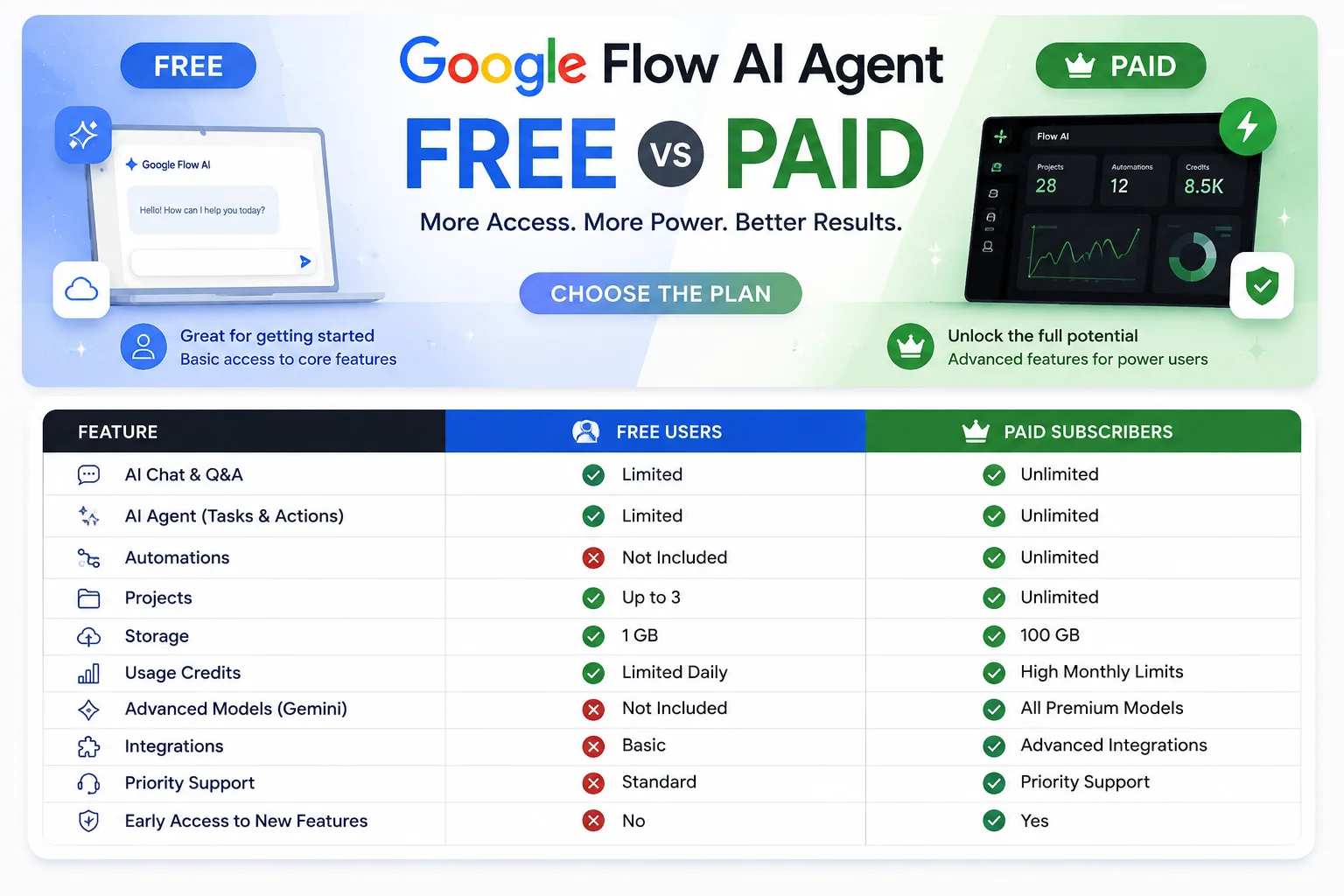
This is what every Flow user wants to know clearly:
| Feature | Free | AI Plus $9.99 | AI Pro $19.99 | AI Ultra $100 |
|---|---|---|---|---|
| Flow Agent — full access | ✅ Yes | ✅ Yes | ✅ Yes | ✅ Yes |
| Flow Agent — multi-step tasks | ✅ Yes | ✅ Yes | ✅ Yes | ✅ Yes |
| Flow Agent — batch editing | ✅ Yes | ✅ Yes | ✅ Yes | ✅ Yes |
| Flow Tools — use existing tools | ✅ Yes | ✅ Yes | ✅ Yes | ✅ Yes |
| Flow Tools — create custom tools | ❌ No | ✅ Yes | ✅ Yes | ✅ Yes |
| Flow Tools — remix tools | ❌ No | ✅ Yes | ✅ Yes | ✅ Yes |
| Gemini Omni Flash model | ❌ No | ✅ Yes | ✅ Yes | ✅ Yes |
| Veo 3.1 video generation | ❌ No | ✅ Yes | ✅ Yes | ✅ Yes |
| Image generation (Imagen 4) | ✅ Yes | ✅ Yes | ✅ Yes | ✅ Yes |
| Nano Banana Pro image model | ❌ No | ✅ Yes | ✅ Yes | ✅ Yes |
| Monthly AI credits | Limited | 200 | 1,000 | 12,500 |
| Videos per month (~20cr each) | 0 | ~10 | ~50 | ~625 |
| Generation speed | Standard | Standard | Priority | Highest |
| Flow Mobile App Android beta | ✅ Yes | ✅ Yes | ✅ Yes | ✅ Yes |
| Google One storage | 15GB | 200GB | 2TB | 20TB |
The honest takeaway:
Free users get something meaningful with Flow Agent — the brainstorming, batch editing, asset organization, and multi-step task capabilities are all there without paying anything. What free users do not get is the upgraded AI model (Gemini Omni Flash) that makes video generation significantly better, and they cannot generate video at all.
If you are using Flow AI for image generation only, the free tier with Flow Agent is genuinely useful. If you want video generation and the best quality outputs, a paid plan is necessary.
Google Flow AI Mobile App — Also Launched at I/O 2026
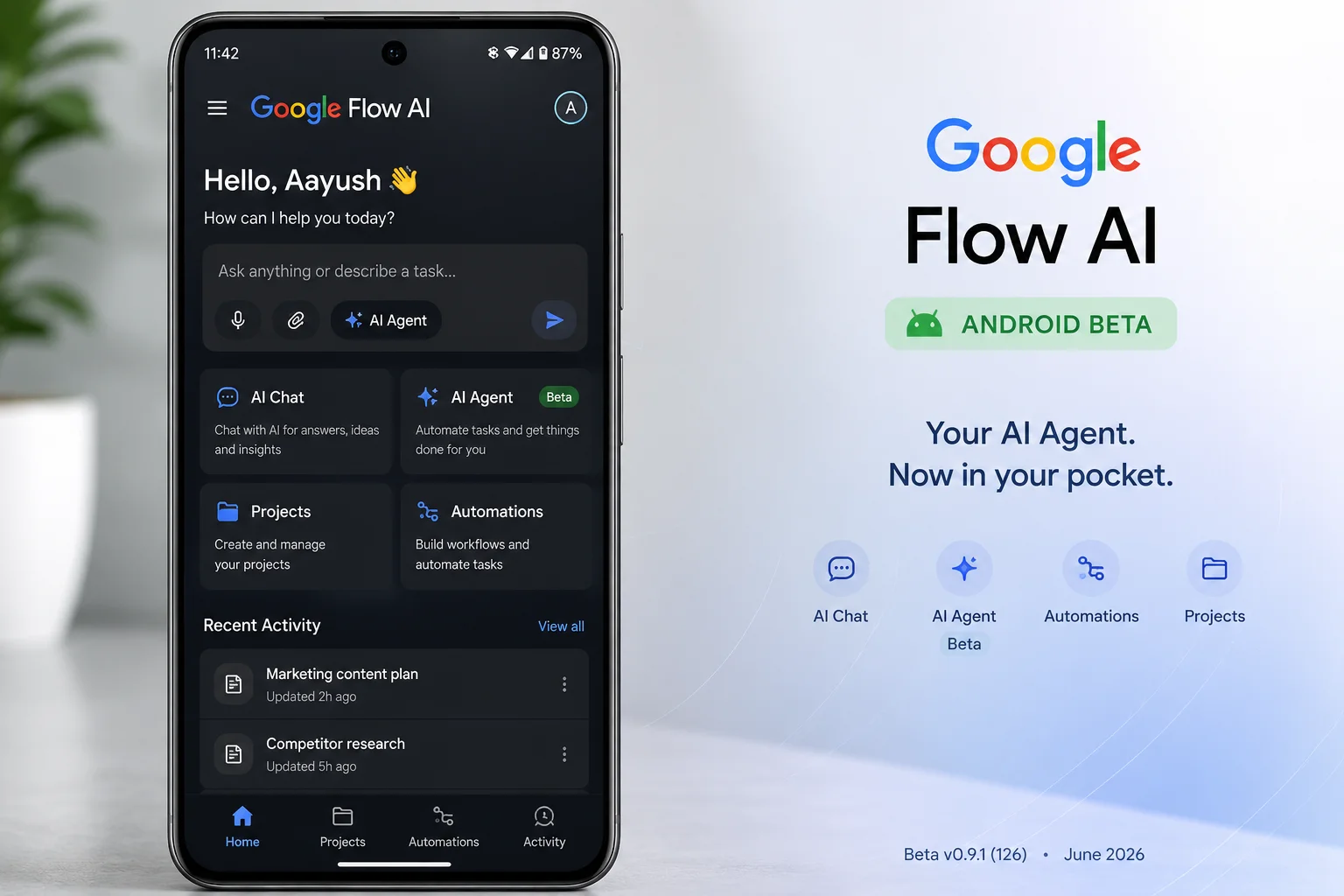
Alongside the Flow Agent and Flow Tools announcements, Google launched the Google Flow mobile app — making it possible to use Flow AI directly from your phone.
Android beta is live now for users aged 18 and above. You can download it through the Play Store.
iOS — planned but no confirmed launch date yet. Google described it as coming soon.
The mobile app brings the core Flow experience to your phone — image generation, the Ingredients system for saving characters and styles, access to your existing projects and generated assets, and the new Flow Agent capabilities.
Video generation on mobile follows the same credit system as desktop — 20 credits per Veo 3.1 video generation — so your subscription credits work across both platforms.
For a detailed walkthrough of the mobile app, our Google Flow AI Mobile App guide covers the full setup and usage.
Google Flow Music Updates — Also Worth Knowing
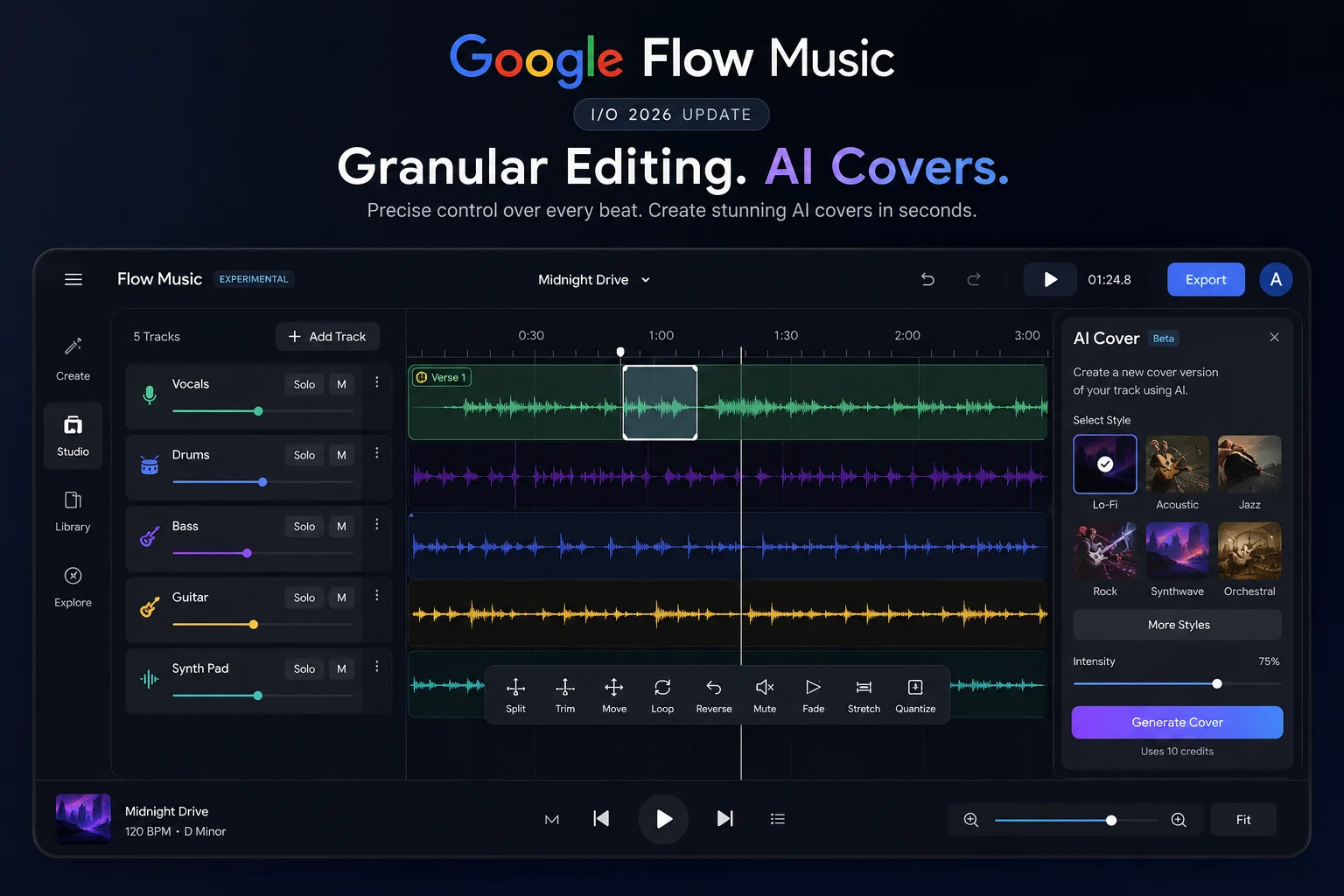
For anyone interested in music creation alongside video, Google Flow Music received its own significant upgrades at I/O 2026 — powered by the Lyria 3 Pro music model.
Section editing without destroying the whole track Previously, editing any part of a Flow Music generation meant regenerating the entire song. Now you can highlight specific sections — a verse, a chorus, a beat drop — and edit only that part. Rewrite those specific lyrics. Translate them. Modify the beat drop timing. Extend a section into a longer composition. The rest of the track stays exactly as it was.
AI cover feature Flow Music can now take an existing generated track and transform its style while preserving the original melody and song structure. The example Google showed was converting a standard track into a lo-fi remix — same melody, completely different sonic character.
Music videos via Gemini Omni Gemini Omni Flash is coming to Flow Music as well, enabling creators to generate music videos by conversationally directing the visual style, subjects, scenes, and narrative flow to match what the song is doing.
Platform availability: Flow Music app is currently on iOS. Android support is coming soon — opposite from the main Flow app situation.
How to Start Using Flow Agent Right Now
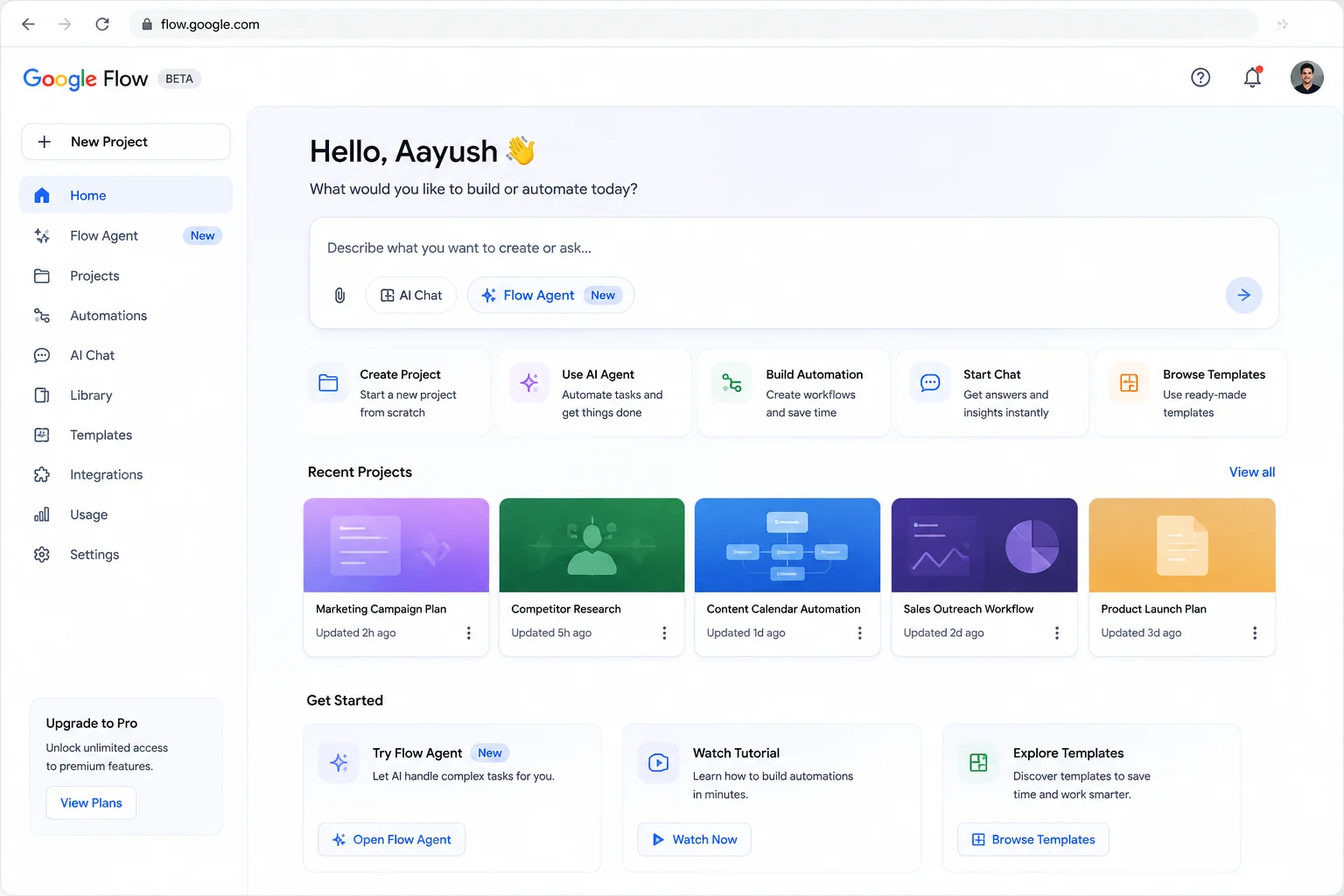
Flow Agent is already rolling out globally. Here is how to access it:
Step 1: Open your browser and go to flow.google.com
Step 2: Sign in with your Google account — the same one you use for Gmail or any Google service
Step 3: Open an existing project or create a new one by clicking the new project button
Step 4: Look for the Flow Agent icon or panel in your workspace — it appears in the left sidebar or as a dedicated panel depending on your interface version
Step 5: Click on the agent and start a conversation about your project. You can begin with something as simple as: “I’m building a short video about [your topic]. Help me plan the first three scenes.”
Step 6: From there, give the agent specific tasks — ask it to generate variations, batch edit assets, organize your files, or brainstorm dialogue.
If you do not see Flow Agent in your workspace yet, the global rollout is still in progress as of early June 2026. Check back in a day or two — Google confirmed the rollout is underway for all users worldwide.
For a complete walkthrough of the Google Flow AI workspace and how to navigate it from scratch, our Google Flow AI Tutorial for Beginners covers everything step by step.
Tips for Getting the Best Results from Flow Agent
Based on how the agent works and early user feedback, here are practical tips that will save you time:
Be specific about your project upfront. When you first open a conversation with the agent, give it a clear description of what you are building — the genre, the tone, the characters, the goal. The more context it has at the start, the more useful its suggestions throughout.
Use it for the decisions you want to skip, not the ones you care about. Flow Agent shines at the work you would rather not do manually — organizing assets, applying consistent changes across clips, generating multiple options. Trust it with the mechanical work. Keep your own hand in the creative decisions.
Give it one clear instruction at a time for batch edits. When asking for batch changes, be precise: “Apply warm color grading to all clips in Scene 2” works better than “make all the scenes look better.” The more specific the instruction, the more reliably it executes.
Save your Ingredients before using the agent. The Ingredients system — where you save your characters, scenes, and styles — gives Flow Agent the reference points it needs to maintain consistency across your project. Set these up before asking the agent to generate or edit.
Expect iteration. Early users report that around 15% of the agent’s outputs need correction. That is still a significant improvement over doing everything manually, but go in knowing that reviewing and refining is part of the workflow, not a sign the tool is broken.
Frequently Asked Questions
Is Flow Agent free to use? Yes. Google confirmed that Flow Agent is available to all Flow users worldwide, including free accounts. The full agent capabilities — brainstorming, batch editing, asset organization, multi-step tasks — are accessible without a paid subscription.
What is the difference between Flow Agent and Flow Tools? Flow Agent is the AI assistant that helps you brainstorm, create, and manage your project conversationally. Flow Tools is the system for building custom creative tools using natural language. They are separate but complementary — you might use Flow Agent to help plan your workflow and then use a Flow Tool to execute a specific editing task within it.
Do I need to pay to use Flow Tools? You can use existing community-built tools without a paid plan. To build your own custom tools from scratch, or to remix and modify existing ones, you need a Google AI Plus, Pro, or Ultra subscription.
What is Gemini Omni Flash and why does it matter? Gemini Omni Flash is Google’s new multimodal AI model powering video generation in Google Flow for paid subscribers. It significantly improves video quality, character consistency across scenes, and conversational editing. Think of it as the same leap that Nano Banana Pro was for image generation, applied to video.
Is Flow Agent available in Pakistan? Yes. Flow Agent is available globally across all 140+ countries where Google Flow AI is accessible, including Pakistan. No additional setup is required.
The agent is not showing in my workspace — what should I do? The global rollout was announced in late May 2026 and is still completing. If you do not see it yet, wait 24-48 hours and check again. Make sure you are using Google Chrome and that you are signed into the correct Google account. If it still does not appear after a few days, try clearing your browser cache and reloading flow.google.com.
Does Flow Agent work on mobile? Yes. Flow Agent is part of the new Google Flow Android beta app. iOS support is coming when the iOS app launches.
Can Flow Agent generate video on its own? The agent can help you plan and manage video generation tasks, but actual video generation still requires Veo 3.1 access — which means a paid plan. Free users can use Flow Agent for image generation and project management tasks.
How many projects does Flow Agent remember at once? Flow Agent maintains memory within a single project session. It understands the full context of the project you are currently working in. Switching to a different project starts a fresh context for that project.
Is Flow Agent replacing Gemini in Flow? No. Flow Agent and Gemini Omni Flash work together within Flow. Gemini models power the agent’s reasoning capabilities. They are not separate things competing with each other — they are different layers of the same system.
Related Guides on WhiskAILabs
- What Is Google Flow AI? — Complete 2026 Guide
- Google Flow AI Tutorial for Beginners
- Google Flow AI Free vs Paid — Is $19.99 Worth It?
- Google Flow AI Not Working? — Every Fix Explained
- Google Flow AI Blank Screen Fix — 7 Solutions
- Google Flow AI Prompts Guide — 50 Tested Prompts
- Google Flow AI Mobile App Guide















