
Google Flow Not Available In Your Country Yet — Every Fix That Actually Works 2026
You opened your browser, went to flow.google, and instead of the creative studio you were expecting — you got this:
“Flow is not available in your country yet.”
Or maybe: “It looks like you don’t have access to Flow.”
Frustrating. Especially when you can clearly see millions of people using it online, and you just want to try it yourself.
Here’s the good news: this error is almost always fixable. It’s a geographic restriction, not a permanent ban. And in most cases — including Pakistan, India, and most of Asia — Google Flow AI is actually available, and the error comes from something fixable like a VPN conflict, a wrong account type, or a cached redirect.
This guide covers every working fix for 2026, why the restriction exists in the first place, which countries are actually blocked versus which ones just show the error by mistake, and exactly what to do in each situation.
Work through these fixes in order and you’ll be generating in Flow AI before you finish reading.
First: Understand What This Error Actually Means
Before jumping into fixes, it’s worth understanding what you’re actually dealing with — because the “not available in your country” error has two very different causes that need two different solutions.
Cause A — You’re in a country that’s genuinely blocked. Google Flow AI is available in 149+ countries but not all of them. The European Union and United Kingdom are the most significant excluded regions — blocked due to GDPR and EU AI Act compliance requirements. A handful of other markets also have restricted access. If you’re in one of these regions, the fix involves a VPN (we’ll cover exactly how below).
Cause B — You’re in a supported country but getting the error anyway. This is actually more common than people realize. Pakistan, India, Bangladesh, most of the Middle East, and most of Asia are all on Google’s supported list — but users in these countries frequently see the “not available” error due to VPN conflicts, wrong account types, browser cache issues, or DNS problems. If you’re in a supported country, the fix is usually simpler and doesn’t require a VPN at all.
The fastest way to figure out which situation you’re in is to check the supported country list below, then follow the matching fix section.
Is Your Country Supported? — The 2026 Country List
✅ SUPPORTED — Google Flow AI works here (149+ countries):
Google Flow AI is confirmed available in Pakistan 🇵🇰, India 🇮🇳, United States 🇺🇸, Canada 🇨🇦, Australia 🇦🇺, Japan 🇯🇵, South Korea 🇰🇷, Singapore 🇸🇬, UAE 🇦🇪, Saudi Arabia 🇸🇦, Turkey 🇹🇷, Brazil 🇧🇷, Mexico 🇲🇽, Indonesia 🇮🇩, Malaysia 🇲🇾, Philippines 🇵🇭, Thailand 🇹🇭, Vietnam 🇻🇳, Bangladesh 🇧🇩, Nigeria 🇳🇬, Kenya 🇰🇪, South Africa 🇿🇦, Egypt 🇪🇬, and 120+ more countries.
If you’re in Pakistan — Flow AI is available for you. If you’re seeing the “not available” error, it’s almost certainly a fixable technical issue, not a genuine regional block. Jump to Fix 1 or Fix 2 below.
❌ BLOCKED — Google Flow AI is genuinely restricted here:
- European Union (Germany, France, Italy, Spain, Netherlands, Poland, and all other EU member states) — blocked due to GDPR and EU AI Act compliance
- United Kingdom — blocked due to UK data protection regulations
- Some additional markets — Hong Kong has had intermittent access issues
If you’re in the EU or UK, you’ll need Fix 4 (VPN method) below.
Fix 1 — Disable Any Active VPN (Most Common Fix for Supported Countries)
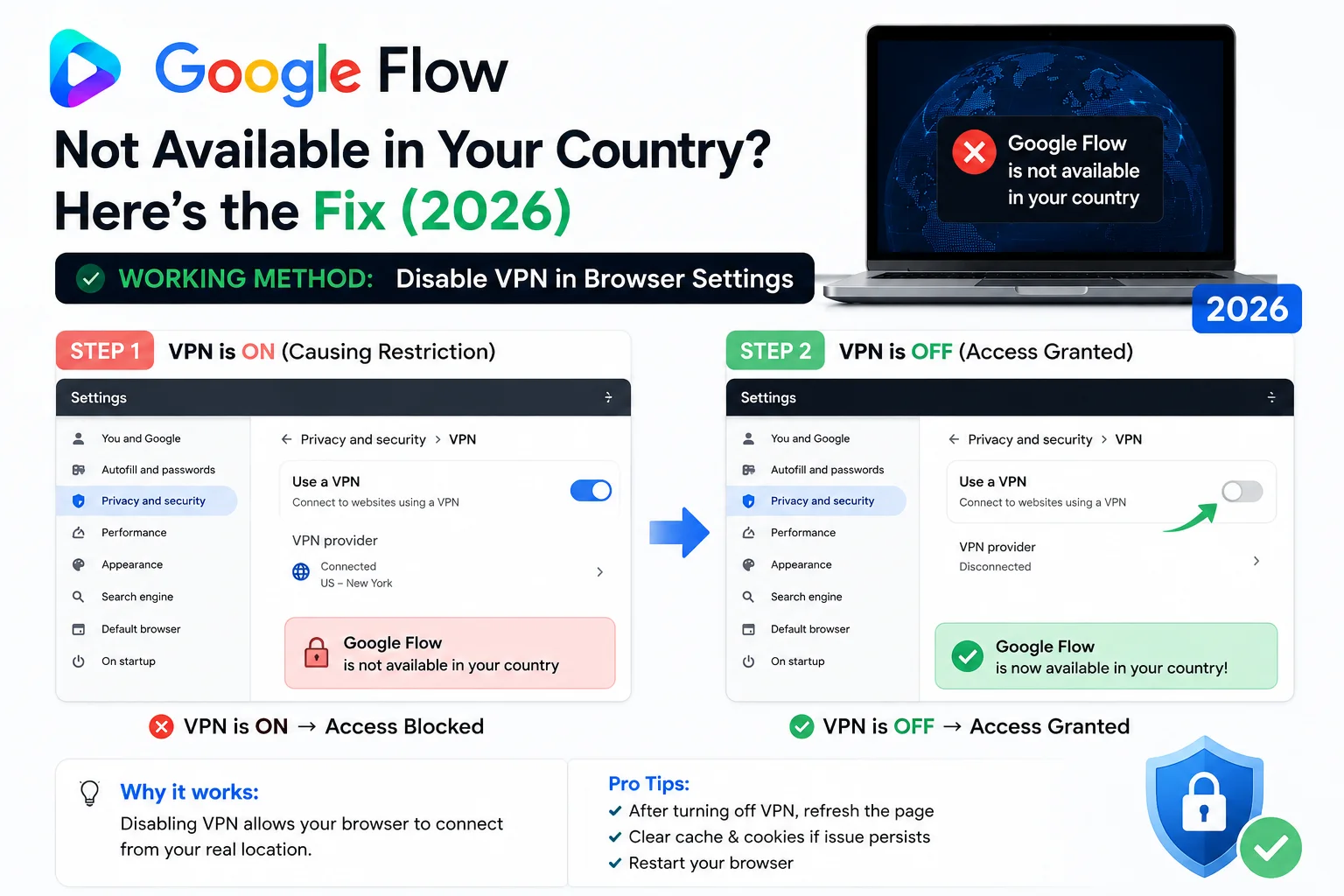
This is the single most common cause of the “not available” error for users in supported countries — and the most commonly overlooked fix.
If you have a VPN running — even one you set up a long time ago and forgot about — there’s a good chance it’s routing your traffic through a restricted region. Google sees a European IP address and blocks access, even though you’re physically in Pakistan or India.
How to fix it:
Step 1: Turn off your VPN completely. Not just pause it — turn it off.
Step 2: If you use a VPN browser extension (NordVPN, ExpressVPN, Windscribe, Browsec, or any similar extension), disable it from your browser’s Extensions panel. In Chrome: go to the three-dot menu → Extensions → Manage Extensions → toggle off any VPN extension.
Step 3: Clear your browser cache. Press Ctrl+Shift+Delete (Windows) or Cmd+Shift+Delete (Mac), select “Cached images and files” and “Cookies and site data”, set the time range to “All time”, and click Clear.
Step 4: Close your browser completely and reopen it.
Step 5: Go directly to flow.google — not labs.google/flow, not any bookmarked link. Type the URL fresh.
For most users in Pakistan and other supported countries, this fix works immediately. If it doesn’t work after following all five steps, move to Fix 2.
Fix 2 — Switch to a Personal Gmail Account
The second most common cause of the “not available” error in supported countries is using the wrong type of Google account.
Google Flow AI works with personal Gmail accounts — the kind you create at gmail.com. It does NOT work reliably with:
- Google Workspace accounts (accounts your employer, school, or university manages — these often end with your organization’s domain like yourname@school.edu or yourname@company.com)
- Google for Education accounts
- Family-managed Google accounts with certain parental controls active
How to fix it:
Step 1: Click your profile icon in the top-right corner of your browser.
Step 2: Check which account you’re signed into. If it’s not a personal @gmail.com account, that’s likely the problem.
Step 3: Sign out and sign back in with a personal @gmail.com account. If you don’t have one, create one for free at accounts.google.com.
Step 4: After signing in with your personal account, go to flow.google again.
This is especially common for students and people who use a work email as their primary Google account. The fix is always the same — use a personal Gmail.
Fix 3 — Clear Cache and Use the Correct URL
Sometimes the “not available” error is simply a cached redirect. If your browser previously cached an error page from Google Flow AI, it may keep showing you that error even after the access issue is resolved.
How to fix it:
Step 1: Open a fresh incognito/private window in your browser. In Chrome: press Ctrl+Shift+N. In Firefox: press Ctrl+Shift+P. In Safari: press Cmd+Shift+N.
Step 2: In the incognito window, go to flow.google. Sign in with your personal Gmail when prompted.
Step 3: If it loads correctly in incognito, the problem is cached data in your regular browser. Go back to your regular browser and do a full cache clear: press Ctrl+Shift+Delete, select all options, set time range to “All time”, and clear.
Important URL note: Always use flow.google — not labs.google/fx/tools/flow or any other URL variation. The old labs.google/flow URL sometimes redirects to an unsupported-country page even for users in supported countries. The direct flow.google URL bypasses this.
Fix 4 — VPN Method (For EU, UK, and Genuinely Blocked Countries)
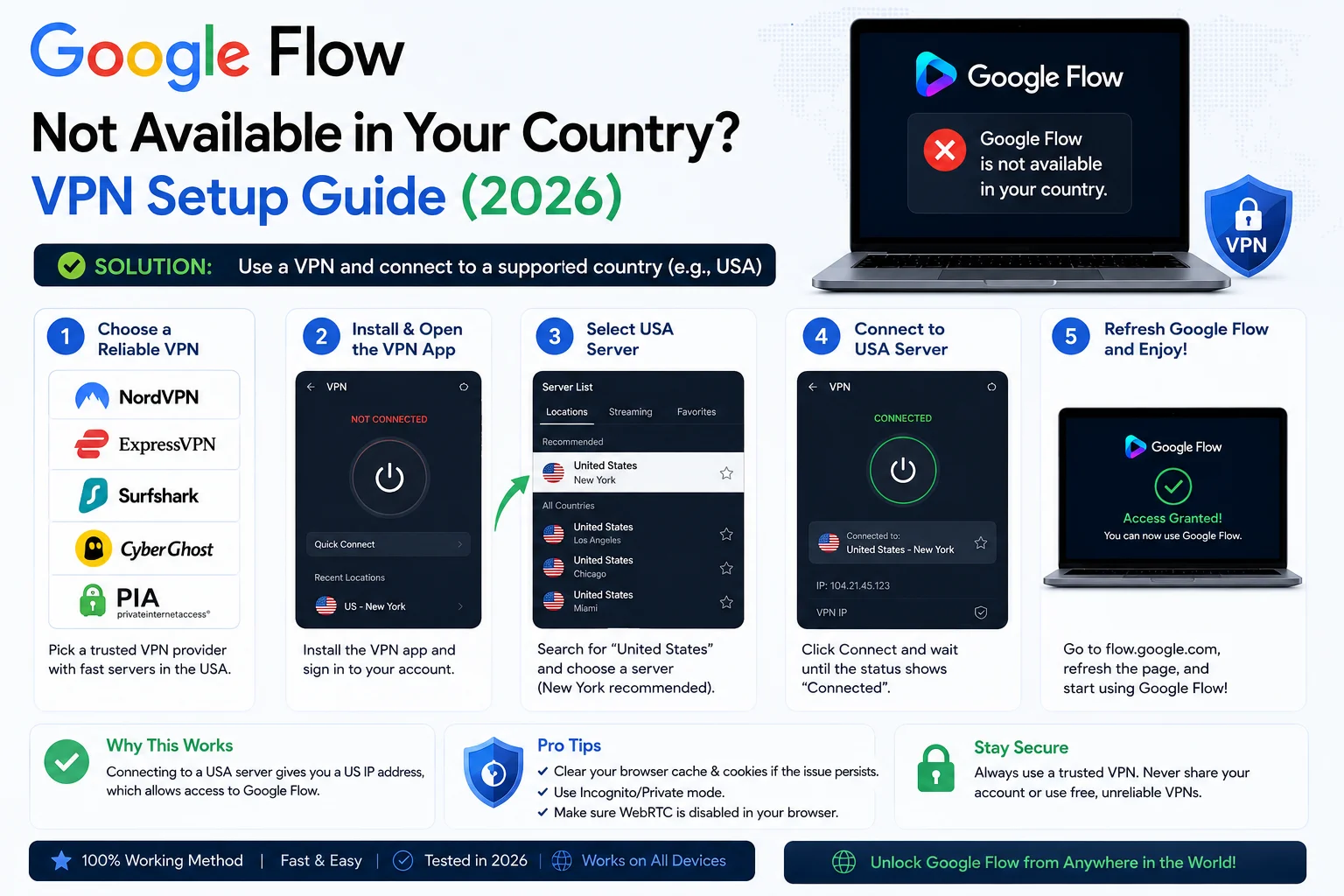
If you’re in the European Union, United Kingdom, or another genuinely blocked region, you’ll need a VPN to access Google Flow AI. Here’s how to do it correctly.
Which VPN to use:
Any reputable VPN with US servers works. The most reliable options tested for Google Flow AI access are:
- ProtonVPN — Has a free tier. Connect to a US server. Works well for Flow AI access.
- NordVPN — Paid, very reliable US connections.
- ExpressVPN — Paid, fast US servers.
- Windscribe — Has a free tier with limited data (enough for testing).
Avoid very cheap or unknown VPNs — some get their IP addresses blocked by Google quickly.
Which server to choose:
Connect to a United States server. Cities that work most reliably: Los Angeles, New York, Chicago, Dallas. Avoid connecting to UK or EU servers — those are blocked regions.
Step-by-step VPN setup:
Step 1: Download and install your chosen VPN.
Step 2: Open the VPN app and connect to a US server (Los Angeles or New York recommended).
Step 3: Confirm your IP address has changed. Go to whatismyip.com and verify it shows a US location.
Step 4: Open a fresh incognito/private browser window.
Step 5: Sign into your personal Google account in the incognito window.
Step 6: Go to flow.google.
Step 7: If it loads correctly, keep the VPN connected while using Flow AI. If you disconnect the VPN mid-session, Flow AI will likely block you again.
Important note for Pakistan users: You do NOT need a VPN to access Google Flow AI in Pakistan. Pakistan is on the supported country list. If you’re in Pakistan and seeing the error, Fix 1 (disable existing VPN) or Fix 2 (use personal Gmail) will almost certainly solve it.
Fix 5 — Change Your DNS Settings
Sometimes the block isn’t Google’s restriction at all — it’s your internet provider’s DNS filtering that’s preventing the connection from reaching Google’s servers correctly.
How to fix it:
On Windows:
- Open Settings → Network & Internet → Change adapter options
- Right-click your active connection → Properties
- Select “Internet Protocol Version 4 (TCP/IPv4)” → Properties
- Select “Use the following DNS server addresses”
- Enter: Preferred: 8.8.8.8 / Alternate: 8.8.4.4 (Google’s public DNS)
- Click OK and restart your browser
On Android:
- Go to Settings → Network & internet → Private DNS
- Select “Private DNS provider hostname”
- Enter: dns.google
- Save and try Flow AI again
On iPhone/iPad:
- Go to Settings → Wi-Fi
- Tap the (i) next to your network
- Scroll to DNS → Configure DNS → Manual
- Remove existing entries and add: 8.8.8.8
After changing DNS, close and reopen your browser and try flow.google again.
Fix 6 — Try a Different Browser
If none of the above fixes have worked yet, try a completely different browser. This rules out browser-specific issues entirely.
Best browsers for Google Flow AI:
- Google Chrome — Works best. Most Flow AI features are optimized for Chrome.
- Microsoft Edge — Works well (also Chromium-based).
- Brave — Works well (Chromium-based).
- Firefox — Works for most features but occasionally has issues with video playback.
- Safari — Works but may have limitations with some video features.
To test: open a browser you don’t normally use, sign into your personal Google account, and go directly to flow.google. If it works in the new browser, the problem is specific to your main browser’s settings or extensions.
Fix 7 — Mobile Data Instead of WiFi (or Vice Versa)
Your WiFi network and your mobile data connection use different IP addresses and potentially different DNS servers. If one is showing the “not available” error, the other might not.
If you’re on WiFi: Turn off WiFi and try Google Flow AI on mobile data.
If you’re on mobile data: Connect to WiFi and try again.
This fix sounds too simple but works surprisingly often — particularly in cases where a building’s WiFi network has a VPN or proxy configured at the router level, which can route traffic through a restricted region without you knowing it.
After Getting Access — What’s Free vs Paid in Flow AI?
Once you’re in, here’s what you can do without spending anything:
Free (no subscription needed):
- Image generation with Imagen 4 — unlimited
- The full Ingredients to Image workflow
- Browsing your creations gallery
- Veo 3.1 Lite video generation (lower priority, zero credits needed)
Google AI Plus — $19.99/month (Rs. 1,400/month in Pakistan):
- Full Veo 3.1 video generation with audio
- Ingredients to Video with Audio
- Gemini Avatar setup and @me prompting
- Flow Agent features
- Gemini Omni Flash model access
For first-time subscribers, Google has been offering 50% off for the first 6 months — making the entry price approximately Rs. 700/month. Worth checking the current offer when you sign up.
Still Not Working? Other Flow AI Errors to Check
If you’ve worked through all these fixes and still can’t access Flow AI, the problem might be something other than a country restriction. Here are related issues we’ve covered:
Blank white screen instead of error message — This is a different problem from the “not available” error. Our Google Flow AI blank screen fix guide covers every solution.
“Generation failed” error after getting in — Getting into Flow AI but having videos fail to generate is a separate issue. See our Google Flow generation failed fix guide for the full list of causes and solutions.
Flow AI outage / works for others but not you — Occasionally Google’s servers have regional issues that look like a country block but are actually a temporary outage. Our Google Flow AI outage guide explains how to tell the difference and what to do.
Whisk AI links no longer working — If you have old bookmarks to labs.google/whisk or similar URLs, those are permanently broken. Whisk AI shut down on April 30, 2026. Everything moved to flow.google. Our Whisk AI to Flow AI migration guide explains the full transition.
Frequently Asked Questions
Q: Is Google Flow AI available in Pakistan?
Yes. Pakistan is confirmed on Google Flow AI’s supported country list. If you’re seeing the “not available” error in Pakistan, it’s almost always caused by an active VPN routing you through a restricted region, or using a Google Workspace account instead of a personal Gmail. Follow Fix 1 and Fix 2 above.
Q: Why is Google Flow AI not available in the EU?
The European Union has strict AI regulations under the GDPR and the EU AI Act that impose specific data handling and transparency requirements on AI tools. Google has excluded EU countries from Flow AI rather than build a separate compliant version for what was originally an experimental tool. EU users can access Flow AI via VPN (Fix 4 above).
Q: Can I use a free VPN for Google Flow AI?
Yes — ProtonVPN’s free tier and Windscribe’s free tier both work for accessing Google Flow AI. The important thing is connecting to a US server. Very cheap or unknown VPNs sometimes have their IP addresses blocked by Google, so stick to well-known services.
Q: Do I need to keep the VPN on while using Flow AI?
If you’re using VPN because you’re in a genuinely blocked region (EU, UK), yes — keep the VPN connected throughout your Flow AI session. If you’re using VPN for another reason and it was causing the error, turn it OFF (Fix 1) — you don’t need a VPN to use Flow AI from a supported country.
Q: Is it against Google’s terms to use a VPN to access Flow AI?
Google’s terms of service do not explicitly prohibit using a VPN. However, Google does state that Flow AI is only officially available in supported regions. Use your own judgment — using a VPN is technically standard internet practice, but accessing services outside their intended availability zone comes with a degree of uncertainty about long-term access.
Q: I’m in a supported country but still see the error. I’ve tried everything. What now?
Try accessing from mobile data on a different device (Fix 7), or wait 24 hours and try again. Occasionally Google’s systems temporarily flag certain IP address ranges. If the problem persists for more than 48 hours, check Google’s status page at status.cloud.google.com for any reported service issues.
Q: Will Google expand Flow AI to more countries?
Google has consistently expanded Flow AI’s country availability since launch — starting in the US and reaching 149+ countries over 12 months. EU and UK expansion depends on regulatory compliance, which Google hasn’t announced a timeline for. For all other blocked countries, expansion is likely as Google’s rollout continues.
Quick Fix Summary — Use This as Your Checklist
Print this or screenshot it and work through each step:
| # | Fix | Who It’s For |
|---|---|---|
| Fix 1 | Disable active VPN | Anyone in a supported country with VPN running |
| Fix 2 | Switch to personal Gmail | Anyone using school/work Google account |
| Fix 3 | Clear cache + use flow.google URL | Anyone with cached redirect issues |
| Fix 4 | Connect to US VPN | EU, UK, and genuinely blocked countries |
| Fix 5 | Change DNS to 8.8.8.8 | Anyone with ISP-level filtering issues |
| Fix 6 | Try a different browser | Anyone with browser-specific issues |
| Fix 7 | Switch WiFi ↔ Mobile data | Anyone with network-level proxy issues |
Work from the top. One fix at a time. Most users in Pakistan and Asia are sorted by Fix 1 or Fix 2.
Final Thoughts
“Google Flow not available in your country” is one of the most misleading error messages in AI tools right now — because for most of the people who see it, it’s not actually true. Google Flow AI is available in 149+ countries, and the vast majority of users getting this error are in supported countries where a simple VPN conflict, wrong account, or browser cache is the real culprit.
Work through the fixes above, starting from the top. In 9 out of 10 cases for Pakistan and Asian users, Fix 1 (disable VPN) or Fix 2 (use personal Gmail) solves it within two minutes.
Once you’re in, everything you can do in Google Flow AI is worth the effort of getting access. Start with our Google Flow AI Tutorial to understand every feature — then check out the Veo 3.1 update guide and the Ingredients to Video with Audio guide for the most powerful things Flow AI can do.
Related Articles on WhiskAILabs:
- Google Flow AI Complete Guide 2026
- Google Flow AI Tutorial — Step by Step
- Google Flow Generation Failed Fix
- Google Flow AI Blank Screen Fix
- Google Flow AI Outage Fix
- Whisk AI Not Working — Move to Flow AI
- Ingredients to Video with Audio Guide
- Veo 3.1 Update 2026 — All New Features
- Gemini Avatar in Google Flow AI
- Pakistan Access Guide for Google AI
- What Is Google Flow AI?
- News & Updates — WhiskAILabs
Official External Sources:















