
Google Flow Outage: Why It Happens & How to Fix It Fast 2026
Google Flow Outage — Why This Guide Exists
You sat down with a great idea. You opened Google Flow, typed out your prompt, hit generate — and nothing. A red error box. A spinning circle that never stops. Or that message everybody dreads: “Flow is temporarily unavailable. Please try again later.”
If that is what happened to you right now, you are in exactly the right place.
The Google Flow outage problem has been one of the most talked-about frustrations in the AI creator space throughout 2025 — and 2026 has brought its own wave of new issues. Right after Google I/O 2026 in May, a fresh bug called Error 253 started breaking Flow and AI Studio workspaces for entire creative teams simultaneously. Real money. Real deadlines. Real frustration.
Here is what matters most: Most outages either fix themselves on the server side, or can be resolved on your end in under five minutes — if you know which fix to try first.
This guide covers every known cause of the Google Flow outage problem as of 2026, breaks down what each error message means, and gives you 8 tested fixes ranked from fastest to most involved. Whether you are a content creator, a filmmaker, or someone who paid for a Google AI subscription and simply wants the tool to work — this guide is built for you.
Let’s fix it.
Quick Note: At Whiskailabs, we track Google Flow issues reported by real users and test fixes consistently. Everything in this guide has been verified as of May 2026.
What Happened to Google Flow in 2026 — The Full Timeline
Before getting into fixes, here is a quick look at everything that has happened to Google Flow since the start of 2026. Understanding the timeline helps you figure out whether your outage is related to a known event.
January 2026 — Workspace Expansion Google Flow became available to Google Workspace business customers for the first time, opening it beyond individual AI Pro and AI Ultra subscribers. This sudden expansion in user base created new strain on servers that were not yet built for enterprise-scale traffic.
February 25, 2026 — Major Unified Relaunch Google shipped one of its biggest Flow updates ever. Three separate tools — Whisk, ImageFX, and the original Flow — were merged into a single unified creative studio at flow.google.com. Millions of new users flooded the platform overnight. Within days of this launch, widespread blank screen issues and loading failures were reported globally. The sudden infrastructure demand caused significant disruption.
March 2026 — Asset Migration and Stability Work Starting March 2026, users could migrate their existing Whisk and ImageFX projects into their new unified Flow library. Server capacity was expanded during this period and stability improved for most regions.
May 19–20, 2026 — Google I/O 2026 Launch Events At Google I/O 2026, Google announced major new additions to Flow including the Gemini Omni Flash model for advanced video editing, Google Flow Tools for building custom workflows in natural language, mobile apps for Android (beta) and iOS, and deeper YouTube integration. Google also confirmed Flow users had collectively created over 1.5 billion images and videos since launch.
May 20–21, 2026 — Post-I/O Error 253 Outage (Most Recent) Within hours of the Google I/O 2026 announcements, a widespread backend bug known as Error 253 began breaking Flow and AI Studio workspaces for large numbers of users. Entire creative teams reported total workflow disruption. Users flooded the Google AI Developers Forum demanding manual quota resets. As of the time this article was updated, Google had not yet issued an official fix timeline. Users suspect the problem stems from server-side synchronization issues as Google rolls out backend infrastructure changes following I/O.
What a Google Flow Outage Actually Looks Like
A Google Flow outage is not just one single thing. It shows up in several different ways:
- You go to flow.google.com and see a completely white or blank page
- The page loads but every generation attempt fails immediately
- You see the specific error message “Error 253”
- Your video or image gets stuck at 99% and never finishes
- The dreaded message appears: “Flow is temporarily unavailable”
- You get a generic “Something went wrong” with no explanation
- Flow works fine for someone else in a different country but not for you
Each of these has a slightly different cause. We will go through every single one.
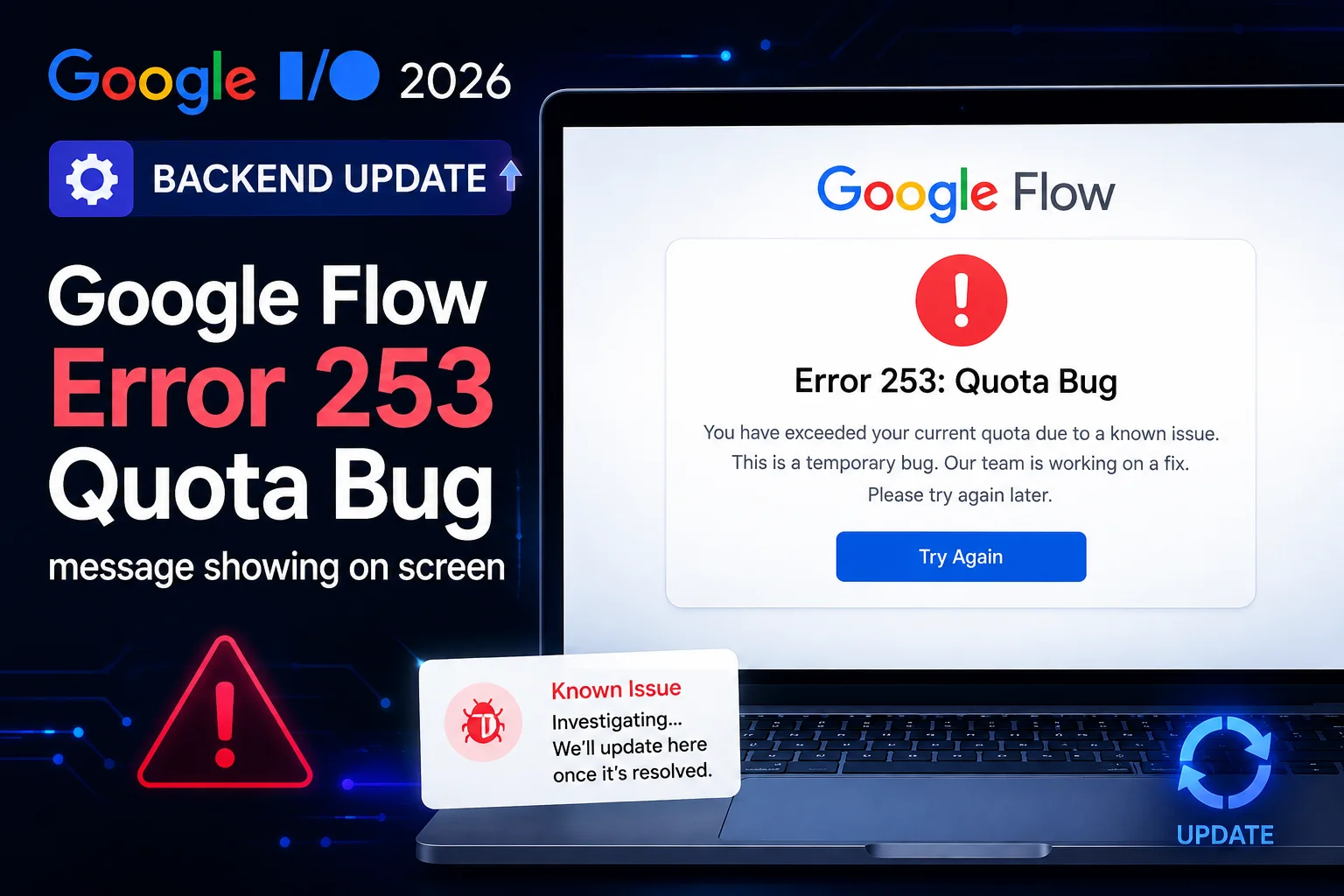
The New 2026 Error: Error 253 Explained
This is the freshest and most relevant outage issue for anyone hitting a wall right now in 2026.
What Error 253 actually is: A backend quota synchronization bug that appeared immediately after Google I/O 2026. When Google pushed major infrastructure updates to roll out the Gemini Omni Flash model and new Flow features, the server-side quota tracking system lost sync for a large number of accounts. The result is that accounts — including fully active paid subscriptions — show as having zero quota or throw Error 253 when trying to generate anything.
Who is affected: Paid Google AI Pro and AI Ultra subscribers, developers using the Gemini API, and teams using Flow in Google Workspace environments. Multiple users have reported the same message: “Why am I unable to use services I’ve already paid for?”
What to do right now:
- Check the Google AI Developers Forum for the latest status thread on Error 253
- Do not try to fix this locally — it is entirely server-side
- Your credits are likely not actually gone — quota balances often reappear once Google resolves the sync issue
- Contact Google One support and request a manual quota reset if the issue persists beyond 24 hours
What Each Google Flow Error Message Actually Means in 2026
| What You See | What It Actually Means | Your Best Move |
|---|---|---|
| Error 253 | Backend quota sync failure. Your account’s generation credits are showing incorrectly due to a server-side infrastructure bug. | Wait for Google to fix server-side. Check the AI Developers Forum for updates. Request manual quota reset if it persists. |
| “Flow is temporarily unavailable” | Google’s servers are overloaded or mid-update. Requests cannot be processed right now. | Wait and check Google’s status page. Almost always server-side. |
| “Something went wrong” | A broad catch-all error covering rate limits, model failures, or mid-generation server crashes. | Try the fixes below. Start with cache clear. |
| Stuck at 99% | Video generated successfully on Google’s servers but the result never delivered to your browser. A delivery failure, not a generation failure. | Refresh and check your project history. The finished video may already be there. |
| “You don’t have access to Flow” | Your region is not yet supported, or your subscription tier does not include this feature. | Check your Google AI plan at one.google.com and verify your country is on the supported list. |
| “Image/video could not be created” | Generation request failed. Usually server load, content policy filter, or a specific feature combination that is not yet supported. | Try rephrasing your prompt. Also check the current Flow feature matrix — some combinations like Extend are landscape-only and Ingredients to Video does not work with Veo 3.1 Quality. |
| Blank white or black screen | Either a browser-side loading failure or a broader Google infrastructure outage hitting the frontend. | Hard refresh first — Ctrl+Shift+R. Then try a different browser. |
The Real Reasons Google Flow Goes Down in 2026
These are not guesses. Every cause below is tied to a real documented incident.
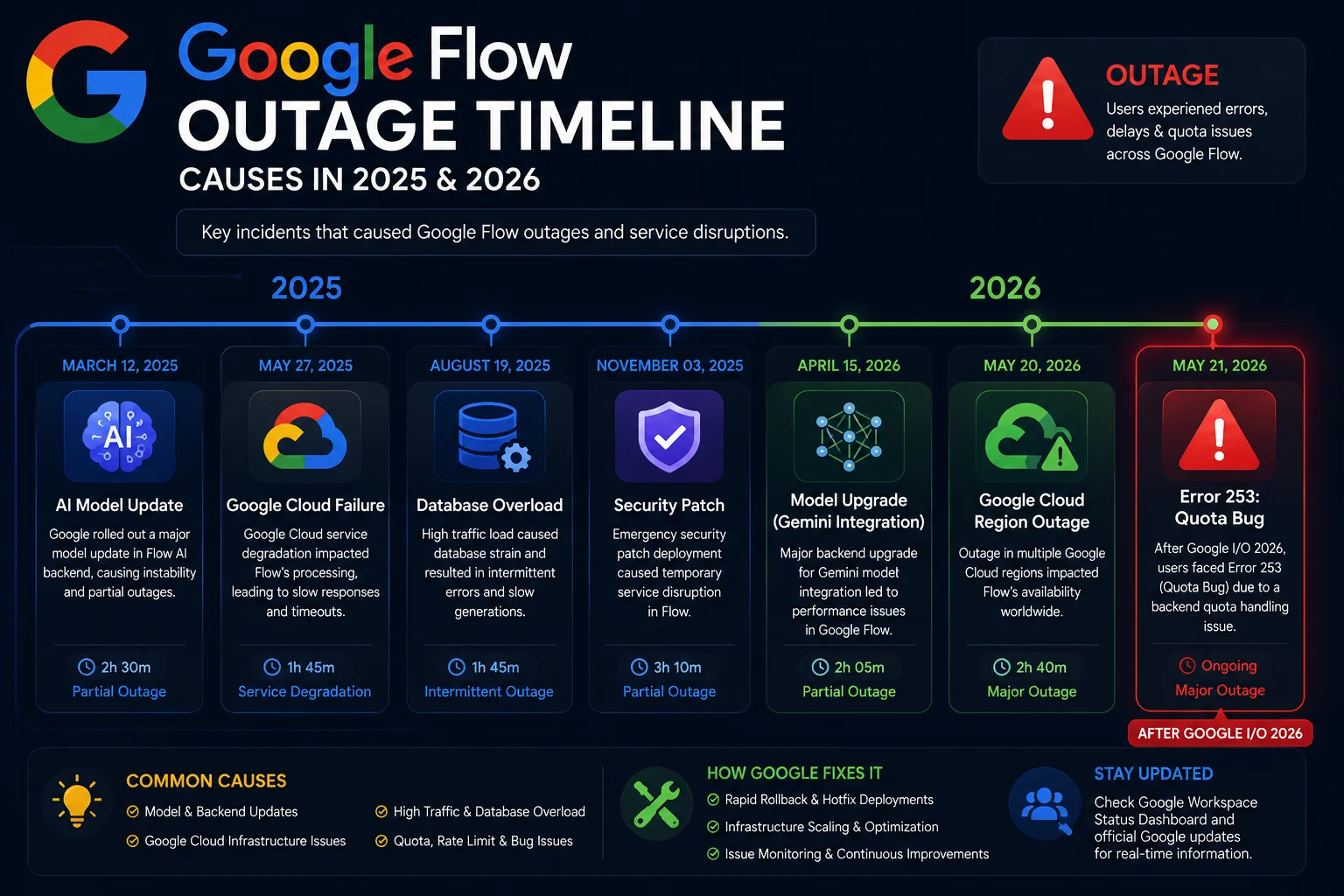
Cause 1 — Post-Update Infrastructure Turbulence (The Biggest Trigger)
Every major Flow release has been followed by a wave of user reports. The October 2025 Veo 3.1 launch caused three days of “temporarily unavailable” errors across multiple countries. The February 2026 unified relaunch triggered widespread blank screens and loading failures within days. The May 2026 Google I/O announcements produced Error 253 within hours of the keynote. The pattern is consistent: when Google pushes major backend changes, the infrastructure takes time to stabilize.
Cause 2 — Google Cloud Platform Failures
Google Flow runs on Google Cloud Platform — the same backbone powering Gmail, Google Drive, and YouTube. In June 2025, a GCP identity and access management failure took down Gmail, Google Meet, Google Drive, and Cloudflare simultaneously. Flow is part of this ecosystem. When GCP’s foundation breaks, everything built on top of it breaks too.
Cause 3 — Quota Sync Failures (The 2026-Specific Problem)
The Error 253 issue that emerged post-I/O 2026 is a new category of outage that did not exist in 2025. As Google scales the infrastructure to support the Gemini Omni Flash model and expanded Workspace access, the systems tracking per-account generation quotas are struggling to stay synchronized. This creates a situation where paid accounts lose generation access not because of an actual shortage of credits, but because the system incorrectly reports zero quota.
Cause 4 — Server Overload During Peak Windows
AI video generation is one of the most computationally intensive operations a server can perform. After major announcements — Google I/O being the biggest example — millions of creators rush to try new features simultaneously. The system hits capacity limits and implements rate limiting that looks and feels identical to an outage from the user’s side.
Cause 5 — Regional Infrastructure Gaps
Google’s servers are organized by geographic region. If servers handling a specific region go down, users there experience full outages while the rest of the world works fine. This is why you sometimes see completely contradictory reports: one person says Flow is perfect, another says it has been dead for days. Both are telling the truth about their own experience.
Cause 6 — Feature Combination Restrictions
A newer category of “outage” that has grown in 2026 is generation failures caused by specific feature combinations that are not yet fully supported. For example, the Extend feature currently only works in landscape orientation. Ingredients to Video does not work with Veo 3.1 Quality. Veo 3.1 audio is still documented as experimental, and low-quality audio prompts can cause the entire generation to fail silently. If your error only happens with specific prompts or settings, this may be the cause rather than a true outage.
Who Gets Hit Hardest by a Google Flow Outage
Paying Subscribers on Google AI Ultra and AI Pro
If you are paying for a Google AI subscription and Flow is down, that is not just inconvenient — it is a direct loss of value. The Error 253 post-I/O 2026 incident particularly frustrated paid users who saw the same access restrictions as free-tier accounts despite active subscriptions. Google’s current policy does credit failed video generations back to accounts, but those credits can take time to reappear.
Content Creators and Agencies on Deadlines
Freelancers and agencies who build client deliverables using AI video have no manual fallback when Flow goes down mid-project. Every hour of downtime is a real cost. The February 2026 relaunch period was especially rough for this group because it coincided with the first wave of commercial clients using Flow through Google Workspace.
Google Workspace Business Users (New in 2026)
Since January 2026, business teams using Google Workspace have had access to Flow for the first time. Enterprise users bring higher usage volumes and tighter delivery commitments than individual creators — making outages more consequential for this group than for casual users.
Users in Non-US or Later-Access Regions
Flow launched in the US in May 2025 and reached 140+ countries by late 2025. Users in regions that came online later tend to sit on less mature server infrastructure and experience more frequent disruptions. Several countries, including most EU and UK users, still face access restrictions due to GDPR and EU AI Act compliance requirements as of 2026.
Note for Pakistan, India, and South Asia: Users in South Asia continue to report higher rates of partial outages compared to North American users. If Flow works inconsistently for you, this is likely a regional infrastructure issue — not your device or internet connection.
8 Fixes to Try Right Now — Google Flow Outage Solutions 2026
Ordered from quickest to most involved. Start at the top. Most people find their fix within the first three steps.
Fix 1 — Check Google’s Official Status Page and the AI Developers Forum
Before touching anything on your device, spend 30 seconds checking whether the problem is on Google’s side. Visit status.cloud.google.com for infrastructure status. Then check discuss.ai.google.dev — during the Error 253 incident, the forum filled with reports within minutes. If there is an active server-side incident, no local fix will help and you should stop troubleshooting your device entirely.
Fix 2 — Hard Refresh Your Browser
A normal page reload often just reloads the same broken cached version. A hard refresh forces your browser to pull everything fresh from Google’s servers.
On Windows or Linux: press Ctrl + Shift + R On Mac: press Cmd + Shift + R
This alone resolves user-side Google Flow outage issues roughly 40% of the time. Try it before anything else.
Fix 3 — Clear Browser Cache and Cookies Fully
In Chrome: go to Settings → Privacy and Security → Clear Browsing Data → set time range to All Time → tick Cached images and files AND Cookies and other site data → click Clear Data. Close Chrome completely — every window — then reopen and go directly to flow.google.com. Do not use a saved bookmark.
This is especially important after the February 2026 relaunch. Users who had visited Whisk, ImageFX, or the old Flow URL had cached data that conflicted with the new unified interface. Clearing it fully fixed most loading failures from that period.
Fix 4 — Test in Incognito Mode to Isolate Extensions
Open a fresh Incognito window with Ctrl+Shift+N in Chrome. Go to flow.google.com and sign in. If Flow loads correctly in Incognito but not in your normal browser, a browser extension is the problem — not a server outage. Ad blockers, script blockers like uBlock Origin or Privacy Badger, and tracker blockers are the most common offenders. Disable them one by one in your normal browser until Flow loads. Then either keep the problem extension disabled for Flow sessions, or add flow.google.com to its whitelist.
Fix 5 — Verify You Are on the Correct Google Account
Click your profile picture in the top-right corner of Flow and check which account is active. Flow’s features are tied to a specific Google account — the one holding your subscription. If you are signed into a different account, Flow may show errors or blank screens that look like an outage but are actually an access issue. Switch to the correct account and try again.
Also visit one.google.com and confirm your Google AI plan is active and your most recent payment went through. A lapsed renewal can silently remove your generation access without a clear notification.
Fix 6 — Check the Feature Combination You Are Trying to Use
If your error only appears with specific prompts or settings, the problem may not be an outage at all. In 2026, Google Flow has specific feature limitations worth knowing:
- The Extend feature only works in landscape orientation — portrait attempts will fail silently
- Ingredients to Video does not work with Veo 3.1 Quality mode
- Veo 3.1 audio is still experimental — low-quality or unclear audio prompts can cause the entire generation to fail
- If you are testing a scene with dialogue, try the same scene first without any audio or dialogue to isolate whether audio is causing the failure
Cross-reference what you are trying to do against the current feature matrix at support.google.com/flow before concluding it is a platform outage.
Fix 7 — Switch Networks
Some internet providers have routing issues that make flow.google.com inaccessible even when the platform itself is healthy. Switch from your home WiFi to your phone’s mobile hotspot and try loading Flow again. If Flow loads immediately on mobile data but not on your WiFi, the block is at your network level — not Google’s servers. This is especially common on corporate or university networks that filter Google Labs domains.
Fix 8 — Sign Out Fully, Wait Ten Minutes, Sign Back In
Google AI services occasionally issue stale or corrupted authentication tokens that cause generation requests to silently fail every single time. Signing out completely, waiting a full ten minutes, and signing back in refreshes that token. Many users experiencing what felt like a platform-wide outage resolved it this way when the real cause was a corrupted session — not a server problem.
Full Fix Checklist — 2026
| Step | Fix | Time Needed |
|---|---|---|
| 1 | Check status.cloud.google.com for active outages | 30 seconds |
| 2 | Check discuss.ai.google.dev for Error 253 or current incident threads | 1 minute |
| 3 | Hard refresh — Ctrl+Shift+R | 3 seconds |
| 4 | Clear full browser cache and cookies | 2 minutes |
| 5 | Open Flow in Incognito mode to test extensions | 1 minute |
| 6 | Disable ad blockers and script blockers | 2 minutes |
| 7 | Verify correct Google account is active | 1 minute |
| 8 | Check subscription status at one.google.com | 1 minute |
| 9 | Review feature compatibility for your specific prompt | 2 minutes |
| 10 | Test on mobile hotspot to rule out network block | 1 minute |
| 11 | Sign out fully, wait 10 minutes, sign back in | 10 minutes |
| 12 | Request manual quota reset via Google One support | 5 minutes |
How to Check If Google Flow Is Down for Everyone Right Now
Official Sources
Google Cloud Status Page — the most authoritative source. Limitation: Google sometimes lags 30–60 minutes before posting updates, so the page can show “Operational” during the first hour of a real outage.
Google Workspace Status Dashboard — covers Flow as part of Google’s broader service ecosystem.
Google AI Developers Forum — the most responsive community source during active incidents. The Error 253 thread after Google I/O 2026 was filling up with reports in real time while Google’s official status page had not yet acknowledged the issue. Always check this alongside the official status pages.
Community Sources
DownDetector — search for “Google” or “Google Flow” for real-time user-submitted outage reports. These often appear faster than official acknowledgements.
Twitter/X — search “Google Flow down” or “Google Flow error” with the Latest filter. Creators are consistently the fastest group to surface platform problems because their livelihood depends on the tool running.
What to Use While You Wait Out a Google Flow Outage
If it is a confirmed server-side outage and you have a deadline, here are honest backup options:
Runway Gen-3 Runway is the closest alternative for cinematic video quality. It does not have native audio synthesis like Veo, but it handles complex motion and visual prompts reliably. Strong uptime record.
Kling AI Kling has grown into a direct competitor for AI video in 2026. Particularly strong for realistic human motion. Available in most regions where Flow has access issues. Free tier is generous enough for emergency work.
Pika Labs Pika is fast, simple, and works well for short social media clips. If your Flow work was going to TikTok or Instagram Reels, Pika can produce something usable within minutes.
Veo API via Vertex AI Directly If you have developer experience, Google’s Veo model is accessible through the Vertex AI API. The Flow interface may be down during a partial outage while the underlying API remains functional. Not for everyone, but a real option for developers and technical users.
From the Whiskailabs team: An outage is not the end of a project. It is a reminder that any professional creative workflow needs a backup tool that does not depend on a single platform.
For a full comparison of backup tools, see our AI Video Tools Comparison 2026 guide.
Will Google Flow Outages Keep Happening in 2026?
The honest answer is yes — but with an important caveat.
Google Flow has gone through a transformation in 2026 that no AI tool has matched in speed. It launched as a simple video generator in May 2025. By February 2026, it had absorbed two other tools and become a full creative studio. By May 2026, it was processing over 1.5 billion user-generated assets and receiving major new model upgrades at Google I/O. That kind of growth trajectory generates growing pains.
The Gemini Omni Flash model announced at Google I/O 2026 brings advanced video editing, character consistency, and music video creation into Flow. The new Google Flow Tools feature lets users build custom workflows in natural language without any coding. Mobile apps are arriving on Android and iOS. YouTube direct publishing is expected before the end of 2026.
Every one of those expansions adds infrastructure complexity. The Error 253 incident that followed I/O 2026 is a direct example of what happens when backend systems are pushed faster than they can fully stabilize.
The direction is clearly toward greater reliability. But if you are using Flow for professional or commercial work right now, plan for occasional outages the same way you would for any cloud-based tool that is scaling aggressively. Have a backup workflow. Do not finalize anything with a hard deadline in the last hour before it is due.
What Google is actively doing to improve:
- Expanding server capacity across additional geographic regions
- Working on clearer error messaging during incidents so users know faster whether the problem is local or server-side
- Increasing communication speed on the Google AI Developers Forum during active incidents
- Crediting failed video generations back to accounts (though it can take time to appear)
- Building toward YouTube direct publishing integration which will further stress-test the infrastructure
Prevention Tips — Stop the Google Flow Outage Problem Returning
Keep Chrome updated. Flow updates frequently and older browser versions can fall behind what the interface requires.
Audit your browser extensions. Remove anything you do not actively use. Fewer extensions means fewer chances of a conflict with Flow’s JavaScript-heavy interface.
Bookmark the correct URL. Since the February 2026 relaunch, the correct address is flow.google.com. Old bookmarks pointing to labs.google/flow, whisk.google, or imagefx.google may redirect incorrectly or load stale cached versions.
Use one dedicated Google account for Flow. If you manage multiple Google accounts, keeping one account exclusively for AI tools eliminates the wrong-account problem entirely.
Check your subscription monthly. Verify your Google AI plan is active at one.google.com. A payment failure can silently restrict access without a clear notification.
Bookmark the Google AI Developers Forum. discuss.ai.google.dev gives you five to ten minutes of early warning when outages start — consistently faster than Google’s official status pages.
Frequently Asked Questions — Google Flow Outage 2026
Is Google Flow down right now in 2026?
Check status.cloud.google.com for official status. Also check discuss.ai.google.dev — especially for the Error 253 thread that emerged after Google I/O 2026 in May. Community reports on the forum typically appear faster than official acknowledgements during the first hour of a new incident.
What is Google Flow Error 253?
Error 253 is a backend quota synchronization bug that appeared immediately after Google I/O 2026 in May. It shows up when Google’s server-side quota tracking system loses sync during infrastructure updates. Affected accounts — including active paid subscriptions — show as having zero generation credits even when they do not. It is entirely server-side and cannot be fixed locally. Check the Google AI Developers Forum for the latest status and request a manual quota reset via Google One support if it persists beyond 24 hours.
Why does Google Flow keep saying “temporarily unavailable” in 2026?
This message appears when Google’s servers are under heavy load, during or after a major update, or when a regional infrastructure problem is active. It is almost always server-side. The most common 2026 trigger has been the period immediately after major Google announcements — particularly the February 2026 unified relaunch and the Google I/O 2026 feature rollout.
Will my Google Flow credits come back after an outage?
According to Google’s current support documentation as of April 2026, failed video generations are re-credited to accounts. However, the credits can take time to reappear after an outage is resolved. If your balance looks wrong right after an outage, wait a few hours before contacting support.
Can I get a refund if Google Flow is down for days?
Google’s terms of service do not guarantee 100% uptime, so automatic refunds do not apply. However, for extended outages you can contact Google One support and request a billing credit. For outages lasting more than 24 hours — like the Error 253 incident — it is worth asking directly.
Why is Google Flow stuck at 99% in 2026?
The video likely generated successfully on Google’s servers but the result failed to deliver to your browser. Check your project history first — the completed file may already be there. If not, this is a server-side delivery failure. Check your project again after 30 minutes before assuming the generation needs to be redone.
How long do Google Flow outages usually last in 2026?
Minor outages typically resolve within two to six hours. The October 2025 Veo 3.1 disruption lasted two to three days for some users in specific regions. The June 2025 Google Cloud outage cleared in approximately seven hours. The Error 253 post-I/O 2026 incident was still ongoing at the time this article was updated and had not received an official fix timeline from Google.
Does clearing cache delete my Google Flow projects?
No. All your Flow projects, generated images, and videos are saved to your Google account in the cloud — not in your browser. Clearing your cache only removes temporary local files. Your work is completely safe.
What is the new Google Flow URL after the 2026 relaunch?
The correct address is flow.google.com. The old URLs — labs.google/flow, whisk.google, and imagefx.google — should redirect, but if you are hitting errors, go directly to flow.google.com in your browser rather than using an old bookmark.
Why did Google merge Whisk and ImageFX into Flow?
In February 2026, Google unified three tools — Whisk for mood boards and visual collages, ImageFX for text-to-image generation, and the original Flow for video — into a single creative studio. The goal was to let users move from concept to final video without switching between separate platforms. The merged platform uses Veo 3.1 for video, Nano Banana Pro for images, and Gemini for all text understanding and prompting.















