
The Ultimate Whisk AI App Guide — Features, Free Access & Pro Tips 2026
Discover everything you need to know about the Google Whisk AI app in this complete 2026 guide. Learn how Whisk AI works, explore its latest features, understand free access options, and discover advanced pro tips for creating better AI-generated images faster. Whether you’re a beginner or a creative professional, this guide covers setup, prompts, workflows, troubleshooting tips, and the best ways to use Whisk AI for high-quality results.
Table of Contents
- What Is the Whisk AI App?
- Is the Whisk AI App Free?
- Whisk AI App Download — Is There One?
- How To Access the Whisk AI App
- How the Whisk AI App Works
- How To Use the Whisk AI App — Step by Step
- Whisk AI App Features — Full List
- Whisk AI App on Mobile Phones
- Whisk AI App vs Other AI Image Tools
- Whisk AI App Problems and Fixes
- Whisk AI App Pro Tips for Better Results
- Whisk AI App Pricing — Free vs Paid
- Whisk AI App — Frequently Asked Questions
What Is the Whisk AI App? {#what-is-whisk-ai-app}
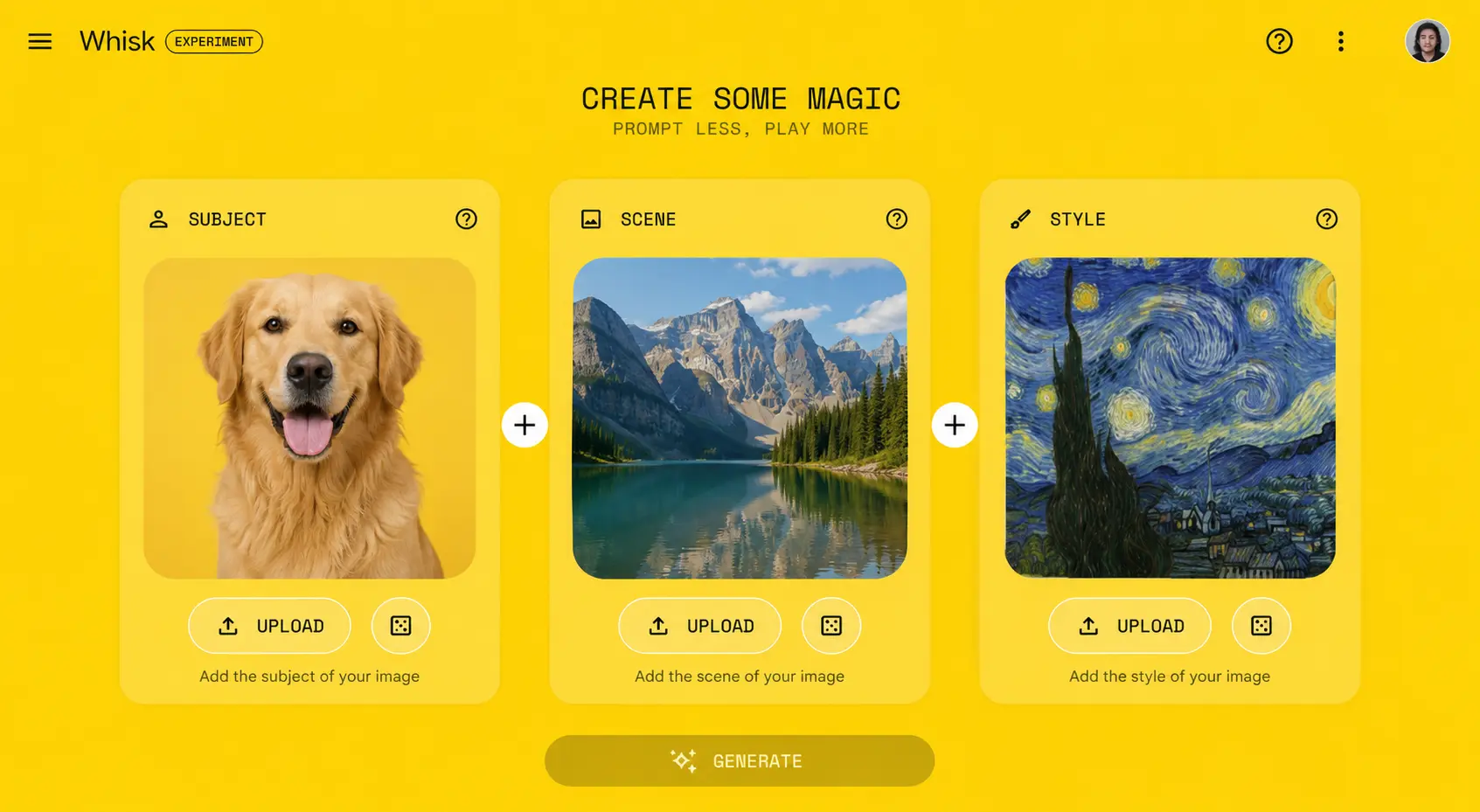
The Whisk AI app is a free image creation tool built by Google. It runs entirely inside your web browser and lets you create brand-new AI-generated images by combining three photos together — no art skills, no confusing settings, and no long text prompts required.
Most AI image tools make you describe what you want in words. You type something like “a dog sitting on a beach at sunset in watercolor style” and hope the AI gets it right. The Whisk AI app does something much smarter — instead of asking you to type, it asks you to show.
Here is how the Whisk AI app works at a basic level. You give it three images:
- Subject — the main thing you want in the picture (your pet, a person, an object)
- Scene — where you want them to be (a forest, a city, a fantasy world)
- Style — how the final image should look (oil painting, anime, photography, watercolor)
The Whisk AI app reads all three photos, understands what is in them, and generates four brand-new images that combine everything together. The whole process takes about 15 to 25 seconds.
Behind the scenes, the Whisk AI app runs on Google Imagen 3 — one of the most powerful image generation models in the world right now — and uses Google Gemini to understand your uploaded photos before creating anything new.
Bottom line: The Whisk AI app is Google’s visual remix tool. You bring three photos. It builds something completely new. No typing needed, no experience required.
If you have ever struggled with text-based AI image tools, the Whisk AI app solves that problem completely.
Is the Whisk AI App Free? {#whisk-ai-app-free}
Whisk AI App Free Version — What You Get
Yes — the Whisk AI app is completely free to start using today. No credit card. No subscription. No trial period that expires.
All you need to access the free Whisk AI app is:
- A Google account (a regular Gmail account works perfectly)
- Google Chrome or any modern web browser
- A stable internet connection
With the free Whisk AI app, you get full access to the core image remixing tool. You can upload photos, generate images, download your results, and use the remix feature — all at no cost.
The free Whisk AI app does have a daily generation limit. Once you hit that cap, you have to wait until the following day when it resets. For most casual users — people using the Whisk AI app a few times a day for fun or personal projects — the free limit is more than enough.
If you are a content creator or designer using the Whisk AI app heavily every day, a Google One subscription raises your daily generation limit and adds extra features. But start free. Most people never need to upgrade.
Full pricing details in the Whisk AI app pricing section below.
Whisk AI App Download — Is There One? {#whisk-ai-app-download}
Can You Download the Whisk AI App?
This is one of the most common questions people search — so here is the straight answer:
There is no Whisk AI app to download. There is no Android APK, no iPhone app in the App Store, no Windows software, and no Mac desktop application for the Whisk AI app.
The Whisk AI app is a browser-based web app. You open it in your browser and use it directly. No installation. No storage used on your device. No updates to manage. Everything runs on Google’s servers.
The official Whisk AI app address is:
Bookmark this link. That is the only place the real Whisk AI app lives.
Warning About Fake Whisk AI App Downloads
If you search for “Whisk AI app download” and find a third-party website offering a downloadable file, an APK, or a desktop installer — do not download it. These are not made by Google. The Whisk AI app does not have an official downloadable version. Anything claiming to be a downloadable Whisk AI app is either fake or potentially harmful.
Add Whisk AI App to Your Phone’s Home Screen
Even though there is no native Whisk AI app to download, you can add a shortcut to your phone’s home screen so it feels like an installed app. See the full steps in the Whisk AI app on mobile section.
How To Access the Whisk AI App {#how-to-access-whisk-ai-app}
Getting into the Whisk AI app for the first time takes about one minute. Here is the exact process:
Step 1 — Open Google Chrome
The Whisk AI app works in other browsers, but Chrome gives you the most reliable, fastest experience. If you do not have Chrome, download it free from google.com/chrome.
Step 2 — Go to the Official Whisk AI App URL
Type this directly into your browser address bar:
labs.google/fx/tools/whisk
Step 3 — Sign In With Your Google Account
The Whisk AI app requires a Google account. Click Sign In and enter your Gmail credentials. If you do not have a Google account yet, create a free one at accounts.google.com.
Step 4 — Accept the Google Labs Terms
On your first visit to the Whisk AI app, Google Labs will show you their experiment terms and conditions. Read through and accept to continue. This is a one-time step.
Step 5 — Start Using the Whisk AI App
The Whisk AI app interface loads immediately. You will see three image upload panels labeled Subject, Scene, and Style. That is the entire interface — clean and simple by design.
Pro tip: Bookmark the Whisk AI app URL right now so you can return with one click instead of searching for it every time.
How the Whisk AI App Works {#how-whisk-ai-app-works}
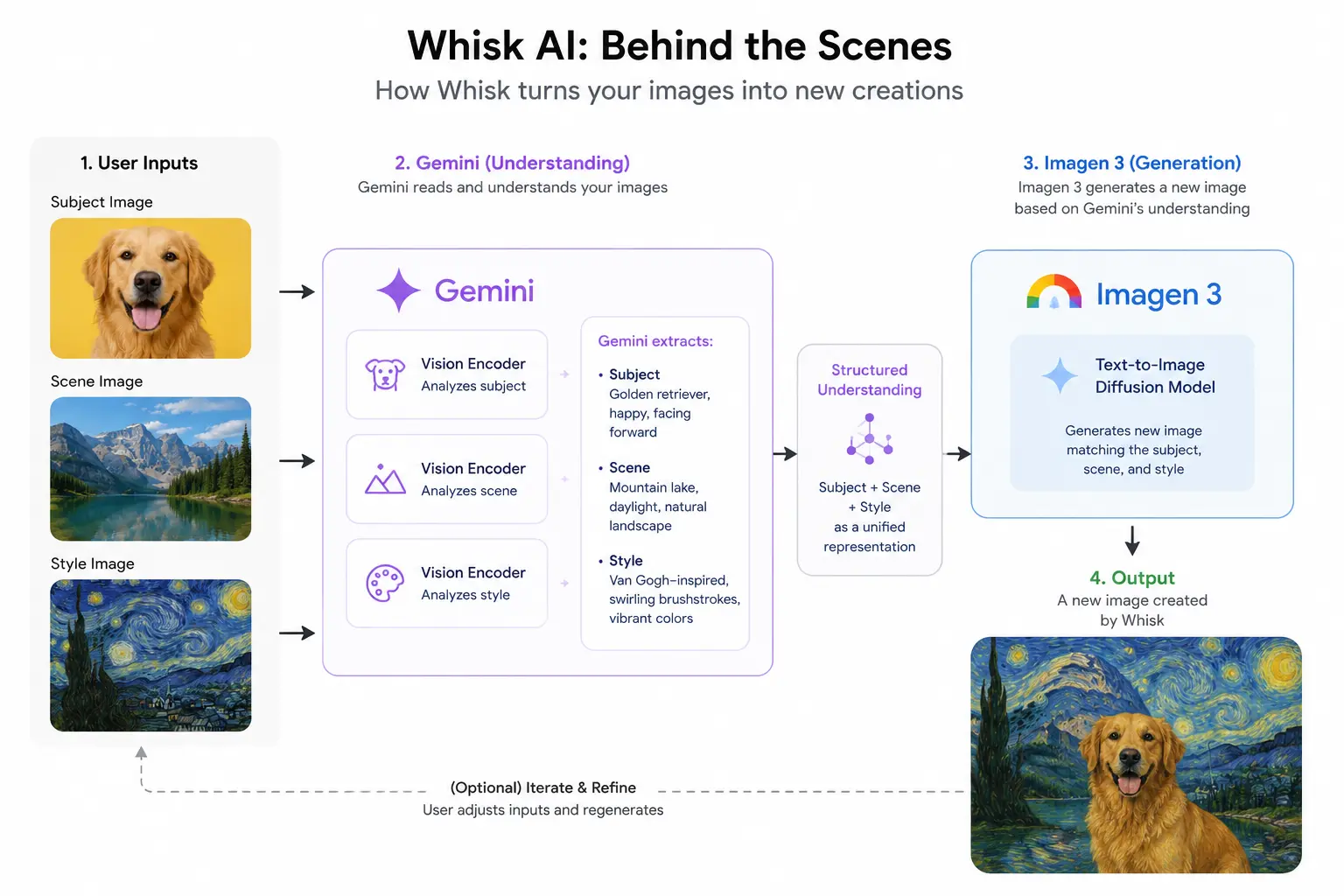
Understanding what happens inside the Whisk AI app helps you get much better results. Here is the full process in plain language.
Step 1 — You Upload Three Photos to the Whisk AI App
You drop your subject, scene, and style images into their slots. These can be photos from your phone camera, images saved from the web, or anything on your device in JPG or PNG format.
Step 2 — Gemini Reads and Describes Each Image
This is what makes the Whisk AI app genuinely clever. The app does not just copy your photos pixel by pixel. It passes each image through Google Gemini, which analyzes and describes what it sees in detailed written language.
For a subject photo of a golden retriever, Gemini might generate: “fluffy golden retriever dog, friendly expression, sitting upright, warm coat.”
For a forest scene: “dense pine forest, soft morning mist, dappled sunlight through tall trees.”
For a watercolor painting style: “loose watercolor brush strokes, muted earthy tones, soft edges, paper texture visible.”
Step 3 — Imagen 3 Creates Something New
Those three descriptions get handed to Imagen 3, Google’s top image generation model. Imagen 3 does not copy your original photos. It creates a completely original image that captures the essence of your subject, sets it in your chosen scene, and renders everything in your chosen style.
Step 4 — The Whisk AI App Returns Four Variations
Every time you hit Generate in the Whisk AI app, you get four different versions — each one interpreting the combination slightly differently. You pick your favorite, download it, or use it as a new input for another round of generation.
This is why the Whisk AI app produces such coherent results — because Gemini truly understands your photos rather than just pattern-matching pixels.
How To Use the Whisk AI App — Step by Step {#how-to-use-whisk-ai-app}
Ready to create your first image? Here is the complete walkthrough for using the Whisk AI app from start to finish.
Before You Start — Prepare Your Three Images
Good Whisk AI app results start with good inputs. Before opening the app, have these three photos ready:
- Subject photo: A clear image of what or who you want featured. Good lighting and a clean background help the Whisk AI app read the subject accurately.
- Scene photo: A photo of the setting or environment. Landscapes, rooms, cityscapes — anything works.
- Style photo: An image whose visual look you want to copy. A painting, an illustration, or even a stylized photograph all work well as style inputs.
Save your files as JPG or PNG, under 5MB each, before opening the Whisk AI app.
Upload Images to the Whisk AI App
Open the Whisk AI app at labs.google/fx/tools/whisk. Click each panel — Subject, Scene, Style — and upload your prepared images. You can also drag and drop files directly onto each panel.
If you do not have images ready, click the search icon inside any panel to browse Google’s example image library. This is a great way to experiment with the Whisk AI app before using your own photos.
Generate Your Image
Once all three slots are filled, the Generate button activates. Click it once and wait. The Whisk AI app typically takes 15 to 25 seconds to produce your four results.
Review and Download
Browse through the four images the Whisk AI app generated. Click on any one to see it at full size. Download the ones you like using the download button.
Iterate for Better Results
The Whisk AI app rewards experimentation. Try these after your first generation:
- Swap just the style image and regenerate — watch how dramatically the mood shifts
- Use one of your generated images as the new subject for the next round
- Keep your subject and scene but try a completely different style
Most of the best results from the Whisk AI app come after two or three rounds of tweaking, not the very first attempt.
Whisk AI App Features — Full List {#whisk-ai-app-features}
Here is everything the Whisk AI app can currently do:
Core Image Remixing in the Whisk AI App
The main feature. Upload a subject, scene, and style image, and the Whisk AI app generates four new AI images combining all three. Works with photos of people, animals, objects, artwork, and more.
Text Input Option in the Whisk AI App
You are not limited to uploading photos. The Whisk AI app also accepts text descriptions in any slot. Type what you want instead of uploading an image — or combine text in one slot with images in the others.
Remix Chaining
After generating an image in the Whisk AI app, you can use that result as a new input. Feed a Whisk AI app output back into the subject slot and generate again with a new scene or style. This chaining technique creates progressively refined and unique results.
Whisk Animate — Whisk AI App Video Feature
Google One subscribers can access Whisk Animate — a feature that takes any still image created by the Whisk AI app and turns it into a short animated video clip. The animation runs on Google’s Veo 2 video model and produces smooth, impressive results for how little effort the Whisk AI app requires.
Clean Downloads — No Watermark
Every image the Whisk AI app generates can be downloaded in full resolution with no watermark. The files are clean and ready to use directly in projects or on social media.
Whisk AI App on Mobile Phones {#whisk-ai-app-mobile}
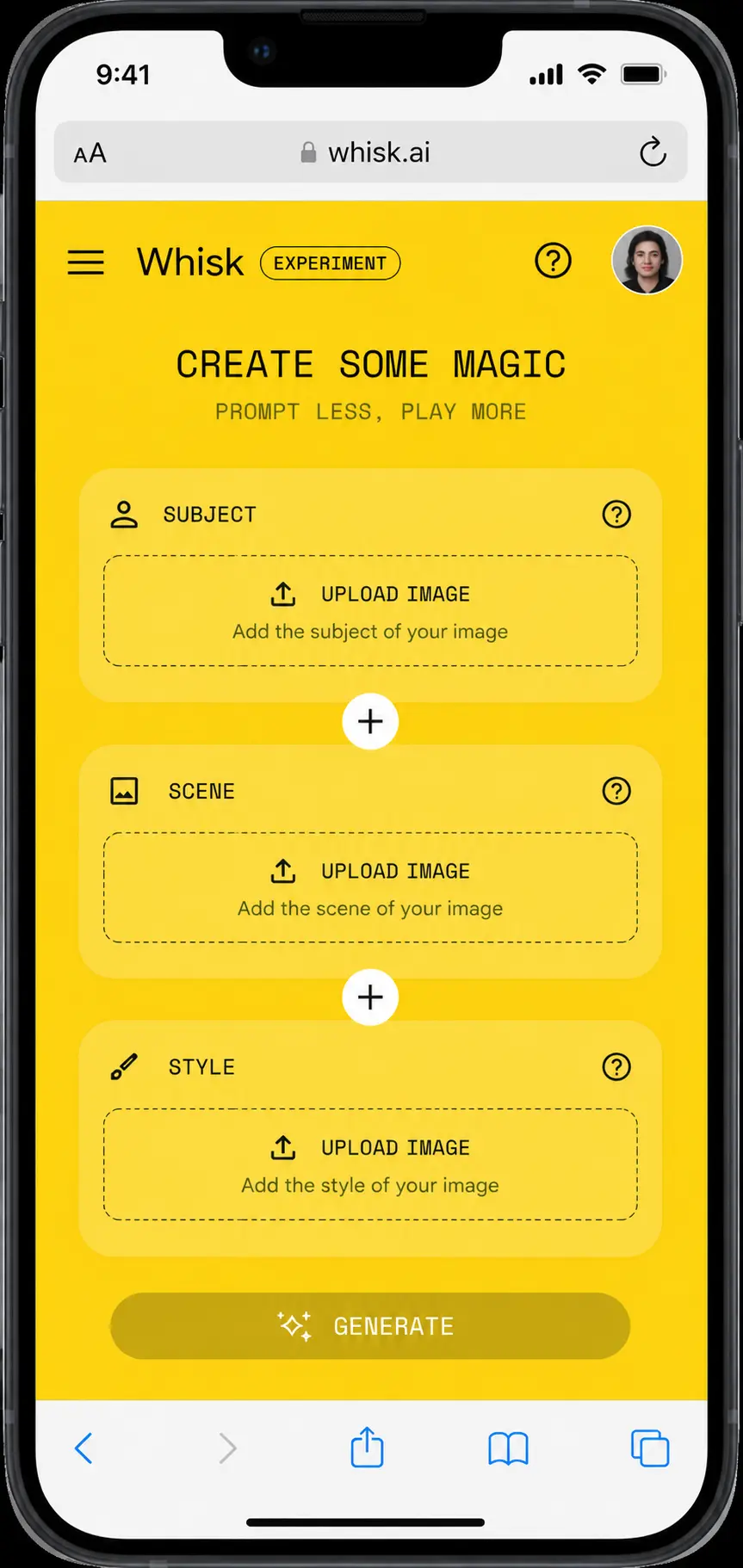
Does the Whisk AI App Work on Mobile?
Yes — the Whisk AI app works on mobile phones through your browser. You can open it in Chrome for Android or Safari on iPhone and use the core features without any problems.
What Works Well on Mobile With the Whisk AI App
- Uploading photos directly from your camera roll into the Whisk AI app
- Viewing and downloading generated images
- The Whisk AI app layout adjusts to smaller screens reasonably well
- Generating images works the same as desktop
What Works Better on Desktop
- Drag-and-drop file uploads (not available on most mobile browsers)
- Speed and stability — the Whisk AI app runs faster on a desktop connection
- Older smartphones with less RAM can occasionally slow down or refresh mid-session
Add the Whisk AI App to Your Home Screen
Even without a downloadable app, you can add a home screen shortcut to the Whisk AI app that opens with one tap — just like a native app.
On Android (Chrome):
- Open the Whisk AI app in Chrome
- Tap the three-dot menu (top right corner)
- Tap “Add to Home screen”
- Name it “Whisk AI App” and confirm
On iPhone (Safari):
- Open the Whisk AI app in Safari
- Tap the Share button (box with arrow at the bottom)
- Tap “Add to Home Screen”
- Name it “Whisk AI App” and tap Add
Your Whisk AI app shortcut now appears on your home screen like any other app icon.
Whisk AI App vs Other AI Image Tools {#whisk-ai-app-vs-others}
How does the Whisk AI app stack up against the competition?
| Feature | Whisk AI App | Midjourney | Adobe Firefly | DALL·E 3 |
|---|---|---|---|---|
| Free tier | Yes — full access | Limited trial | Yes (limited) | Yes via ChatGPT |
| Input method | Images + optional text | Text prompts only | Text prompts | Text prompts |
| Skill level needed | Very low | Medium–High | Low | Low |
| Mobile access | Browser-based | Discord / app | Browser / app | Browser / app |
| Watermark on images | No | No (paid) | No | No |
| Video generation | Yes (Whisk Animate) | No | No | No |
| Made by | Midjourney Inc. | Adobe | OpenAI |
The Whisk AI app’s biggest strength is its image-first input system. If you work from visual references — which most designers, marketers, and content creators do — the Whisk AI app removes the friction that every text-prompt tool has. You show what you want instead of struggling to describe it.
The trade-off: the Whisk AI app is intentionally simple. Power users who need fine-grained parameter control will find Midjourney more flexible. But for the vast majority of people, the Whisk AI app’s simplicity is exactly what makes it so useful.
For a full head-to-head breakdown, read our detailed guide: Whisk AI App vs Midjourney vs Adobe Firefly — Which Is Best in 2026?
Whisk AI App Problems and Fixes {#whisk-ai-app-problems}
Whisk AI App Not Loading
Open the Whisk AI app in an incognito window (Ctrl+Shift+N on Windows, Cmd+Shift+N on Mac). Incognito disables most browser extensions. If the Whisk AI app loads there but not in your regular browser, an extension is blocking it. Also check status.google.com for any Google-wide outages.
Whisk AI App Image Upload Not Working
Check that your file is under 5MB and saved as JPG, PNG, or WebP. iPhones save photos as HEIC by default — the Whisk AI app does not accept HEIC. Convert your image to JPG first using squoosh.app (free and browser-based).
Whisk AI App Shows a Blank Screen
Press Ctrl+Shift+R (Windows) or Cmd+Shift+R (Mac) to hard refresh the page. This forces the Whisk AI app to reload without using any cached files. Fixes the blank screen issue in most cases.
Whisk AI App Generation Keeps Failing
First check if you have hit your daily free generation limit. If yes, wait for the next day when limits reset. If it is your first generation of the day and it is still failing, try a very simple image combination first to confirm the Whisk AI app’s generation pipeline is working, then try your original combination again.
Whisk AI App Access Denied
Sign out of any work or school Google account and sign back in with a personal Gmail account. Organizations using Google Workspace frequently block access to Google Labs experiments like the Whisk AI app. See our full troubleshooting guide: Google Whisk AI Application Error Fix (2026).
Whisk AI App Running Very Slowly
Close all other browser tabs and background apps. The Whisk AI app needs available RAM to run smoothly. If generation is slow across the board, check status.google.com — during peak hours Google’s servers can slow down and there is nothing on your end that speeds it up.
Whisk AI App Pro Tips for Better Results {#whisk-ai-app-tips}
These habits make a real difference in the quality of what the Whisk AI app produces:
Start with clean subject images. The clearer your subject is in the photo — good lighting, obvious focus, minimal clutter in the background — the better the Whisk AI app reads it. A well-lit photo of your subject against a plain wall beats a dark, busy photo every time.
Your style image controls more than you think. In the Whisk AI app, the style input does not just apply a filter. It shifts the entire mood, lighting, color palette, and texture of the output. Spend as much time choosing your style image as you do your subject.
Try artwork as your style. Using a real photograph as your style gives you realistic outputs. But feeding the Whisk AI app a painting, sketch, or illustration as the style produces dramatically different and often more interesting results.
Always review all four results before deciding. The Whisk AI app generates four variations every time. Each interprets the combination differently. Your best image is rarely the first one — look through all four before downloading.
Chain your generations. After getting a result you like, use it as the new input for your next Whisk AI app generation. Run it through two or three rounds with small changes each time. This iterative approach produces the most polished final images.
Organize before you open the app. Have your three images ready in a folder before you open the Whisk AI app. Searching for files mid-session breaks your creative flow and wastes time.
Mix real photos with Whisk AI app outputs. Use a generated image as the style input for your next round. The Whisk AI app handles this extremely well and produces results you would never get with only real photos as inputs.
Whisk AI App Pricing — Free vs Paid {#whisk-ai-app-pricing}
Whisk AI App — Free Tier
| Feature | Details |
|---|---|
| Access to Whisk AI app | Full access — no payment needed |
| Daily image generations | Limited (resets every 24 hours) |
| Image quality | Standard Imagen 3 output |
| Whisk Animate feature | Not included |
| Priority server access | Not included |
| Cost | $0 — completely free |
Whisk AI App — Google One Subscription
| Feature | Details |
|---|---|
| Daily generation limit | Significantly higher cap |
| Server priority | Yes — fewer timeouts during busy periods |
| Whisk Animate | Included — create videos from Whisk AI app images |
| Early feature access | Yes — new Whisk AI app features before free users |
| Starting price | ~$2.99/month (100GB Google One plan) |
The Whisk AI app itself does not have a standalone paid subscription. Paid benefits come through a Google One plan. Enhanced Whisk AI app features typically come with mid-tier and higher plans.
Always check one.google.com for current plan pricing and which tier includes which Whisk AI app benefits — Google updates these regularly.
Our recommendation: Start with the free Whisk AI app. It is genuinely capable and most users never need to upgrade. If you are hitting the daily generation cap regularly or want Whisk Animate, Google One is worth it.
Whisk AI App — Frequently Asked Questions {#whisk-ai-app-faq}
Is the Whisk AI app made by Google?
Yes. The Whisk AI app is a Google product developed and maintained under Google Labs. It uses Google’s own Imagen 3 model for image generation and Google Gemini to understand uploaded photos.
Do I need a Google account to use the Whisk AI app?
Yes. The Whisk AI app requires you to sign in with a Google account. A free Gmail account is all you need — no paid plan required to access the Whisk AI app.
Can I download the Whisk AI app on my phone?
No — there is no downloadable Whisk AI app for Android or iPhone. The Whisk AI app is browser-based. You can however add a home screen shortcut on your phone that opens the Whisk AI app with one tap. Full steps are in the mobile section above.
Are the images I make with the Whisk AI app mine to keep?
Images created in the Whisk AI app can generally be used for personal projects. For commercial use, always check the current Google Labs Terms of Service since policies can be updated. The Whisk AI app does not watermark your downloads.
Does the Whisk AI app save my generated images?
The Whisk AI app shows your recent generations during your current session but does not provide permanent cloud storage. Download any image you want to keep before you close the Whisk AI app — they may not be available the next time you open it.
Is the Whisk AI app available in my country?
The Whisk AI app is available in most major markets as of 2026. Some newer features like Whisk Animate may still be rolling out to certain regions. Check labs.google for the current supported countries list.
Why is the Whisk AI app not working for me?
The most common reasons the Whisk AI app stops working are: hitting the daily free generation limit, using an outdated browser, a browser extension blocking the app, or a Google Workspace account that restricts Google Labs access. See our full fix guide: Google Whisk AI Application Error Fix (2026).
What is Whisk Animate in the Whisk AI app?
Whisk Animate is a feature inside the Whisk AI app that converts a still generated image into a short animated video clip. It runs on Google’s Veo 2 video model and is available to Google One subscribers. Full guide: How To Use Whisk Animate.
More Whisk AI Guides on WhiskAILabs.net
- Whisk AI Login — How To Sign In and Fix Login Errors (2026)
- Google Whisk AI Application Error Fix — Full Troubleshooting Guide
- Whisk Animate Guide — Turn Whisk AI App Images Into Videos
- Best Image Sizes for the Whisk AI App
- 20 Creative Things To Make With the Whisk AI App
Final Thoughts on the Whisk AI App
The Whisk AI app is one of those tools that feels genuinely new the first time you use it. Not because it is complicated — actually the opposite. Because it takes something most people found frustrating (describing images in words) and replaces it with something completely natural (showing pictures).
It is free. It runs in your browser. Nothing to download. No learning curve. Whether you are a designer, a student, a content creator, a parent making fun things with your kids, or just someone curious about AI — the Whisk AI app is worth trying right now.
Open it at labs.google/fx/tools/whisk, drop in three photos, and see what the Whisk AI app builds for you.
Last updated: May 2026 | Published by WhiskAILabs.net | Information is accurate as of the update date above. Google may change the Whisk AI app features, limits, and availability at any time. Always verify at labs.google.















