
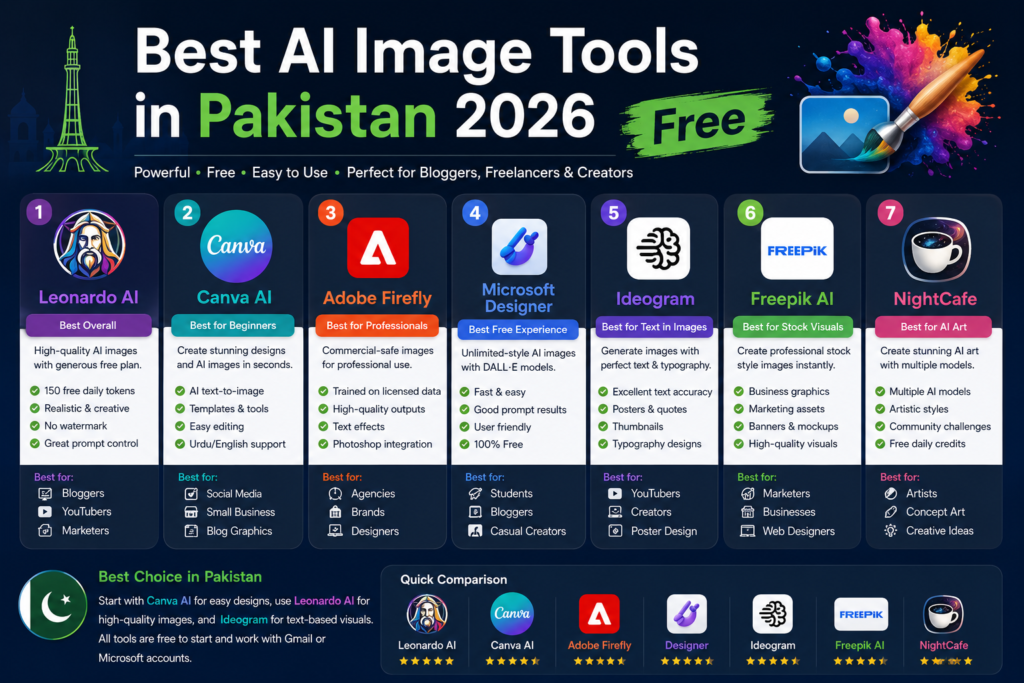
Best AI Image Tools in Pakistan 2026 Free
Quick Answer: Microsoft Designer, Adobe Firefly, Ideogram, Canva AI, and Leonardo AI — these five tools work in Pakistan right now, without a VPN, without a credit card, and without spending a single rupee.
Let Me Be Real With You First
A few months back, a friend from Faisalabad messaged me. He runs a small garment shop and wanted nice product photos for his Instagram page. He’d asked a local photographer — Rs. 8,000 for a half-day shoot. A designer friend quoted him Rs. 3,500 just for five edited images.
He typed his product description into an AI image tool instead. Thirteen seconds later, he had four professional-looking images. He used two of them. His sales page looked better than most big brands I’ve seen.
That’s what this article is about. Not theory. Not hype. Just the actual tools that work for people like him — and like you — sitting in Pakistan in 2026.
I went through over a dozen tools. I checked which ones actually open here without a VPN headache, which ones are truly free (not “free for 3 days then Rs. 2,000/month”), and which ones give results worth using. Here’s what I found.
What Even Is an AI Image Generator?
Let’s not overcomplicate this. You type what you want. The AI draws it.
Say you type: “a cup of chai on a wooden table near a rainy window, warm lighting, photo style” — and the tool gives you an image of exactly that. No camera. No designer. No skill required from your side.
The way it works technically involves something called diffusion models — the AI has seen hundreds of millions of images during training, so it knows what things look like. When you describe something, it builds that image from scratch based on that knowledge.
That’s it. You don’t need to understand the engineering to use it. My khala uses Canva AI and she doesn’t know what a GPU is. Works perfectly for her.
How I Actually Tested These Tools
Before anyone asks — no, I didn’t just read other reviews and list the same tools everyone else lists. I opened each tool on a Pakistani internet connection (Zong 4G and PTCL fiber), tried creating images in both Urdu-style scenarios and general use cases, and noted what broke, what was slow, and what actually delivered.
My checklist for each tool:
Pakistan Access — Does it load? Does signup work with a Gmail or Pakistani email? Real Free Tier — How many images can you make without paying? Does it reset daily or monthly? Quality — Is the output something you’d actually use, or does it look like a melted painting? Simplicity — Could a 60-year-old shopkeeper figure it out without a tutorial? Prompt Language — Does it understand plain, simple English descriptions? Usage Rights — Can you put these images on your shop’s Facebook page legally?
Alright, let’s get into it.
1. Microsoft Designer — Start Here If You’ve Never Done This Before
| What You Get Free | Pakistan Access | Credit Card Needed |
|---|---|---|
| Unlimited images + 15 daily fast ones | ✅ Yes, no VPN | ❌ No |
Best for: Social media content, WhatsApp banners, YouTube thumbnails, general graphics
Honestly, if I had to point one person to one tool and say “start here,” it’s this one. Microsoft Designer is free, opens perfectly in Pakistan, and the only thing you need is a Microsoft account — which you probably already have if you use Outlook or Hotmail. If not, signing up takes about two minutes with any Gmail address.
The images come out clean. Not always perfect, but clean enough that most people won’t be able to tell you made it with a text box and thirty seconds. I’ve seen Fiverr sellers use these for client thumbnails and nobody complained.
What I liked specifically: it refreshes your high-quality “boost” credits every single day. So even if you use all 15 today, tomorrow morning you get 15 more. For most people doing occasional creative work, you’ll never hit a wall.
One thing to know: It leans toward a slightly American aesthetic by default. If you want something that looks more local — desi patterns, Pakistani architecture, etc. — you have to be specific in your prompt. Write “inspired by Pakistani truck art” or “Lahori wedding decoration style” and it adjusts well.
Try it → designer.microsoft.com
For Fiverr sellers specifically: I know a handful of people from Lahore and Gujranwala who’ve built decent gigs around AI image creation. Microsoft Designer is their first tool because it’s fast, free, and the outputs don’t need much cleanup. If you’re trying to start a social media design gig, this is your warm-up tool.
👉 More on AI tools for Pakistani freelancers at WhiskAI Labs
2. Adobe Firefly — The One I’d Trust for Client Work
Image Alt Text: Adobe Firefly free AI image generator 25 monthly credits for Pakistan commercial use 2026
| What You Get Free | Pakistan Access | Credit Card Needed |
|---|---|---|
| 25 credits/month | ✅ Yes, no VPN | ❌ No |
Best for: Business graphics, anything you’ll put on packaging or client deliverables
Adobe has been in the design software business since before most of us were born. Firefly is their AI image generator, and it carries that same professional-grade seriousness.
Here’s the one thing that makes Firefly different from everything else on this list: Adobe trained it only on images they actually own or have proper licensing for. Every other AI tool? Somewhere in the legal fine print, there’s uncertainty about training data and copyright. With Firefly, Adobe takes full responsibility. If you’re making marketing images for a client, or putting AI graphics on product packaging, or doing anything where someone might someday question where the image came from — Firefly is the only safe choice.
The free plan gives 25 credits monthly. I know that sounds small. But 25 images a month is realistically enough for most small businesses who aren’t running a content mill. And the quality per image is genuinely high.
Beyond just creating images from text, Firefly does some genuinely clever things:
Generative Fill lets you remove something from an existing photo — like that plastic bag in the background of your shop photo — and the AI fills it in naturally. Upload your product image, erase the messy background, and the AI replaces it with whatever you describe.
Generative Expand lets you make an image wider or taller. You have a square product photo but need a wide banner? Expand it. The AI intelligently adds what would logically be there.
Try it → firefly.adobe.com
👉 Explore how AI tools are being used for Pakistani businesses at WhiskAI Labs
3. Ideogram — The Only One That Gets Text Right
Image Alt Text: Ideogram free AI image generator creating marketing poster with readable English text overlay Pakistan 2026
| What You Get Free | Pakistan Access | Credit Card Needed |
|---|---|---|
| 25 prompts/day | ✅ Yes, no VPN | ❌ No |
Best for: Sale posters, banners with prices, Instagram graphics with quotes, anything where words appear inside the image
Every other AI image tool I’ve used has a text problem. You ask for a poster that says “Summer Sale — 30% Off” and the AI comes back with something that looks like Arabic mixed with alien hieroglyphics. The words are sort of shaped like letters but they mean nothing.
Ideogram fixed this. It’s the one tool specifically built to put readable, accurate text inside your images — and it works. I’ve tested it with sale poster prompts, menu card designs, motivational quote graphics, and social media announcements. The text comes out clean and readable almost every time.
For Pakistani shop owners, this is massive. Think about what you actually need for your WhatsApp business catalogue or your Facebook shop:
- “Eid Sale — Flat 40% Off — All Lawn Collections”
- “Free Home Delivery on Orders Above Rs. 2000”
- “Naye Arrivals — Monsoon Collection 2026”
Type any of these as a prompt in Ideogram and you’ll get a poster with that exact text, in a proper layout, with a decent design around it. It’s not always magazine-quality, but it’s entirely usable for social media.
25 free prompts per day, refreshes every 24 hours, no card required.
Try it → ideogram.ai
4. Canva AI — Best When You Need More Than Just an Image
Image Alt Text: Canva AI Magic Studio free image generation interface showing design workflow for Pakistan users 2026
| What You Get Free | Pakistan Access | Credit Card Needed |
|---|---|---|
| 50 lifetime AI image generations + full design suite | ✅ Yes, no VPN | ❌ No |
Best for: Teachers, students, people who need to design something — not just generate an image
If you already use Canva — and honestly, most people in Pakistan who do any kind of digital work do — you probably already have the AI image feature waiting for you.
The AI generation credits on the free plan are capped at 50 (lifetime for new accounts, not daily), so Canva is not the tool for someone who wants to generate hundreds of AI images. But that’s missing the point of Canva. The real value is that you generate an image and it drops directly into your design. No downloading, no re-uploading, no switching tabs. You type a prompt, the image appears in your design, and you resize it, add text over it, change the background color, and download it — all in one place.
I’ve seen teachers in Islamabad use this to make classroom worksheets with custom illustrations. Students use it for university project presentations. Small businesses use it for price list graphics with custom photos.
The free design library around the AI features is massive — thousands of templates, fonts, icons, stock photos. Even without the AI image generation, Canva’s free tier is one of the most useful design tools available anywhere.
Try it → canva.com
5. Leonardo AI — When You Want Something That Looks Like Real Art
Image Alt Text: Leonardo AI free image generator showing multiple art styles canvas editor for Pakistani designers game developers 2026
| What You Get Free | Pakistan Access | Credit Card Needed |
|---|---|---|
| ~10–15 images/day (150 tokens) | ✅ Yes, no VPN | ❌ No |
Best for: Illustration-style work, game assets, creative projects, anyone who wants more visual control
Leonardo AI is where things get more interesting — and a little more involved. It’s not quite as instant and simple as the other tools on this list, but the ceiling for what you can create is noticeably higher.
What’s different about it: you get to choose which AI model generates your image. One model is better for photorealism. Another specializes in anime and illustration styles. Another leans toward 3D-rendered environments. If you have a specific visual style in mind, you’re not stuck with whatever default look the tool uses.
There’s also a real-time canvas feature where you sketch something rough — even stick-figure rough — and the AI refines it into a finished image as you draw. For illustrators or anyone doing creative concept work, that’s actually fun to use.
150 tokens per day reset daily. Each image costs around 10–15 tokens depending on settings. So you’re looking at 10 to 15 free images per day, which is solid.
Who in Pakistan would get the most out of this: game design students, freelance illustrators, concept artists, anyone working on creative projects that need stylized or artistic visuals rather than generic stock-photo-style images.
Try it → leonardo.ai
6. Bing Image Creator — No Signup, No Waiting, Just Generate
Image Alt Text: Bing Image Creator free unlimited AI image generation powered by DALL-E available in Pakistan no account needed 2026
| What You Get Free | Pakistan Access | Credit Card Needed |
|---|---|---|
| Unlimited (15 fast boosts/day) | ✅ Yes, no VPN | ❌ No |
Best for: Quick one-off images, people who don’t want to create another account
Sometimes you just need one image right now and you don’t want to sign up for anything or learn a new interface. Bing Image Creator is for those moments.
If you use Microsoft Edge or Bing — or if you’ve ever talked to Copilot — you’ve already brushed against this tool. You can generate an image by literally typing in the Bing Copilot chat: “create an image of a desi breakfast spread, top-down view, warm kitchen lighting.” It does it. No switching apps. No accounts.
The quality is the same DALL-E engine that Microsoft Designer uses. The images are clean and usable. It’s just less feature-rich than Designer — there’s no editing suite, no templates, no design environment. You generate, you download, that’s it.
But for fast use? It works great.
Try it → bing.com/images/create
7. NightCafe Studio — For the Curious Explorer Type
Image Alt Text: NightCafe Studio AI image community platform showing multiple generation models and daily free credits for Pakistan users
| What You Get Free | Pakistan Access | Credit Card Needed |
|---|---|---|
| Daily credits earned through community | ✅ Yes, no VPN | ❌ No |
Best for: Experimenting with different styles, people interested in AI art as a hobby
NightCafe is less of a productivity tool and more of a creative playground. It’s built around a community — people share their generations, vote on each other’s work, and earn extra free credits through participation.
What makes it practically useful: it’s one of the only platforms where you can try multiple AI models (including FLUX and Stable Diffusion) without setting each one up separately. Want to see how the same prompt looks across five different engines? NightCafe lets you do that.
It’s not the best tool for someone who needs professional marketing graphics quickly. But if you enjoy experimenting, want to learn about different AI styles, or just like seeing what these tools can do — NightCafe is worth at least an afternoon of exploring.
Try it → creator.nightcafe.studio
8. Stable Diffusion — For the Tech-Minded Ones
Image Alt Text: Stable Diffusion open source AI image generator running locally unlimited free image generation for advanced Pakistani users developers
| What You Get Free | Pakistan Access | Credit Card Needed |
|---|---|---|
| Unlimited (runs on your own computer) | ✅ No internet needed once set up | ❌ No |
Best for: Computer science students, developers, anyone with a decent gaming PC
This one’s not for everyone — but if you’re the kind of person who enjoys setting things up and getting maximum control, Stable Diffusion is genuinely remarkable.
It’s completely open-source. You download it, run it on your own computer, and generate unlimited images with zero daily limits, no accounts, no servers, no subscription. Once it’s set up, it works even without internet.
The catch: you need a good graphics card. At least 8GB VRAM recommended, 12GB for comfortable use. And the setup involves some command-line work. It’s not complicated for someone with a CS background, but it’s not a point-and-click install either.
For computer science students at FAST, NUST, LUMS, or anywhere else in Pakistan — this is worth learning. The skills you build understanding how to configure and run Stable Diffusion translate directly into understanding modern AI systems.
Learn more → stability.ai
9. Flux (via NightCafe or BasedLabs) — Best Image Quality on the Free Tier
Image Alt Text: Flux AI image model high quality photorealistic output available through free platforms NightCafe BasedLabs Pakistan 2026
| What You Get Free | Pakistan Access | Credit Card Needed |
|---|---|---|
| Limited credits through hosting platforms | ✅ Yes, no VPN | ❌ No |
Best for: When quality matters most and you’re okay with fewer free images
Flux is the AI model that keeps surprising people who try it for the first time. The images look significantly more detailed and realistic than what most people expect from a free tool. Lighting, textures, proportions — it handles them in a way that feels closer to what paid tools like Midjourney produce.
You can access it through NightCafe or BasedLabs without any setup. The free credits are limited, so you won’t generate hundreds of images daily, but for the images you do make — the quality shows.
Learn more → blackforestlabs.ai
Quick Comparison Table
Image Alt Text: Comparison table of best free AI image tools Pakistan 2026 showing daily limits features and commercial use rights
| Tool | Free Daily Images | Pakistan Access | Text in Images | Best Use |
|---|---|---|---|---|
| Microsoft Designer | Unlimited + 15 fast | ✅ | ✅ Good | Everyday social media |
| Adobe Firefly | 25/month | ✅ | ✅ Good | Commercial/client work |
| Ideogram | 25/day | ✅ | ✅ Excellent | Posters, sale graphics |
| Canva AI | 50 lifetime | ✅ | ✅ Good | Full design workflow |
| Leonardo AI | ~10–15/day | ✅ | ⚠️ Average | Art, illustrations |
| Bing Image Creator | Unlimited | ✅ | ✅ Good | Quick one-off images |
| NightCafe | Daily earned credits | ✅ | ⚠️ Average | Experimentation |
| Stable Diffusion | Unlimited (local) | ✅ | ✅ With setup | Tech-savvy users |
| Flux | Limited (hosted) | ✅ | ⚠️ Average | High-realism images |
The Difference Between a Weak Prompt and a Good One
Image Alt Text: Example showing weak versus strong AI image prompt comparison for Pakistani users creating social media and marketing graphics
This is the part most people skip — and then wonder why their results look generic. The tool is only as good as what you type into it.
Here’s a side-by-side example:
Weak prompt: “a shop in Pakistan”
What you get: some vague storefront that could be anywhere in the world.
Strong prompt: “exterior of a small, colorful clothing shop in a busy Pakistani bazaar, afternoon sunlight casting shadows, handwritten price signs, realistic photo style, warm tones, street food stall visible in background”
What you get: something that actually feels like Pakistan.
The difference is specificity. Think about:
- What’s the main subject? (a shop, a person, a product)
- Where is it? (Karachi sea front, Lahore’s Anarkali bazaar, a rural Punjab village)
- What time of day / what light? (morning fog, golden hour, bright noon)
- What style? (realistic photo, watercolor painting, flat illustration, 3D render)
- What’s the mood? (busy, peaceful, dramatic, warm)
Give the AI those five things and you’ll see a completely different level of result.
For a deeper dive into prompt techniques, Adobe’s help center has solid guidance: helpx.adobe.com
Which Tool Makes Sense for You?
Instead of listing “best for beginners” in a generic way, let me match tools to real Pakistani scenarios:
You sell clothes, shoes, or accessories online → Ideogram for promotional graphics with text, Adobe Firefly for product-adjacent images you’ll use commercially.
You’re a student finishing a project tonight → Canva AI. It’s the fastest path from “I need an image” to “my presentation looks good.”
You’re building a Fiverr profile for social media design → Microsoft Designer daily, Leonardo AI when clients want something more artistic.
You teach at a school or tuition center → Canva AI for classroom materials, Bing Image Creator when you just need something quick mid-lesson.
You manage social media for a local business → Ideogram for text-heavy graphics, Microsoft Designer for everything else.
You’re a CS student or developer → Learn Stable Diffusion. Understand FLUX. These go on your CV in a way that “I used Canva” does not.
You just want to try this for the first time right now → Open Bing Image Creator. Type anything. See what happens. Takes 30 seconds.
Common Questions
Is it legal to use AI images for my business in Pakistan?
Generally, yes. The images you generate belong to you for most platforms. The safest option for anything commercial is Adobe Firefly, which is specifically designed for commercial use and comes with proper licensing. For the others, just read their terms quickly — most allow business use, some have restrictions on the free tier.
For global guidance on AI and IP, the World Intellectual Property Organization has published practical guidance on this.
Do I need a VPN?
No. Every tool on this list works in Pakistan on a normal connection. I tested them on both mobile data and home broadband. None required a VPN.
Can I use Urdu prompts?
Most tools work in English only. But you can describe Pakistani settings, aesthetics, and subjects in English and the tools understand well. “Inspired by Pakistani truck art” or “traditional Sindhi ajrak pattern” — these work in English prompts.
Do the images have watermarks?
Bing Image Creator, Microsoft Designer, Ideogram (free tier), and Adobe Firefly free plan all output images without watermarks. Canva’s free plan also gives you clean downloads. Always double-check before using anything commercially.
What internet speed is needed?
5–10 Mbps is comfortable. Even 3G works on most platforms, just slower. The actual image processing happens on their servers, not your device, so your connection just needs to handle the upload and download of the image file.
A Few Mistakes Worth Skipping
Typing one vague word and expecting magic. “Car” is not a prompt. “A red Toyota Corolla parked outside a desi dhaba at night, neon signs reflecting on the hood” is a prompt.
Giving up after one try. Generate multiple variations. Most tools give you 4 images per prompt. Pick the best, then try again with a slightly adjusted description.
Forgetting to check the license. Especially if you’re using images for a client or putting them on product packaging. Two minutes reading the terms saves future headaches.
Only using one tool forever. Different tools genuinely excel at different things. Stack a few. Microsoft Designer for speed, Ideogram when you need text, Firefly when the work is professional.
Not saving the prompts that worked. When you find a prompt that gives you great results, write it down. That’s your template for next time.
Why This Matters More in Pakistan Than in Most Places
I’ll say something that doesn’t get said often enough in tech articles: access to these tools genuinely means more here than it does in the US or UK.
A freelancer in Manchester who needs professional-looking images has dozens of options — expensive software, professional photographers, design agencies. A freelancer in Multan or Mirpur Khas has far fewer, and the cost difference is enormous relative to income.
AI image tools don’t just make things faster. For a lot of people in Pakistan, they make things possible that weren’t possible before. A first-generation entrepreneur who can’t afford a proper product shoot. A student designing their portfolio without any design budget. A teacher in a government school making visual aids with no resources.
These tools are free. They’re accessible. And they’re genuinely good now. The only investment they ask for is time to learn how to use them.
Internal Link: We write regularly about AI, technology, and how they affect work and creativity in Pakistan. Follow along at WhiskAI Labs.
Final Thoughts
Here’s what I’d actually do if I were starting from scratch today:
Day one — open Bing Image Creator or Microsoft Designer and generate ten random things. Just to see how it works.
Day two — try Ideogram with a proper prompt: describe a sale poster for something you or someone you know actually sells.
Day three — create a free Adobe Firefly account and try Generative Fill on a photo you already have.
By day four, you’ll have a real sense of which tool fits your workflow. And you’ll have made things you couldn’t make before.
That’s the whole point. Not to understand AI deeply. Just to use it.
Sources & Links
- Microsoft Designer
- Adobe Firefly
- Ideogram
- Canva
- Leonardo AI
- Bing Image Creator
- NightCafe Studio
- Stability AI
- Black Forest Labs (Flux)
- WIPO on AI & Copyright
- Adobe Help Center
al Pakistani user type















