
Google Flow Video Stuck at 99% Fix — Complete Solution Guide 2026
Google Flow Video Stuck at 99% Fix — Why This Keeps Happening
You clicked generate. You watched that progress bar slowly climb — 10%, 40%, 70%, 90%… and then it hit 99% and just stopped. No video. No error message. Just a frozen bar sitting there like it forgot what it was supposed to do next.
If that is your situation right now, you are in exactly the right place — and you are definitely not alone.
The Google Flow video stuck at 99% fix is one of the most searched topics among Flow users right now in May 2026. This specific problem — where video generation gets all the way to the finish line and then refuses to cross it — has been appearing across Google’s own developer forums, the Gemini Help Community, and social media since the Veo 3.1 update rolled out. Ultra plan subscribers, Pro subscribers, and free users have all reported it. It hits across different countries, different browsers, and different devices.
The frustrating part is that the progress bar reaching 99% feels like success — until it isn’t. And the lack of a clear error message makes it even harder to know what went wrong or where to start fixing it.
This guide walks you through every known cause of the Google Flow video stuck at 99% problem, with a working fix for each one — explained simply so anyone can follow along, whether you are a daily creator or someone who just signed up for Flow for the first time.
Let’s get your video generated.
From the Whiskailabs team: We track Google Flow problems reported by real users and test every fix before publishing it. Everything in this Google Flow video stuck at 99% fix guide is verified against actual user reports and Google’s documentation as of May 20, 2026. For more Google Flow guides, visit Whiskailabs.
What “Stuck at 99%” Actually Means — The Truth Most Articles Miss
Before getting into the fixes, there is one thing you need to understand about the Google Flow video stuck at 99% problem — and it completely changes how you approach it.
In many cases, your video has actually already finished generating on Google’s server. The generation completed successfully on the backend. The problem is that the final step — delivering that completed video back to your browser — failed. The progress bar hit 99% because the server was done, but the last handoff never happened.
This is what experts call a “ghost generation.” The video exists. It just did not make it through to your screen.
This matters a lot because it means your very first step is NOT to panic, NOT to immediately retry, and NOT to assume your credits are wasted. Your first step — always — is to check your Library.
But more on that in Fix 1.
There are also cases where the generation genuinely did not complete — due to server timeouts, audio generation bugs, overly complex prompts, or browser interference. Each cause has a different fix, which is why this guide covers all of them.
Every Cause Behind the Google Flow Video Stuck at 99% Problem
Based on verified reports from Google’s Gemini Help Community, the Google AI Developers Forum, and community research as of 2026, here are all the confirmed causes:
Cause 1 — Ghost generation: The video finished on the server but failed to return to your browser interface. Extremely common.
Cause 2 — Brief internet drop: Your connection dropped for even a second during the final delivery stage. The generation completed but the transfer broke.
Cause 3 — Server timeout: Google’s server took too long to deliver the completed video and the session timed out.
Cause 4 — Post-update backend instability: Multiple users documented generations freezing at 99% immediately following the Veo 3.1 update, with the issue persisting for days across different accounts, browsers, and networks.
Cause 5 — Browser cache or extension interference: Corrupt cached data or browser extensions can interfere with Flow’s ability to receive and render the server’s completed output — causing the generation to appear stuck even when it has finished on the backend.
Cause 6 — Audio generation failure: Google’s own documentation states that sometimes Veo can produce low-quality audio, in which case your video will not be generated. If your prompt includes dialogue or sound effects, the audio branch can cause the whole generation to hang.
Cause 7 — Overly complex or long prompt: Some users report that brief prompts succeed during high-load periods where longer, more complex inputs consistently fail — getting stuck at 99%.
Cause 8 — Too many concurrent generations: Flow currently allows up to five concurrent generations. Running several at the same time increases the chance of one hanging at the end.
Cause 9 — Peak server load: During periods of very high global usage — after major feature launches or during US prime time — Flow’s infrastructure gets strained and final video delivery fails more often.
Cause 10 — Wrong model for the feature being used: Certain Flow features only work with specific Veo models. Using the wrong model causes generations to stall without a clear error.
Now let us go through every Google Flow video stuck at 99% fix, step by step.
Google Flow Video Stuck at 99% Fix 1 — Check Your Library First (Do This Before Anything Else)
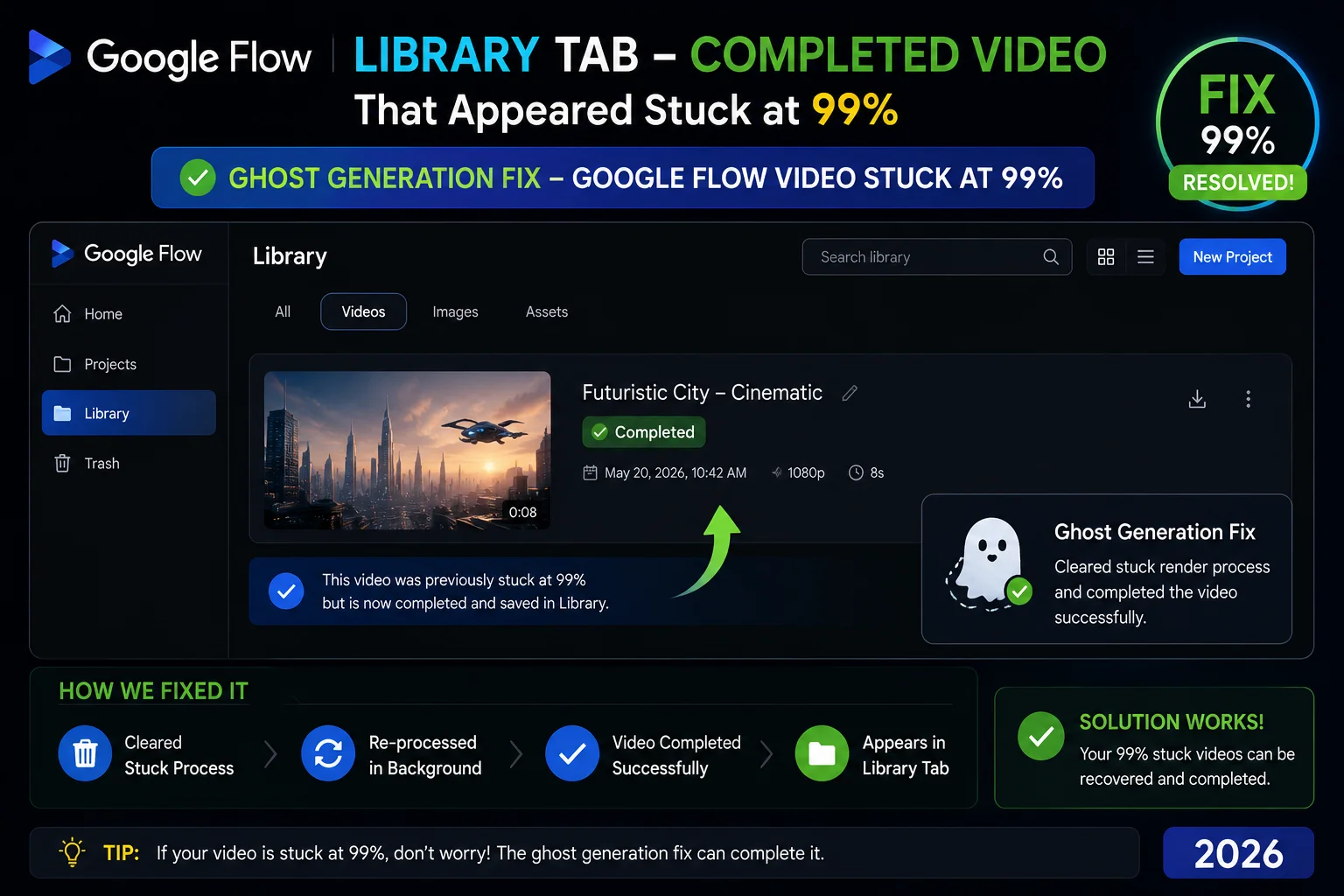
This is the single most important step in the Google Flow video stuck at 99% fix process — and most people skip it entirely.
Because the stuck-at-99% issue is very often a ghost generation where the server has already finished the job, your first step should always be to refresh the page and check your Library or History tab inside Flow. The completed video may already be there, created successfully, despite the interface showing an error or a frozen bar.
How to do it:
- Do NOT click retry immediately — wait 60 seconds first
- Press Ctrl + Shift + R (Windows) or Cmd + Shift + R (Mac) to do a hard refresh
- Once the page reloads, click on Library or History in the Flow navigation
- Look for your video — it will often be sitting there, completed, waiting for you
If your video is in the Library — great, the Google Flow video stuck at 99% fix was simply a refresh. Download it and carry on.
If it is NOT in the Library, the generation genuinely did not complete. Move to the next fixes.
What about your credits?
Google explicitly states that failed video generation credits are re-credited, though they may take time to reappear in your balance. Do not panic if your credit count dropped after a failure — check back in 15 to 30 minutes and they should return.
Google Flow Video Stuck at 99% Fix 2 — Check Your Internet Connection
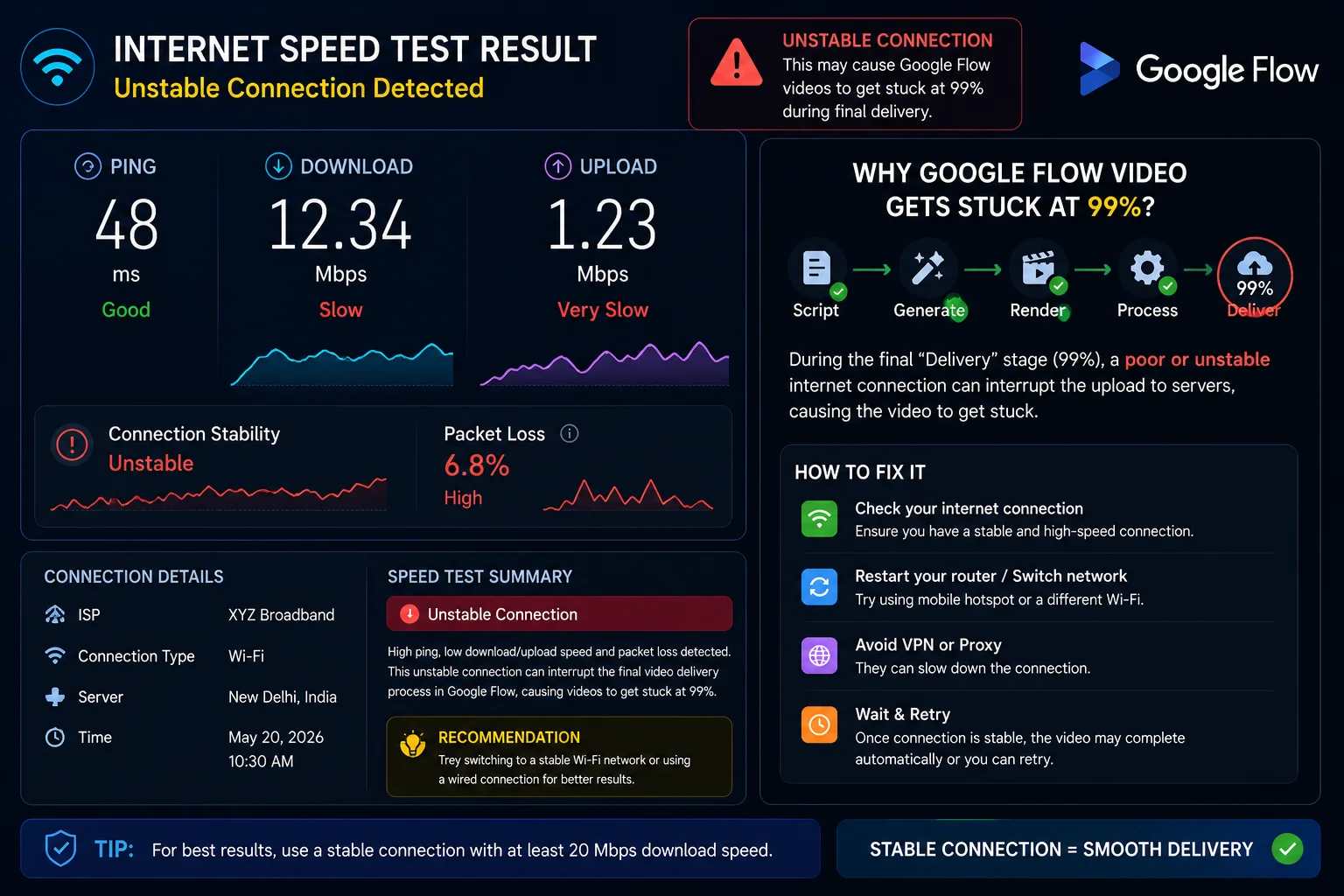
The Google Flow video stuck at 99% problem is very sensitive to internet stability — specifically during the last stage of generation, when the completed video file transfers from Google’s servers back to your browser.
Even a one or two second drop in connection during this transfer can break the delivery — leaving the progress bar frozen at 99% while the server-side generation sits completed but unreachable.
How to test and fix this:
- Run a quick speed test at fast.com — if your speeds are very low or inconsistent, that may be the cause
- If you are on WiFi, move closer to your router or switch to a wired connection
- Disconnect other devices from your WiFi that may be hogging bandwidth during your Flow session
- Turn your mobile data on and connect your laptop to your phone hotspot — then try generating again
- If Flow works fine on mobile data but not on your WiFi, your home internet was causing the 99% freeze
Tip for unstable connections:
Use Veo 3.1 Fast instead of Veo 3.1 Quality when your internet is unreliable. Fast generations are shorter in file size and complete the final transfer step more reliably on weaker connections.
Google Flow Video Stuck at 99% Fix 3 — Hard Refresh and Clear Browser Cache
Browser cache is one of the most overlooked causes of the Google Flow video stuck at 99% problem. Corrupt cached data — especially after a Flow update — can interfere with the browser’s ability to receive and display the completed video, making it appear stuck even when the generation is done.
Step 1 — Hard refresh first:
Press Ctrl + Shift + R (Windows/Linux) or Cmd + Shift + R (Mac)
Step 2 — If hard refresh does not work, clear the full cache:
In Chrome:
- Press
Ctrl + Shift + Delete - Set time range to All time
- Tick Cached images and files and Cookies and other site data
- Click Clear data
- Close Chrome completely — every window
- Reopen Chrome and go directly to flow.google.com
- Try your generation again
This Google Flow video stuck at 99% fix resolves the problem for a very large number of users — especially those who started experiencing the issue after a Flow update without changing anything on their end.
Google Flow Video Stuck at 99% Fix 4 — Disable Browser Extensions
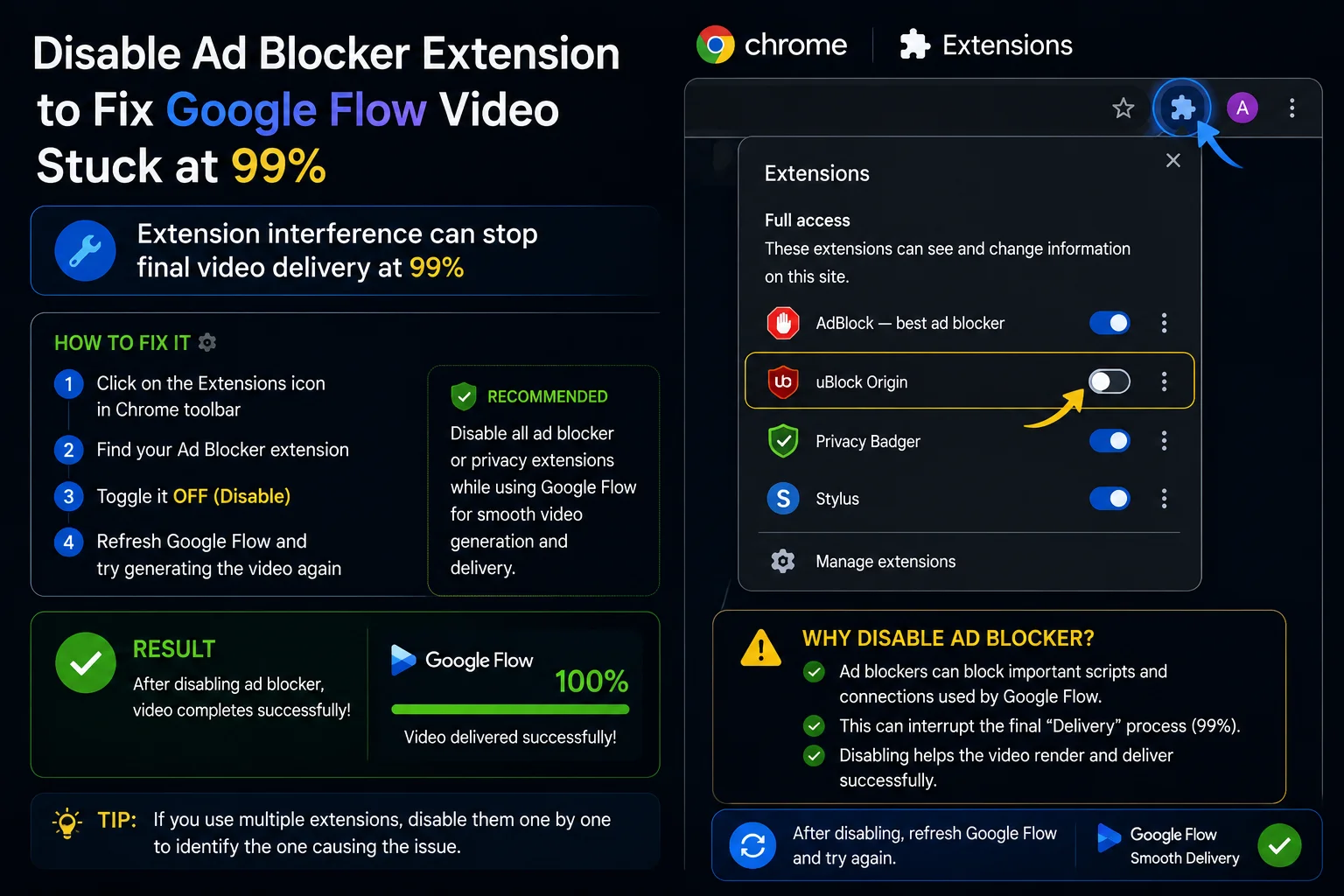
Browser extensions — particularly ad blockers, script blockers, and privacy tools — can actively block the final step of Flow’s video delivery process. When this happens, the generation reaches 99% on the server, but the extension prevents the completed file from loading into your browser.
How to test if an extension is your problem:
- Open a new Incognito window — press
Ctrl + Shift + Nin Chrome - Go to flow.google.com and sign in
- Try generating the same video
If the video completes without getting stuck at 99% in Incognito mode, a browser extension is definitely causing your Google Flow video stuck at 99% problem in the regular browser.
How to fix it:
Go to your browser extensions list and disable them one by one. After disabling each one, try generating in your normal browser. The moment the video completes, the last extension you disabled is the problem.
Add flow.google.com to that extension’s whitelist so it stops interfering with Flow’s video delivery.
Most common extensions that cause this:
- uBlock Origin
- AdBlock Plus
- Privacy Badger
- Ghostery
- VPN browser extensions
Google Flow Video Stuck at 99% Fix 5 — Remove Audio or Dialogue From Your Prompt
This is a Google Flow video stuck at 99% fix that most people never think of — and it solves the problem surprisingly often.
Google’s own documentation explicitly states that audio generation in Flow is an experimental feature on Veo 3.1. Sometimes Veo can produce low-quality audio, in which case your video will not be generated. When this happens, the generation often hangs at or near 99% — the video part is done, but the audio failed, and Flow cannot deliver an incomplete file.
Audio-related causes that trigger the 99% hang:
- Dialogue that is too short — Google notes speech generation performs better with longer text transcripts
- Dialogue that does not fit within 8 seconds
- Complex sound effects combined with dialogue in the same prompt
- Audio involving scenes with younger-looking characters — Flow applies additional restrictions here
- Any audio element that Flow’s safety filters flag during the generation phase
The fix — test without audio first:
- Take your exact prompt
- Remove every audio-related instruction — all dialogue, sound effects, ambient sound descriptions
- Generate the silent version
- If the silent version completes without getting stuck at 99%, your audio instruction was causing the hang
How to add audio back successfully:
Add a separate, clear audio sentence at the end of your prompt rather than weaving it into the visual description. For example:
Instead of: “A woman walks through a rainy street at night, her heels clicking on the wet cobblestones, saying ‘I have to leave now’ under her breath”
Write it as: “A woman walks through a rainy street at night. Audio: heels clicking on wet cobblestones, soft ambient rain, distant traffic.”
Separating the visual and audio descriptions gives Veo 3.1 clearer instructions and significantly reduces audio-related generation hangs.
Google Flow Video Stuck at 99% Fix 6 — Simplify Your Prompt
During periods of high server load, complex and lengthy prompts are significantly more likely to cause the Google Flow video stuck at 99% problem than short, clean prompts. This is because more complex prompts require more processing on the final rendering step — the exact step where the 99% hang occurs.
How to simplify effectively:
- Remove secondary characters that are not essential to the scene
- Cut any camera movement instructions for the test generation — add them back once you confirm the base prompt works
- Remove lighting and atmosphere descriptions and test the core action first
- Keep the prompt to 2 to 3 clear sentences for the initial test
If the simplified prompt generates successfully, build your complexity back in one element at a time — testing after each addition. This way you identify exactly which element is causing the hang.
Prompt length guideline:
Start with prompts under 50 words when debugging a stuck-at-99% issue. Once you have a working base, extend it gradually.
Google Flow Video Stuck at 99% Fix 7 — Reduce Concurrent Generations
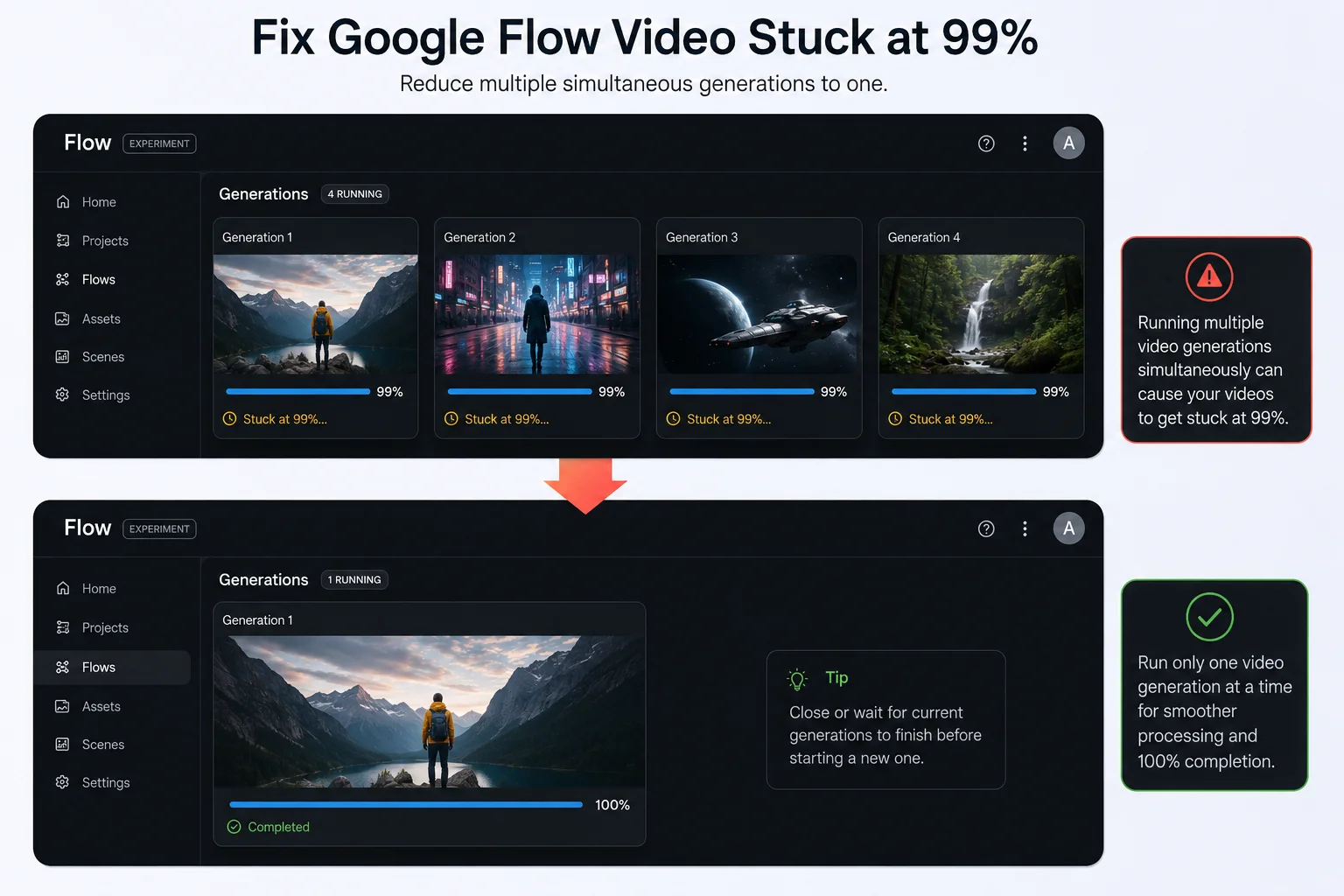
Flow currently allows up to five concurrent generations running at the same time. Many users — especially those testing multiple prompt variations — run several simultaneously without realizing this increases the chance of the Google Flow video stuck at 99% hang.
When multiple generations are competing for server resources and your browser’s processing capacity at the same time, the final delivery stage of each generation becomes less reliable — and the one that reaches 99% first is often the one that gets stuck.
The fix:
- Cancel all currently running generations in Flow
- Wait until everything shows as stopped or completed
- Try your generation with only ONE active at a time
- Once that single generation completes successfully, you can gradually try two at a time again
Running one generation at a time is the most reliable approach when you are actively debugging the stuck-at-99% problem. Speed can come back once stability is confirmed.
Google Flow Video Stuck at 99% Fix 8 — Switch Between Veo 3.1 Fast and Veo 3.1 Quality
Not all Veo 3.1 models behave the same during high-load periods, and switching between them is a quick Google Flow video stuck at 99% fix that many users overlook.
How the models differ in this context:
Veo 3.1 Fast uses 20 AI credits per generation on Pro plans and 10 on Ultra. It is faster but more susceptible to being throttled or timing out at the final delivery step during busy periods.
Veo 3.1 Quality uses 100 AI credits per generation. It takes longer but the server allocates more resources to each job, making the final delivery more reliable.
The fix:
If you are using Veo 3.1 Fast and getting stuck at 99% repeatedly — switch to Veo 3.1 Quality and try the same prompt. The additional resource allocation often clears the hang.
If credits are a concern, also try the zero-credit low-priority Fast model — but be aware this option is more likely to be throttled during high-demand periods, which can actually make the 99% problem worse. Use it during off-peak hours for best results.
To switch models in Flow:
Click the Settings icon in the prompt box, then select your preferred model from the model picker.
Google Flow Video Stuck at 99% Fix 9 — Check If It Is a Platform-Wide Issue
Before spending more time troubleshooting on your own device, spend 30 seconds confirming whether the Google Flow video stuck at 99% problem is happening at the platform level — not just for you.
Post-update backend instability is one of the most widely reported triggers. Multiple users documented generations freezing at 99% immediately following the Veo 3.1 update, with the issue persisting for days across different accounts, browsers, and networks — confirming that platform-side instability can independently produce this symptom regardless of anything on the user’s end.
Where to check:
Google Workspace Status Dashboard — check for any active incidents affecting Google Labs or Flow specifically.
Google AI Developers Forum — search for “stuck 99%” or “Flow not completing” and filter by recent posts. If dozens of people posted the same issue in the last 24 hours, it is a server-side problem.
If it is a platform-wide issue:
The only fix is to wait. Google typically resolves these within a few hours to a couple of days for larger incidents. There is nothing to do on your end — no amount of cache clearing or prompt changes will fix a server-side instability.
Google Flow Video Stuck at 99% Fix 10 — Try at a Different Time of Day
This is one of the simplest Google Flow video stuck at 99% fixes — and one of the most effective during high-traffic periods.
Flow’s servers get significantly more strained during US evening hours and weekends, when the largest number of users are generating content simultaneously. The 99% hang happens more during these peak periods because server resources are stretched thinner on the final video delivery step.
Best times to generate for fewest issues (Pakistan Standard Time):
- Early morning PST (5 AM to 9 AM) — this is late night or early morning US time, when traffic is lowest
- Weekday mornings PST (Monday to Friday) — before US business hours begin
- Avoid Saturday and Sunday evenings PST — this overlaps with US prime time and is the highest-traffic window
Simply trying your generation a few hours later — at a time when US traffic is lower — resolves the Google Flow video stuck at 99% problem for a surprising number of users without any other changes.
Google Flow Video Stuck at 99% Fix 11 — Check the Correct Model for Your Feature
Certain Flow features only work with specific Veo models. Using the wrong model for a specific feature will cause the generation to hang — often at or near 99% — without displaying a clear error message.
The most common example right now is Ingredients to Video. This feature only works with Veo 2. It does not work with Veo 3 or Veo 3.1. If you are using Ingredients to Video with Veo 3.1 selected, your generation will fail — and 99% is a common place for it to hang.
Fix:
In Flow’s model picker, select Veo 2 specifically when using Ingredients to Video. Switch back to Veo 3.1 for standard video generations.
Always double-check the model requirement for any Flow feature before generating — especially for newer or experimental features that have specific model dependencies.
Google Flow Video Stuck at 99% Fix 12 — Try a Different Browser or Device
If you have tried the fixes above and the Google Flow video stuck at 99% problem persists, try generating on a completely different browser or device.
Flow works best on Google Chrome on a desktop computer. Some browser-level issues — particularly on Firefox, Brave, or Edge — can interfere with Flow’s video delivery step in ways that are hard to diagnose without simply switching browsers.
Try in this order:
- Switch to Google Chrome if you are not already on it
- Make sure Chrome is fully updated — go to chrome://settings/help to check
- If already on Chrome, try generating on a different computer entirely
- If you only have one computer, try on your phone using Chrome mobile
If the generation completes on a different device or browser, the issue is isolated to your original browser installation — a full cache clear or browser reinstall will fix it.
What to Do If the Google Flow Video Stuck at 99% Fix Did Not Work
If you have gone through all the fixes above and the problem still persists, here are your next steps.
Report it directly to Google:
Go to support.google.com/flow and submit a bug report. Include:
- Your subscription tier (Free / Pro / Ultra)
- Your browser name and version
- Whether the issue happens across multiple browsers and devices
- When it started and whether it followed any Flow update
- Whether the video appears in your Library despite the interface showing stuck at 99%
- Your approximate location (country)
Post in the Google AI Developers Forum:
Go to discuss.ai.google.dev and search for existing threads about the 99% issue. Add your report to an active thread — Google’s team monitors these and often provides direct responses.
What to say to Google:
“My video generations consistently freeze at 99% and never complete. I have cleared my browser cache, tested in Incognito mode, disabled all extensions, simplified my prompt, and tested on a separate network. The issue persists across [X browsers/devices]. My subscription is [Pro/Ultra]. I am requesting confirmation of whether this is a known backend issue and a timeline for resolution.”
For ongoing updates on this and other Google Flow issues, the Whiskailabs blog covers new developments as they are confirmed.
Why Does the Google Flow Video Stuck at 99% Problem Happen — Simply Explained
Here is the plain-language version for anyone curious about what is actually going on.
When you click generate in Flow, two separate things have to happen successfully for you to see your video.
First, Google’s servers have to actually generate the video — running Veo 3.1 on your prompt, rendering every frame, and adding audio if requested. That is the part the progress bar tracks, from 0% to 99%.
The last 1% — the jump from 99% to 100% — represents the final delivery: taking the completed video file from Google’s server and sending it across the internet to your browser so it can display it.
This final delivery step is where the Google Flow video stuck at 99% problem lives. It is the most vulnerable step because it depends on your internet connection staying stable, your browser being ready to receive the file, no extensions blocking the transfer, and Google’s servers not timing out during the handoff.
When any of those conditions fail — even briefly — you get a frozen progress bar at 99% while the completed video sits on Google’s server, unable to reach you.
That is also why checking your Library is always the first fix — because the video is often already there, waiting.
For a deeper look at how Google Flow’s generation pipeline works and how to get the most reliable results, the Whiskailabs team covers this in detail.
Full Fix Checklist — Google Flow Video Stuck at 99% Fix at a Glance
| Step | Fix | Time | Best For |
|---|---|---|---|
| 1 | Hard refresh + check Library tab | 1 minute | Ghost generation |
| 2 | Test internet connection stability | 2 minutes | Connection drop during delivery |
| 3 | Clear browser cache and cookies fully | 2 minutes | Cached data interference |
| 4 | Test in Incognito + disable extensions | 3 minutes | Extension blocking video delivery |
| 5 | Remove audio/dialogue from prompt | 2 minutes | Audio generation failure |
| 6 | Simplify the prompt length | 3 minutes | Complex prompt overloading |
| 7 | Cancel other generations, run one at a time | 1 minute | Too many concurrent jobs |
| 8 | Switch Veo model (Fast ↔ Quality) | 1 minute | Model throttling |
| 9 | Check Google server status dashboard | 30 seconds | Platform-wide instability |
| 10 | Try during off-peak hours | N/A | Peak traffic throttling |
| 11 | Verify correct model for your feature | 1 minute | Wrong model for feature |
| 12 | Switch browser or device | 5 minutes | Browser-level interference |
Frequently Asked Questions — Google Flow Video Stuck at 99% Fix
Why does my Google Flow video get stuck at 99% and never complete?
The Google Flow video stuck at 99% problem almost always happens at the final video delivery step — not during the generation itself. The video has usually already been created successfully on Google’s server, but the transfer back to your browser failed due to a connection drop, server timeout, browser cache issue, or extension interference. Always check your Library tab first — the video is often already there.
Did I lose my credits when the video got stuck at 99%?
Most likely no. Google explicitly states that failed video generation credits are re-credited, though they may take time to reappear. Wait 15 to 30 minutes and check your credit balance again. If credits were deducted and have not returned after an hour, contact Google One support.
My video is stuck at 99% but it is in my Library — what happened?
This is a ghost generation. Your video completed successfully on Google’s server and was saved to your Library, but the interface failed to show you the completion. This is one of the most common forms of the Google Flow video stuck at 99% problem. Simply download the video from your Library — it should be complete and usable.
Does the prompt language affect the 99% stuck problem?
Yes. Google’s current documentation confirms that prompts to Flow are supported in US English only. Prompts in other languages can cause generation failures — including stalls at 99%. Always write your prompts in English for the most reliable results.
Why does the 99% stuck problem happen more on some days than others?
Peak server load is a major factor. During US evening hours and weekends, Flow’s infrastructure handles significantly higher traffic — which makes the final video delivery step less reliable. Try generating during off-peak hours (early morning Pakistan time) for the most consistent results.
Does clearing the cache delete my Google Flow projects?
No. All your projects, videos, and images are saved to your Google account in the cloud. Clearing your browser cache only removes temporary local files. Your work is completely safe.
How do I know if the problem is on Google’s end or mine?
Check the Google Workspace Status Dashboard and the Google AI Developers Forum. If multiple users posted about the same 99% issue within the last few hours, it is a platform-side problem. If no one else is reporting it, work through the device-side fixes in this guide.
Can audio in my prompt cause the video to get stuck at 99%?
Yes — this is one of the most overlooked causes. Google’s own documentation states that if Veo produces low-quality audio, the video will not be generated. Try removing all audio instructions from your prompt and generating the silent version first. If it completes, add audio back carefully using a separate sentence at the end of your prompt.
Final Thoughts — The Google Flow Video Stuck at 99% Fix Is Usually Simple
The Google Flow video stuck at 99% problem is one of the most frustrating things about using Flow — because it happens at the worst possible moment, right when you thought you were about to see your finished video.
But here is what matters most: in the majority of cases, your video actually generated. It is sitting in your Library right now, waiting for you to find it. A hard refresh and a quick Library check resolve more instances of the Google Flow video stuck at 99% fix than any other single step.
If it is not in your Library, work through the fixes in order — check your connection, clear your cache, test in Incognito, simplify your prompt, remove audio, reduce concurrent generations. Each one takes less than five minutes. Most people find their fix by step 5.
For the latest Google Flow troubleshooting updates, new fixes as they are discovered, and coverage of other Flow issues as they emerge in 2026, the team at Whiskailabs stays on top of this space for you.
Useful Official Resources
- Google Flow Official Site
- Google Flow Help Center — Get Started
- Google Flow Supported Regions
- Google Workspace Status Dashboard
- Google AI Developers Forum
- Google One — Manage AI Credits
- Whiskailabs — Google Flow Not Working Full Guide
- Whiskailabs — Google Flow Blank Screen Fix
- Whiskailabs — Google Flow Tips and Guides
- Whiskailabs Blog















